You have a Microsoft Exchange Server 2019 organization.
You plan to implement a hybrid deployment between Exchange Online and Exchange Server.
You need to install the Exchange Online Hybrid Agent. The solution must use the principle of least privilege.
To which roles should you be assigned to perform the installation? To answer, drag the appropriate roles to the correct products. Each role may be used once, more than once, or not at all. You may need to drag the split bar between panes or scroll to view content.
NOTE: Each correct selection is worth one point.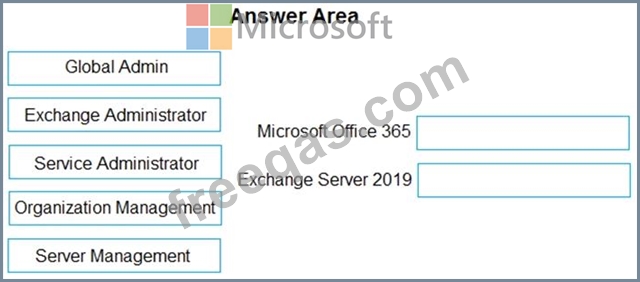

You need to perform a remote wipe of the devices of User2 and User3.
You run the following commands.
Clear-MobileDevice -id User2-Device
-NotificationEmailAddress "[email protected]"
Clear-MobileDevice -id User3-Device
-NotificationEmailAddress "[email protected]"
What occurs on each device? To answer, select the appropriate options in the answer area.
NOTE: Each correct selection is worth one point.

Please wait while the virtual machine loads. Once loaded, you may proceed to the lab section. This may take a few minutes, and the wait time will not be deducted from your overall test time.
When the Next button is available, click it to access the lab section. In this section, you will perform a set of tasks in a live environment. While most functionality will be available to you as it would be in a live environment, some functionality (e.g., copy and paste, ability to navigate to external websites) will not be possible by design.
Scoring is based on the outcome of performing the tasks stated in the lab. In other words, it doesn't matter how you accomplish the task, if you successfully perform it, you will earn credit for that task.
Labs are not timed separately, and this exam may have more than one lab that you must complete. You can use as much time as you would like to complete each lab. But, you should manage your time appropriately to ensure that you are able to complete the lab(s) and all other sections of the exam in the time provided.
Please note that once you submit your work by clicking the Next button within a lab, you will NOT be able to return to the lab.
Use the following login credentials as needed:
To enter your username, place your cursor in the Sign in box and click on the username below.
To enter your password, place your cursor in the Enter password box and click on the password below.
Microsoft 365 Username: [email protected]
Microsoft 365 Password: xxxxxx
If the Microsoft 365 portal does not load successfully in the browser, press CTRL-K to reload the portal in a new browser tab.
The following information is for technical support purposes only.
Lab Instance: XXXXXX
You need to create a public folder named Finance in your Microsoft 365 tenant. Users must be able to send emails to Finance by using an email address of [email protected](1).TenantName.
To complete this task, sign in to the Exchange admin center.
You have a Microsoft Exchange Online subscription.
You run the following command.
Set-ActiveSyncOrganizationSettings -DefaultAccessLevel Block
You run Get-ActiveSyncDeviceAccessRule | f1 Identity, AccessLevel, Characteristic, QueryString and you receive the following output.
For each of the following statements, select Yes if the statement is true. Otherwise, select No.
NOTE: Each correct selection is worth one point.

You have a Microsoft 365 subscription that uses a default domain named contoso.com.
Users report that email messages from a domain named fabrikam.com are identified as spam even though the messages are legitimate.
You need to prevent messages from fabrikam.com from being identified as spam.
What should you do?

