FreeQAs
 Request Exam  Contact
  • Home
  • View All Exams
  • New QA's
  • Upload
PRACTICE EXAMS:
  • Oracle
  • Fortinet
  • Juniper
  • Microsoft
  • Cisco
  • Citrix
  • CompTIA
  • VMware
  • ISC
  • SAP
  • EMC
  • PMI
  • HP
  • Salesforce
  • Other
  • Oracle
    Oracle
  • Fortinet
    Fortinet
  • Juniper
    Juniper
  • Microsoft
    Microsoft
  • Cisco
    Cisco
  • Citrix
    Citrix
  • CompTIA
    CompTIA
  • VMware
    VMware
  • ISC
    ISC
  • SAP
    SAP
  • EMC
    EMC
  • PMI
    PMI
  • HP
    HP
  • Salesforce
    Salesforce
  1. Home
  2. Microsoft Certification
  3. MS-700 Exam
  4. Microsoft.MS-700.v2024-04-28.q212 Dumps
  • ««
  • «
  • …
  • 14
  • 15
  • 16
  • 17
  • 18
  • 19
  • 20
  • 21
  • 22
  • 23
  • …
  • »
  • »»
Download Now

Question 86

You plan to implement Microsoft Teams for 300 users.
For the first stage of the deployment, you will enable the following features:
* Audio
* Video
* Screen sharing
Users will be prevented from using the following features:
* File sharing
* PSTN calling
* Conference audio
* Conference video
* Conference screen sharing
You need to calculate how much network bandwidth is required for the first-stage deployment. What should you use?

Correct Answer: D
Explanation
According to the Microsoft documentation , you can use Network Planner in the Microsoft Teams admin center to calculate how much network bandwidth is required for your Teams deployment. Network Planner helps you determine and organize network requirements for connecting your organization to Teams. You can use Network Planner to:
Input your organization's information, such as the number of users, sites, and expected call and meeting scenarios.
Get a report that tells you if your network can support Teams.
Get a report that tells you what network hardware you need to support Teams.
To use Network Planner, you need to follow these steps1:
In the left navigation of the Microsoft Teams admin center, go to Org-wide settings > Network planner.
Under Overview, click Download the Network Planner Excel template.
Open the template and enter information about your organization's sites, users, and expected call and meeting scenarios.
Save the template and then upload it in Network Planner.
Under Calculated results, view the reports that show you the estimated network requirements for Teams.
insert code

Question 87

Your company has a Microsoft 365 subscription that uses Phone System.
Two employees have the user account shown in the following table.

The employees are leaving the company.
You need to ensure that the phone numbers can be reassigned to other employees as quickly as possible.
What should you use for each employee? To answer, select the appropriate options in the answer area.
NOTE: Each correct selection is worth one point.

Correct Answer:

Reference:
https://docs.microsoft.com/en-us/microsoftteams/assign-change-or-remove-a-phone-number-for-a-user
insert code

Question 88

Note: This question is part of a series of questions that present the same scenario. Each question in the series contains a unique solution that might meet the stated goals. Some question sets might have more than one correct solution, while others might not have a correct solution.
After you answer a question in this section, you will NOT be able to return to it. As a result, these questions will not appear in the review screen.
Your company has a Microsoft 365 subscription.
You need to prevent temporary employees from using the private chat feature in Microsoft Teams.
Solution: You create a messaging policy and assign the policy to the users.
Does this meet the goal?

Correct Answer: B
insert code

Question 89

You have a Microsoft 365 subscription.
You need to create a new Microsoft Teams team named Human Resources that meets the following requirements:
All join requests must be approved by an owner of the team.
The URL for the Microsoft SharePoint Online site of the team must be /teams/HR.
Two users named [email protected] and [email protected] must be assigned as team owners.
How should you complete the PowerShell command? To answer, select the appropriate options in the answer area.
NOTE: Each correct selection is worth one point.

Correct Answer:

Reference:
https://docs.microsoft.com/en-us/powershell/module/teams/new-team?view=teams-ps
https://docs.microsoft.com/en-us/powershell/module/teams/add-teamuser?view=teams-ps
insert code

Question 90

You are Microsoft Teams administrator for your company.
You have the Org-wide app settings shown in the App Settings exhibit. (Click the App Settings tab.)
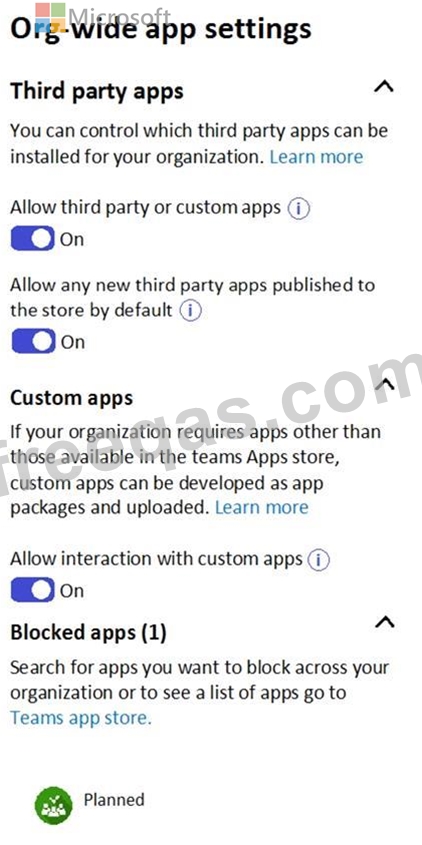
The company's global app permission policy is configured as shown in the Permission Policy exhibit. (Click the Permission Policy tab.)

The company's global app setup policy is configured as shown in the Setup Policy exhibit. (Click the Setup Policy tab.)
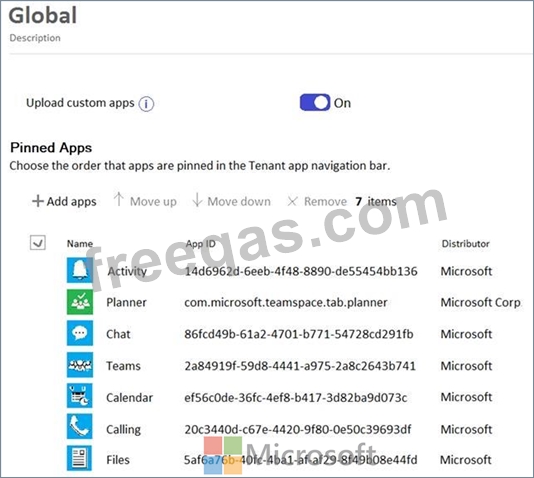
For each of the following statements, select Yes if the statement is true. Otherwise, select No.
NOTE: Each correct selection is worth one point.

Correct Answer:

Explanation
YES
YES
YES
Reference:
https://docs.microsoft.com/en-us/microsoftteams/teams-app-permission-policies
https://office365itpros.com/2019/08/12/using-teams-app-permission-policies/
insert code
  • ««
  • «
  • …
  • 14
  • 15
  • 16
  • 17
  • 18
  • 19
  • 20
  • 21
  • 22
  • 23
  • …
  • »
  • »»
[×]

Download PDF File

Enter your email address to download Microsoft.MS-700.v2024-04-28.q212 Dumps

Email:

FreeQAs

Our website provides the Largest and the most Latest vendors Certification Exam materials around the world.

Using dumps we provide to Pass the Exam, we has the Valid Dumps with passing guranteed just which you need.

  • DMCA
  • About
  • Contact Us
  • Privacy Policy
  • Terms & Conditions
©2026 FreeQAs

www.freeqas.com materials do not contain actual questions and answers from Cisco's certification exams.
