You are an administrator in an organization. You share files in chats with other users.
The users report that they are unable to access the files. Users see an error message as shown in the image:
You need to resolve the issue by updating the OneDrive for Business settings for the users. You navigate to the settings page for the Team's SharePoint site collection.
What should you do?
A company uses Microsoft Teams.
Presence information is incorrect in chats.
You need to troubleshoot the issue.
What should you do?
Note: This question is part of a series of questions that present the same scenario. Each question in the series contains a unique solution that might meet the stated goals. Some question sets might have more than one correct solution, while others might not have a correct solution.
After you answer a question in this section, you will NOT be able to return to it. As a result, these questions will not appear in the review screen.
An IT company has a Microsoft 365 subscription.
The company has a main office in one region. The company opens a new office in another region. You must relocate 400 users to the new office.
Solution: Create a configuration profile with the emergency address and assign the profile to the device for each user.
Does the solution meet the goal?
Users report call delay during Microsoft Teams audio conferences.
You run a network trace from a user's device during an audio conference. You review the following trace results:
You need to identify the cause of delay.
What is the cause?
You manage the Microsoft Teams environment for a tenant.
Users report authentication issues. In the Azure AD admin center, you view many sign in error codes.
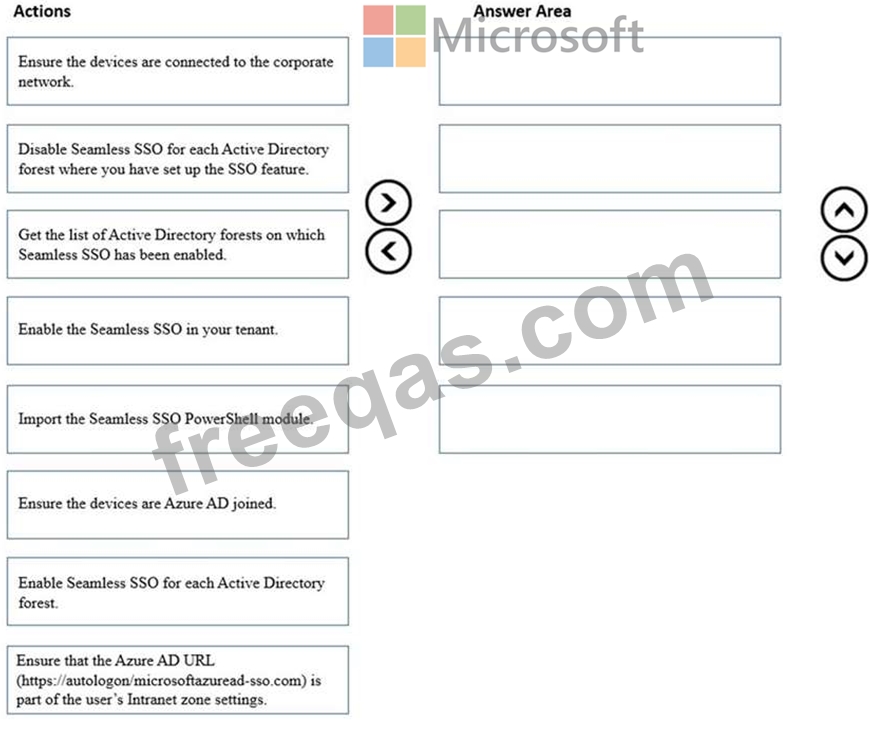
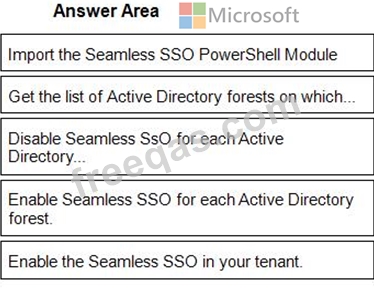
You need to manually reset Seamless Single Sign-on (SSO).
Which five actions should you perform in sequence? To answer, move the appropriate actions from the list of actions to the answer area and arrange them in the correct order.