FreeQAs
 Request Exam  Contact
  • Home
  • View All Exams
  • New QA's
  • Upload
PRACTICE EXAMS:
  • Oracle
  • Fortinet
  • IBM
  • Juniper
  • Microsoft
  • Cisco
  • Citrix
  • CompTIA
  • VMware
  • ISC
  • SAP
  • EMC
  • PMI
  • HP
  • Salesforce
  • Other
  • Oracle
    Oracle
  • Fortinet
    Fortinet
  • IBM
    IBM
  • Juniper
    Juniper
  • Microsoft
    Microsoft
  • Cisco
    Cisco
  • Citrix
    Citrix
  • CompTIA
    CompTIA
  • VMware
    VMware
  • ISC
    ISC
  • SAP
    SAP
  • EMC
    EMC
  • PMI
    PMI
  • HP
    HP
  • Salesforce
    Salesforce
  1. Home
  2. Microsoft Certification
  3. PL-100 Exam
  4. Microsoft.PL-100.v2022-11-25.q114 Dumps
  • ««
  • «
  • …
  • 6
  • 7
  • 8
  • 9
  • 10
  • 11
  • 12
  • 13
  • 14
  • 15
  • …
  • »
  • »»
Download Now

Question 46

DRAG DROP
You create an app with multiple screens.
Test users report that the size and type of gallery displayed on each screen are different. You must improve the consistency for the app screens.
You need to create a reusable gallery that displays information based on the current record.
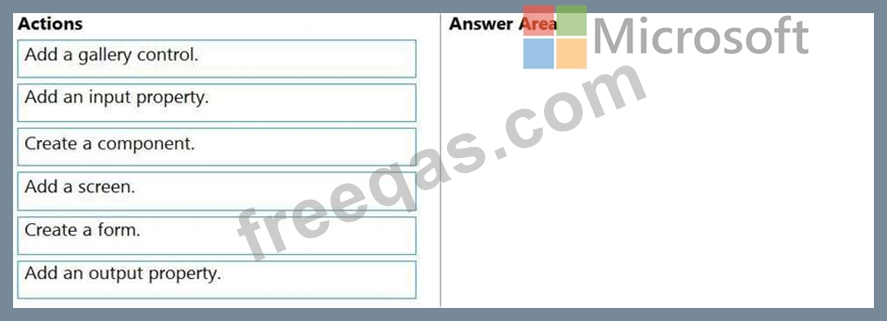
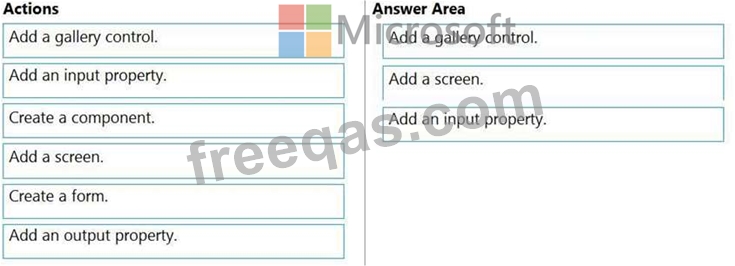
Which three actions should you perform in sequence? To answer, move the appropriate actions from the list of actions to the answer area and arrange them in the correct order.
NOTE: More than one order of answer choices is correct. You will receive credit for any of the correct orders you select.
Select and Place:
Correct Answer:

Explanation:
Step 1: Add a gallery control
Add a gallery to a blank screen
1. On the Insert tab, select Gallery, and then select Vertical.
2. On the Properties tab of the right-hand pane, open the Items list, and then select your Gallery Step 2: Add a screen Add a gallery in a screen
1. On the Home tab, select New screen > List screen.
A screen that contains a Gallery control and other controls, such as a search bar, appears.
Step 3: Add an input property
Input property is how a component receives data to be used in the component.
Incorrect Answers:
Output property is used to emit data or component state. For example, the Selected property on a Gallery control is an output property.
Reference:
https://docs.microsoft.com/en-us/powerapps/maker/canvas-apps/add-gallery
https://docs.microsoft.com/en-us/powerapps/maker/canvas-apps/create-component
insert code

Question 47

DRAG DROP
You have a solution that contains a Power Automate flow, an environment variable, and a model-driven app.
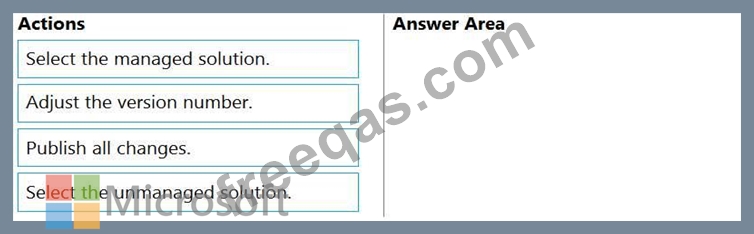
Which three steps should you perform in sequence? To answer, move the appropriate actions from the list of actions to the answer area and arrange them in the correct order.
Select and Place:
Correct Answer:

Explanation:
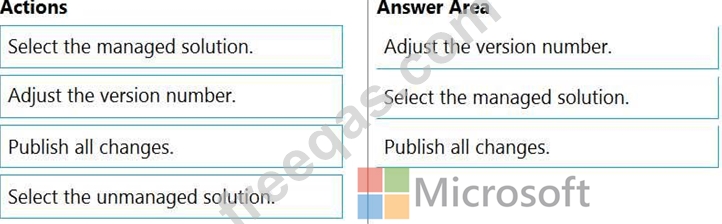
Step 1: Adjust the version number.
Step 2: Select the managed solution.
Managed Solution: A managed solution is a finalized solution that can be distributed and installed. They are created by exporting an unmanaged solution by setting restrictions to prevent any further customizations. The whole point of Managed is locking down the Component states so they cannot be edited. Deleting the Managed Solution will remove all its customisations as well as data contained. Managed Solutions become read only once deployed so they cannot be manipulated.
Step 3: Publish all changes.
Reference:
https://powerusers.microsoft.com/t5/Power-Apps-Pro-Dev-ISV/Managed-vs-Unmanaged/td-p/495685
insert code

Question 48

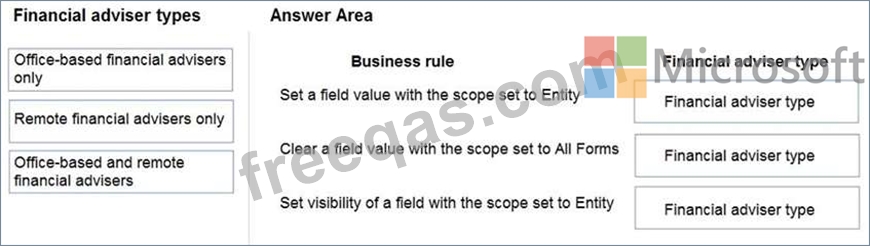
You create the following apps for a company that provides financial guidance services: a model-driven app for financial advisers that work in the company's offices and a canvas app for remote financial advisers.
You need to create business rules for a custom counselling entity used by all financial advisers.
Who will be affected by the business rules?
To answer, drag the appropriate financial adviser types to the correct business rules. Each financial adviser type may be used once, more than once, or not at all. You may need to drag the split bat between panes or scroll to view content.
NOTE: Each correct selection is worth one point.
Correct Answer:

Reference:
https://docs.microsoft.com/en-us/powerapps/maker/data-platform/data-platform-create-business-rule
insert code

Question 49

A company is creating Power Apps apps for their customer service team.
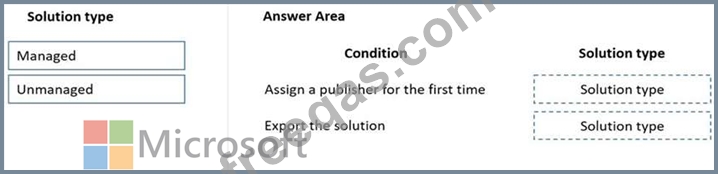
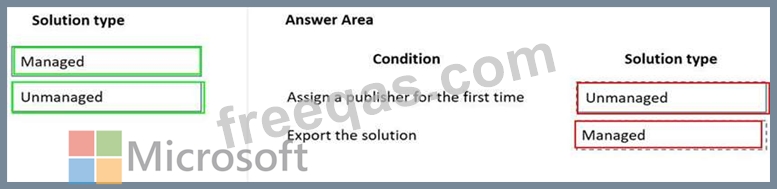
You must create a final released solution to export to their test environment that cannot be changed in the new environment.
You need to determine the types of solutions to use.
Which type of solution should you use? To answer, drag the appropriate solution types to the correct conditions. Each solution type may be used once, more than once, or not at all. You may need to drag the split bar between panes or scroll to view content.
NOTE: Each correct selection is worth one point.
Correct Answer:

Reference:
https://docs.microsoft.com/en-us/power-platform/alm/solution-concepts-alm
insert code

Question 50

You create an app with multiple screens.
Test users report that the size and type of gallery displayed on each screen are different. You must improve the consistency for the app screens.
You need to create a reusable gallery that displays information based on the current record.
Which three actions should you perform?
NOTE: Each correct selection is worth one point.


Correct Answer: A,B,C
Reference:
https://docs.microsoft.com/en-us/powerapps/maker/canvas-apps/add-gallery
https://docs.microsoft.com/en-us/powerapps/maker/canvas-apps/create-component
insert code
  • ««
  • «
  • …
  • 6
  • 7
  • 8
  • 9
  • 10
  • 11
  • 12
  • 13
  • 14
  • 15
  • …
  • »
  • »»
[×]

Download PDF File

Enter your email address to download Microsoft.PL-100.v2022-11-25.q114 Dumps

Email:

FreeQAs

Our website provides the Largest and the most Latest vendors Certification Exam materials around the world.

Using dumps we provide to Pass the Exam, we has the Valid Dumps with passing guranteed just which you need.

  • DMCA
  • About
  • Contact Us
  • Privacy Policy
  • Terms & Conditions
©2026 FreeQAs

www.freeqas.com materials do not contain actual questions and answers from Cisco's certification exams.