FreeQAs
 Request Exam  Contact
  • Home
  • View All Exams
  • New QA's
  • Upload
PRACTICE EXAMS:
  • Oracle
  • Fortinet
  • Juniper
  • Microsoft
  • Cisco
  • Citrix
  • CompTIA
  • VMware
  • ISC
  • SAP
  • EMC
  • PMI
  • HP
  • Salesforce
  • Other
  • Oracle
    Oracle
  • Fortinet
    Fortinet
  • Juniper
    Juniper
  • Microsoft
    Microsoft
  • Cisco
    Cisco
  • Citrix
    Citrix
  • CompTIA
    CompTIA
  • VMware
    VMware
  • ISC
    ISC
  • SAP
    SAP
  • EMC
    EMC
  • PMI
    PMI
  • HP
    HP
  • Salesforce
    Salesforce
  1. Home
  2. Microsoft Certification
  3. PL-200 Exam
  4. Microsoft.PL-200.v2022-08-03.q106 Dumps
  • «
  • 1
  • 2
  • 3
  • 4
  • 5
  • 6
  • 7
  • 8
  • 9
  • 10
  • …
  • »
  • »»
Download Now

Question 11

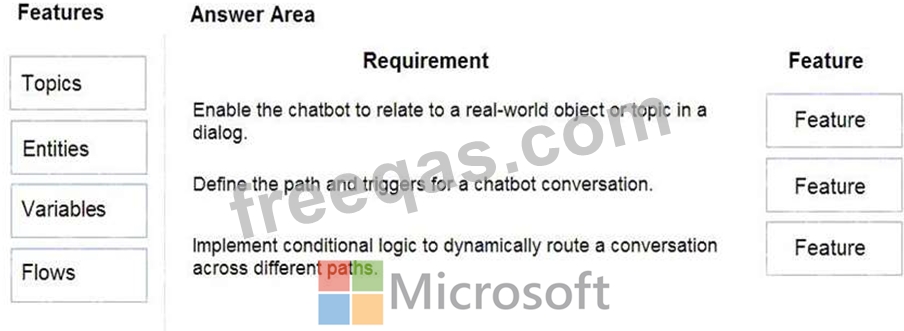
You are designing a chatbot for a sports outlet.
You need to complete the chatbot.
Which features should you use? To answer, drag the appropriate features to the correct requirements. Each feature may be used once, more than once, or not at all. You may need to drag the split bar between panes or scroll to view content.
NOTE Each correct selection is worth one point.
Correct Answer:
Explanation
Graphical user interface, text, application, email Description automatically generated

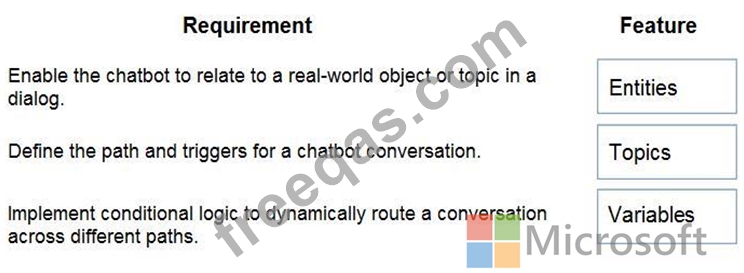
Box 1: Entities
Out of the box, Power Virtual Agents comes with a set of prebuilt entities, which represent the most commonly used stereotype information in real-world dialogs, such as age, colors, numbers, and names.
With the knowledge granted by entities, a bot can smartly recognize the relevant information from a user input and save it for later use.
Box 2: Topics
In Power Virtual Agents, a topic defines a how a bot conversation plays out.
You can author topics by customizing provided templates, create new topics from scratch, or get suggestions from existing help sites.
A topic has trigger phrases - these are phrases, keywords, or questions that a user is likely to type that is related to a specific issue - and conversation nodes - these are what you use to define how a bot should respond and what it should do.
Box 3: Variables
Variables let you save responses from your customers in a conversation with your bot so that you can reuse them later in the conversation.
For example, you can save a customer's name in a variable called UserName. The bot can then address the customer by name as the conversation continues.
You can use variables to create logical expressions that dynamically route the customer down different conversation paths.
Reference:
https://docs.microsoft.com/en-us/power-virtual-agents/advanced-entities-slot-filling
https://docs.microsoft.com/en-us/power-virtual-agents/authoring-create-edit-topics
https://docs.microsoft.com/en-us/power-virtual-agents/advanced-flow
https://docs.microsoft.com/en-us/power-virtual-agents/authoring-variables
insert code

Question 12

You are a Dynamics 365 Customer Service administrator.
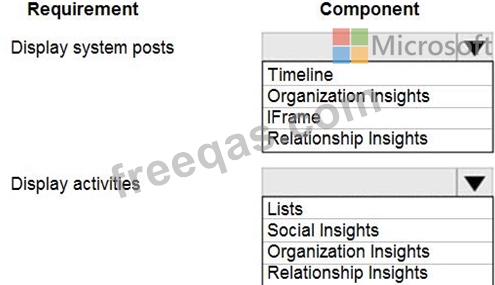
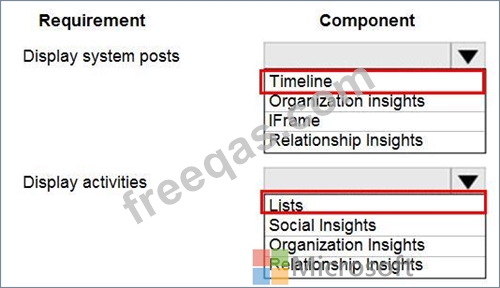
A user must be able to view system posts and activities in a dashboard.
You need to create the dashboard for the user.
Which components should you use? To answer, select the appropriate options in the answer area.
NOTE: Each correct selection is worth one point.
Correct Answer:

Reference:
https://docs.microsoft.com/en-us/dynamics365/customer-service/customer-service-hub-user-guide-timeline-admin
insert code

Question 13

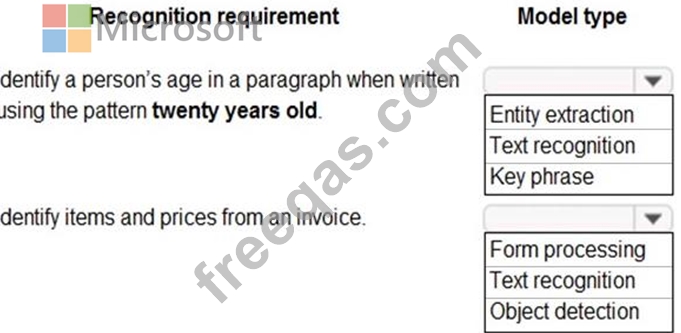
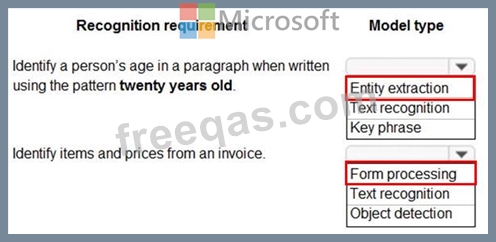
A company plans to implement AI Builder to add intelligence to several business processes.
Each business process uses different sources and produces different outputs.
You need to determine which AI Builder model types to use.
Which model types should you use? To answer, select the appropriate options in the answer area.
NOTE: Each correct selection is worth one point.
Correct Answer:

Reference:
https://docs.microsoft.com/en-us/ai-builder/form-processing-model-overview
https://docs.microsoft.com/en-us/ai-builder/entity-extraction-overview
insert code

Question 14

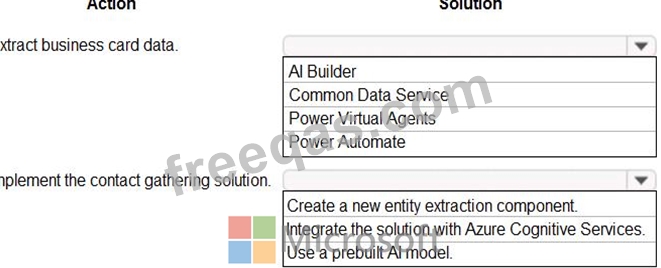
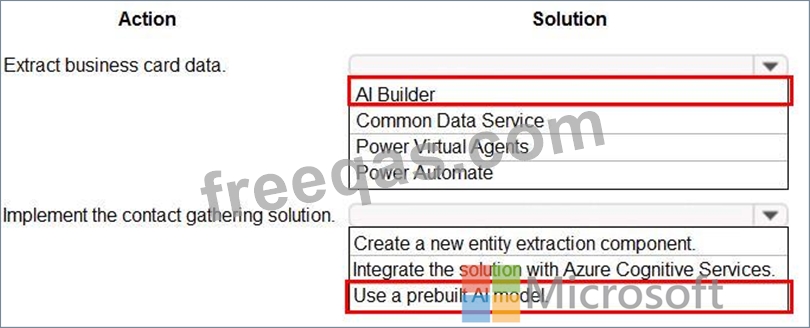
You need to design and create the solution for gathering contact information from guests for marketing purposes.
What should you use? To answer, select the appropriate options In the answer area.
NOTE: Each correct selection is worth one point.
Correct Answer:
insert code

Question 15

You create and publish a Power Bl report that contains an embedded canvas app. The report will be used by multiple people.
The canvas app has an issue that must be corrected.
You update the canvas app.
You need to ensure that the updated canvas app is available in the published Power Bl report.
What should you do?


Correct Answer: B
If you change the data fields associated with the visual, you must edit the app from within the Power BI service by selecting the ellipsis (...) and then selecting Edit. Otherwise, the changes won't be propagated to Power Apps, and the app will behave in unexpected ways.
The Power Apps visual can't trigger a refresh of Power BI reports and Power BI data sources from within Power BI Desktop. If you write back data from the app to the same data source as the report, your changes won't be reflected immediately in Power BI Desktop. Changes are reflected on the next scheduled refresh.
Reference:
https://docs.microsoft.com/en-us/powerapps/maker/canvas-apps/powerapps-custom-visual#limitations-of-the-power-apps-visual
insert code
  • «
  • 1
  • 2
  • 3
  • 4
  • 5
  • 6
  • 7
  • 8
  • 9
  • 10
  • …
  • »
  • »»
[×]

Download PDF File

Enter your email address to download Microsoft.PL-200.v2022-08-03.q106 Dumps

Email:

FreeQAs

Our website provides the Largest and the most Latest vendors Certification Exam materials around the world.

Using dumps we provide to Pass the Exam, we has the Valid Dumps with passing guranteed just which you need.

  • DMCA
  • About
  • Contact Us
  • Privacy Policy
  • Terms & Conditions
©2026 FreeQAs

www.freeqas.com materials do not contain actual questions and answers from Cisco's certification exams.