Case Study 3 - Bellows College
Background
Bellows College is a post-secondary school that wants to start a football team. The college uses Microsoft Power Platform to manage its recruiting efforts. The registration team and assistants use model-driven apps. The coaches use canvas apps on their mobile devices.
Prospects are considered underage if they are younger than 18 years old at the time of registration.
Current environment
Environment
- Custom code is not allowed in the system.
- Server-side synchronization is configured for emails, appointments, contacts, and tasks.
- The database and file storage of Dataverse must be minimized to keep costs low.
Contact table
- Birthdate is a custom date and time field.
- Age at Registration is a calculated field that displays the age of the prospect at the time of registration.
- Current Age is a calculated field that displays the age of the prospect based on the current date and time.
Evaluation table
- The Evaluation table is a custom table used to track evaluation criteria.
- Evaluation records cannot be manually created.
- Users must not be able to continue until an evaluation record is created automatically for the prospect.
Consent table
- The consent forms completed by the parents are stored as records in the Consent table.
- Occasionally, a parent cannot complete the consent online and a paper copy must be printed.
The signed copy must be scanned and stored with the consent record.
Team website
- The team website is created by using Power Pages.
- A starter layout template was used to create the site.
- The site consists of five pages:
o Home: A page open to everyone to view the announcements from the team.
o Schedule: A page open to everyone to view the tryout and game schedule.
o Evaluations: A page that displays tracking from the evaluation table. Prospects are able to view their own information only.
o Forms: A page that displays the consent form.
o Contact Us: A page for anyone to submit questions and comments.
- Two web roles for authenticated users are created: Primary Contact User and Prospect User.
o All primary contacts and prospects are assigned to their respective roles.
Requirements
Registration
- Parents and prospects are created as contacts and must be linked.
- The registration team must be able to rapidly create prospects without navigating away from the Parents form. Only the First Name, Last Name, and Birthdate fields should be displayed for the team.
- Assistants must be able to update prospect information and add teams that the prospect has previously played on to a subgrid.
Parental consent
- When a prospect is underage, a Primary Contact field will appear. The field must be populated before the prospect record can be saved.
- A view named Underage Prospects that lists all underaged prospects is required.
- The Underage Prospects view must run once a week without requiring modifications to display correct information.
- A consent email must meet the following requirements:
o be sent to the primary contact of each new underage prospect o contain a link to the team website o be automatically sent weekly and tracked to the contact record in Dataverse o include the current date using the full month name, date, and year Evaluations
- Coaches rate prospects each day on a scale of 1-10 in three categories: endurance, coordination, and skill.
- The total of the three categories is displayed at the bottom of the form. If the total for the day is greater than 25, the number should appear green.
Hotspot Question
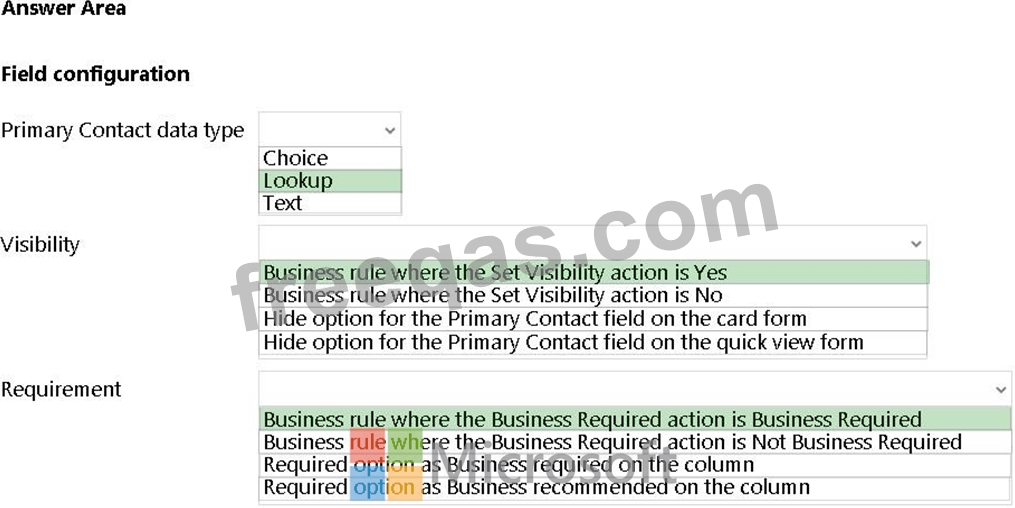
You need to configure the Primary Contact field.
What should you configure? To answer, select the appropriate options in the answer area.
NOTE: Each correct selection is worth one point.
Hotspot Question
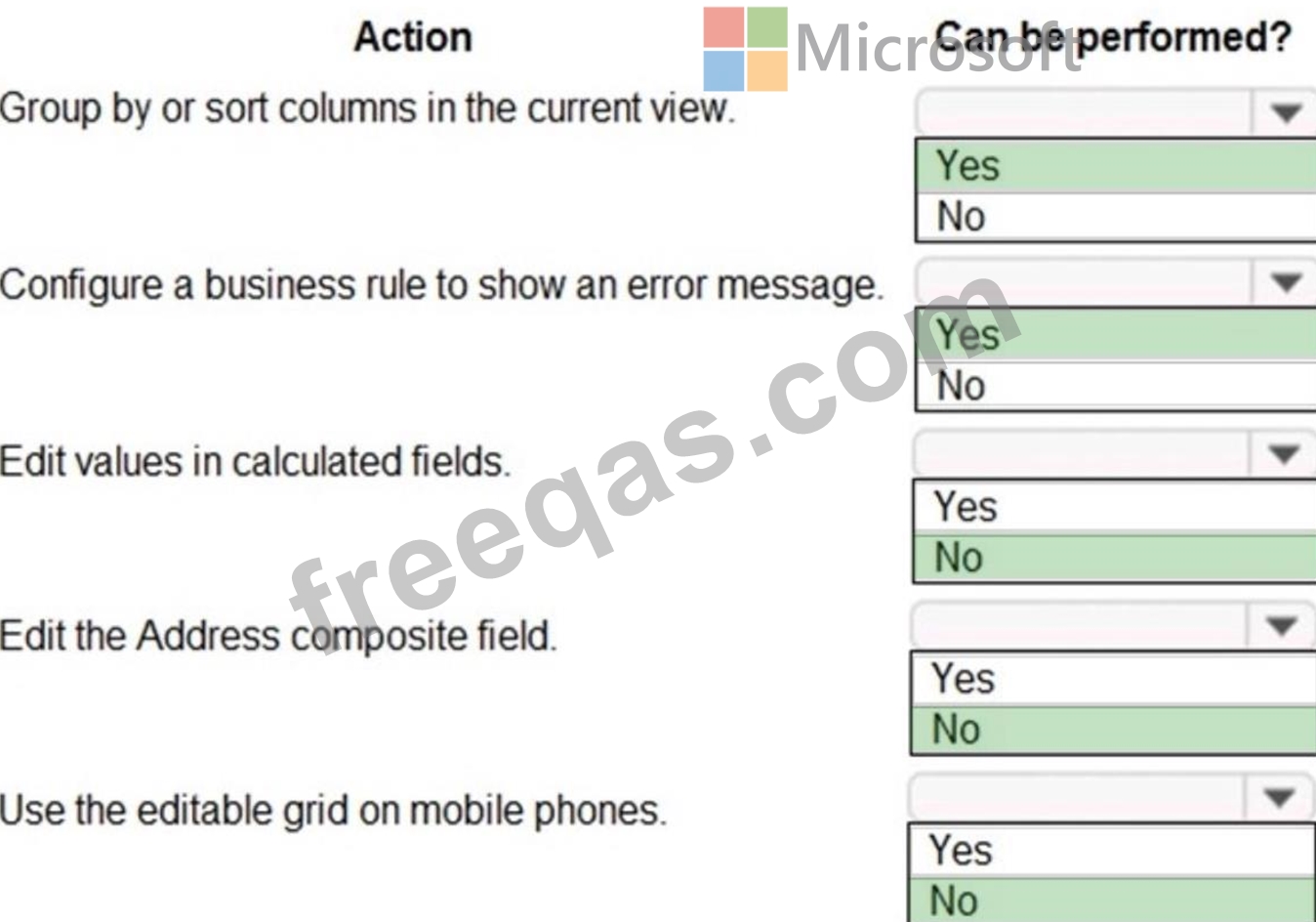
You implement an editable grid for the Account entity.
The business team provides the following list of features that they would like you to implement:
- Group by or sort columns in the current view.
- Configure a business rule to show an error message.
- Edit values in calculated fields.
- Edit the Address composite field.
- Use the editable grid on mobile phones.
Which actions can you perform? To answer, select the appropriate options in the answer area.
NOTE: Each correct selection is worth one point.
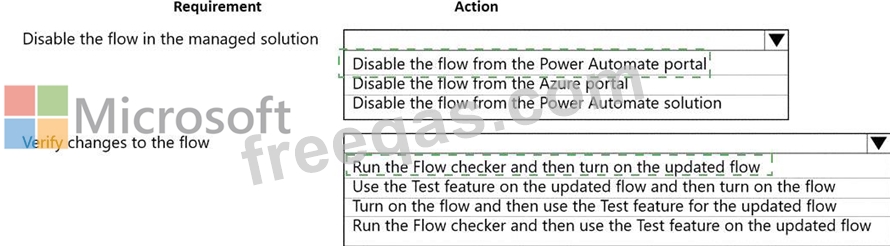
You create a Power Automate flow as part of a managed solution. The flow alerts users when files are uploaded to a SharePoint location.
Files are uploaded to SharePoint at a much higher rate than expected. Users report that they receive too many notifications about uploaded files.
You need to stop the flow and correct the issue.
What should you do? To answer, select the appropriate options in the answer area.
NOTE: Each correct selection is worth one point.

Note: This question is part of a series of questions that present the same scenario. Each question in the series contains a unique solution that might meet the stated goals. Some question sets might have more than one correct solution, while others might not have a correct solution.
After you answer a question in this section, you will NOT be able to return to it. As a result, these questions will not appear in the review screen.
You administer the Microsoft 365 and Power Platform environments for Contoso, Ltd. The company has a model-driven app that is used to track customer interactions with employees. The app uses standard table types for customers. A user named Elisabeth Rice signs in to the app by using the following sign in name:
[email protected].
After marriage, Elisabeth changes her legal name to Elisabeth Mueller.
You need to update the sign in name for the user without losing any application history.
Solution: From Dynamics 365 Settings, select Email Configuration. In the active mailbox for the user, update the name.
Does the solution meet the goal?
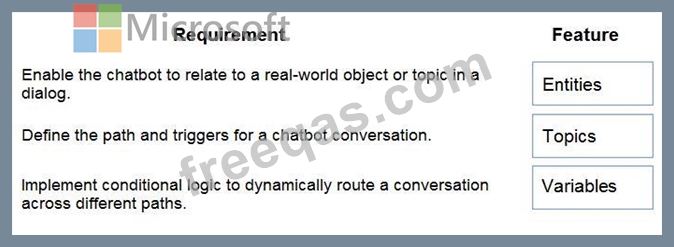
You are designing a chatbot for a sports outlet.
You need to complete the chatbot.
Which features should you use? To answer, drag the appropriate features to the correct requirements. Each feature may be used once, more than once, or not at all. You may need to drag the split bar between panes or scroll to view content.
NOTE Each correct selection is worth one point.