You have two CSV files named Products and Categories.
The Products file contains the following columns:
ProductID
ProductName
SupplierID
CategoryID
The Categories file contains the following columns:
CategoryID
CategoryName
CategoryDescription
From Power BI Desktop, you import the files into Power Query Editor.
You need to create a Power BI dataset that will contain a single table named Product. The Product will table includes the following columns:
ProductID
ProductName
SupplierID
CategoryID
CategoryName
CategoryDescription
How should you combine the queries, and what should you do on the Categories query? To answer, select the appropriate options in the answer area.
NOTE: Each correct selection is worth one point.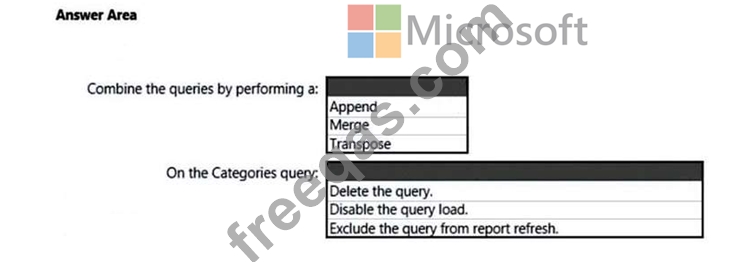

You need to grant access to the business unit analysts.
What should you configure? To answer, select the appropriate options in the answer area.
NOTE: Each correct selection is worth one point.

You have the data lineage shown in the following exhibit.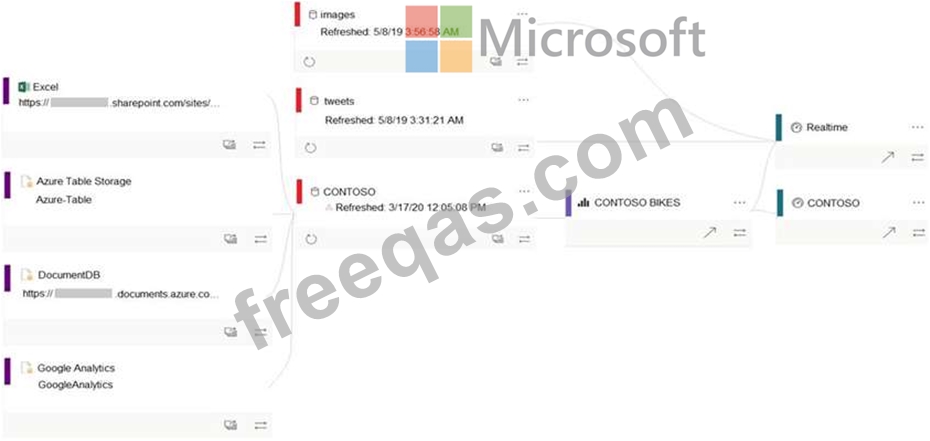
Use the drop-down menus to select the answer choice that completes each statement based on the information presented in the graphic.
NOTE: Each correct selection is worth one point.
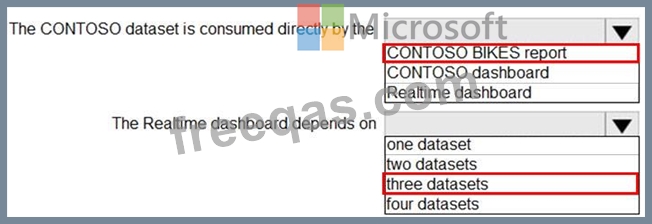
You have a Power B1 report that contains the visuals shown in the following table.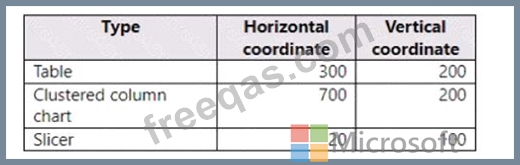
You need to modify the location of each visual.
What should you modify for each visual?
You are creating a query to be used as a Country dimension in a star schema.
A snapshot of the source data is shown in the following table.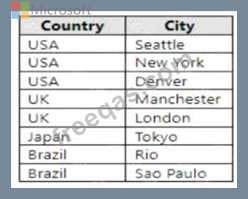
You need to create the dimension. The dimension must contain a list of unique countries.
Which two actions should you perform? Each correct answer presents part of the solution.

