You have an Azure subscription that contains the resource shown in the following table.
For which resources can you create an access review?
You have a Microsoft 365 tenant.
All users have computers that run Windows 10. Most computers are company-owned and joined to Azure Active Directory (Azure AD). Some computers are user-owned and are only registered in Azure AD.
You need to prevent users who connect to Microsoft SharePoint Online on their user-owned computer from downloading or syncing files. Other users must NOT be restricted.
Which policy type should you create?
You have an Azure Active Directory (Azure AD) tenant that has multi-factor authentication (MFA) enabled.
The account lockout settings are configured as shown in the following exhibit.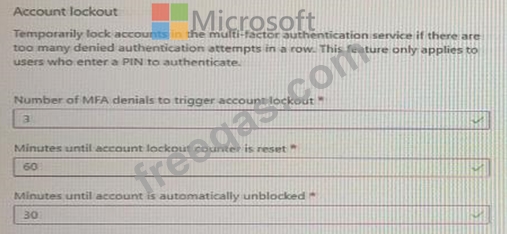
Use the drop-down menus to select the answer choice that completes each statement based on the information presented in the graphic.
NOTE: Each correct selection is worth one point.

You need to configure the MFA settings for users who connect from the Boston office. The solution must meet the authentication requirements and the access requirements. What should you configure?
Note: This question is part of a series of questions that present the same scenario. Each question in the series contains a unique solution that might meet the stated goals. Some question sets might have more than one correct solution, while others might not have a correct solution.
After you answer a question in this section, you will NOT be able to return to it. As a result, these questions will not appear in the review screen.
You have a Microsoft 365 tenant.
You have 100 IT administrators who are organized into 10 departments.
You create the access review shown in the exhibit. (Click the Exhibit tab.)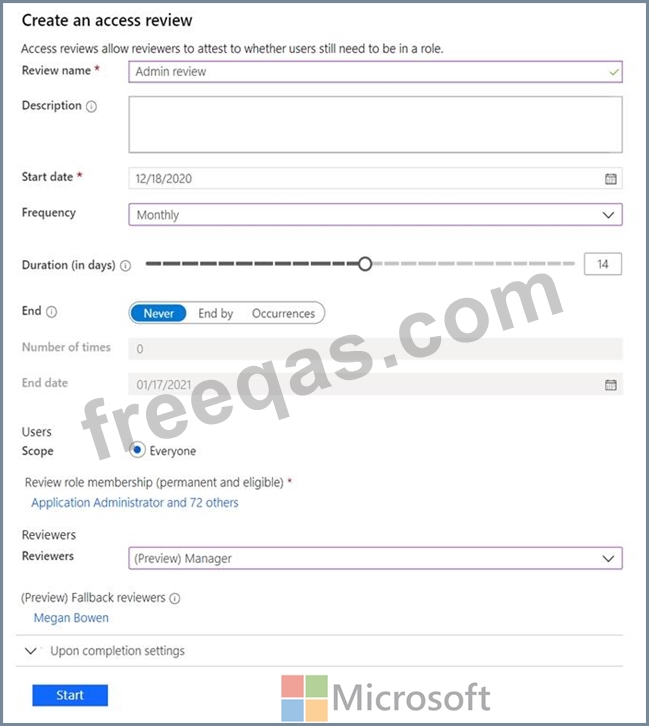
You discover that all access review requests are received by Megan Bowen.
You need to ensure that the manager of each department receives the access reviews of their respective department.
Solution: You create a separate access review for each role.
Does this meet the goal?

