You have an on-premises datacenter that contains the hosts shown in the following table.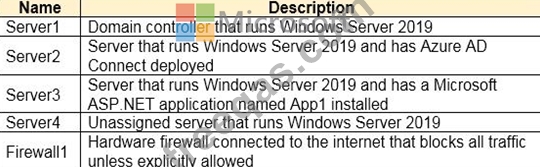
You have an Azure Active Directory (Azure AD) tenant that syncs to the Active Directory forest. Multi-factor authentication (MFA) is enforced for Azure AD.
You need to ensure that you can publish App1 to Azure AD users.
What should you configure on Server and Firewall1? To answer, select the appropriate options in the answer area.
NOTE: Each correct selection is worth one point.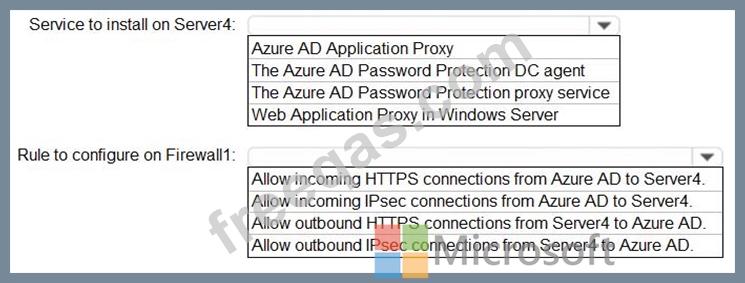

You have a Microsoft 365 tenant.
You configure a conditional access policy as shown in the Conditional Access policy exhibit. (Click the Conditional Access policy tab.)
You view the User administrator role settings as shown in the Role setting details exhibit. (Click the Role setting details tab.)
You view the User administrator role assignments as shown in the Role assignments exhibit. (Click the Role assignments lab.)
For each of the following statement, select Yes if the statement is true. Otherwise, select No.
NOTE: Each correct selection is worth one point.

You have a Microsoft 36S tenant.
You create a named location named HighRiskCountries that contains a list of high-risk countries.
You need to limit the amount of time a user can stay authenticated when connecting from a high-risk country.
What should you configure in a conditional access policy? To answer, select the appropriate options in the answer area.
NOTE: Each correct selection is worth one point.

You have an Azure Active Directory (Azure AD) tenant that contains three users named User1, User1, and User3, You create a group named Group1. You add User2 and User3 to Group1.
You configure a role in Azure AD Privileged identity Management (PIM) as shown in the application administrator exhibit. (Click the application Administrator tab.)
Group1 is configured as the approver for the application administrator role.
You configure User2to be eligible for the application administrator role.
For User1, you add an assignment to the Application administrator role as shown in the Assignment exhibit.
(Click Assignment tab)
For each of the following statement, select Yes if the statement is true, Otherwise, select No.
NOTE: Each correct selection is worth one point.

You have an Azure Active Directory (Azure AD) tenant that contains an administrative unit named Department1.
Department1 has the users shown in the Users exhibit. (Click the Users tab.)
Department1 has the groups shown in the Groups exhibit. (Click the Groups tab.)
Department1 has the user administrator assignments shown in the Assignments exhibit. (Click the Assignments tab.)
The members of Group2 are shown in the Group2 exhibit. (Click the Group2 tab.)
For each of the following statements, select Yes if the statement is true. Otherwise, select No.
NOTE: Each correct selection is worth one point.


