You have a Microsoft 365 tenant and an Active Directory domain named adatum.com.
You deploy Azure AD Connect by using the Express Settings.
You need to configure self-service password reset (SSPR) to meet the following requirements:
When users reset their password, they must be prompted to respond to a mobile app notification or answer three predefined security questions.
Passwords must be synced between the tenant and the domain regardless of where the password was reset.
What should you do? To answer, select the appropriate options in the answer area.
NOTE: Each correct selection is worth one point.

You have an Azure Active Directory (Azure AD) tenant that contains a user named User1 and the groups shown in the following table.
In the tenant, you create the groups shown in the following table.
Which members can you add to GroupA and GroupB? To answer, select the appropriate options in the answer area.
NOTE: Each correct selection is worth one point.


You need to meet the technical requirements for the probability that user identifies were compromised.
What should the users do first, and what should you configure? To answer, select the appropriate options in the answer area.
NOTE: Each correct selection is worth one point.

Your network contains an on-premises Active Directory domain named contoso.com. The domain contains the objects shown in the following table.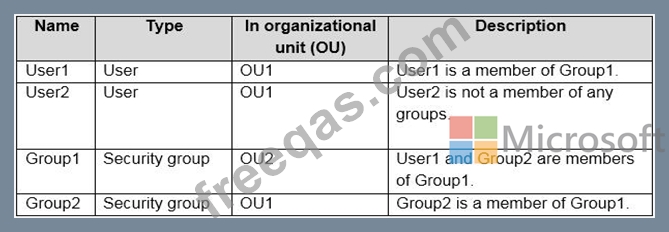
You install Azure AD Connect. You configure the Domain and OU filtering settings as shown in the Domain and OU Filtering exhibit. (Click the Domain and OU Filtering tab.)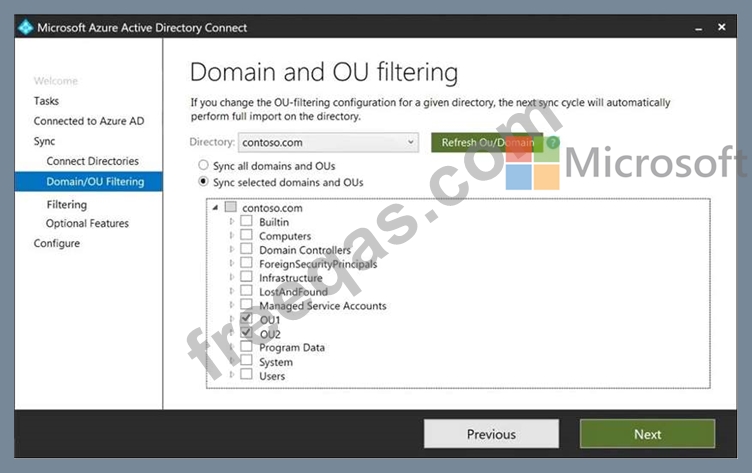
You configure the Filter users and devices settings as shown in the Filter Users and Devices exhibit. (Click the Filter Users and Devices tab.)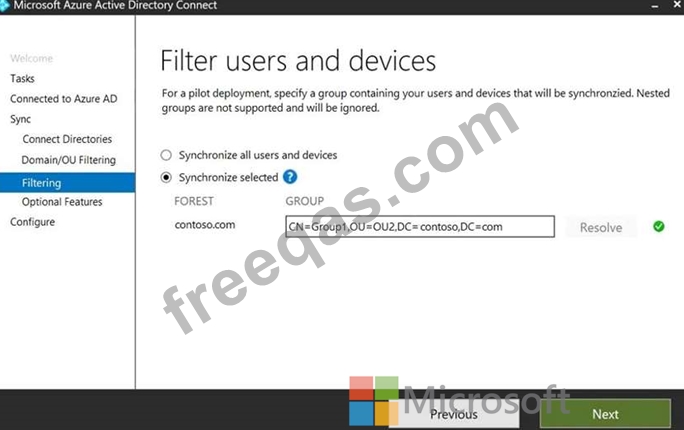
For each of the following statements, select Yes if the statement is true. Otherwise, select No.

Your network contains an on-premises Active Directory domain that syncs to an Azure Active Directory (Azure AD) tenant- Users sign in to computers that run Windows 10 and are joined to the domain.
You plan to implement Azure AD Seamless Single Sign-On (Azure AD Seamless SSO).
You need to configure the computers for Azure AD Seamless SSO.
What should you do?

