FreeQAs
 Request Exam  Contact
  • Home
  • View All Exams
  • New QA's
  • Upload
PRACTICE EXAMS:
  • Oracle
  • Fortinet
  • Juniper
  • Microsoft
  • Cisco
  • Citrix
  • CompTIA
  • VMware
  • SAP
  • EMC
  • PMI
  • HP
  • Salesforce
  • Other
  • Oracle
    Oracle
  • Fortinet
    Fortinet
  • Juniper
    Juniper
  • Microsoft
    Microsoft
  • Cisco
    Cisco
  • Citrix
    Citrix
  • CompTIA
    CompTIA
  • VMware
    VMware
  • SAP
    SAP
  • EMC
    EMC
  • PMI
    PMI
  • HP
    HP
  • Salesforce
    Salesforce
  1. Home
  2. RedHat Certification
  3. EX200 Exam
  4. RedHat.EX200.v2022-09-11.q130 Dumps
  • «
  • 1
  • 2
  • 3
  • 4
  • 5
  • 6
  • 7
  • 8
  • 9
  • 10
  • …
  • »
  • »»
Download Now

Question 21

How does Prometheus gather information about monitored hosts and services?

Correct Answer: E
Explanation/Reference:
Reference https://dzone.com/articles/monitoring-with-prometheus
insert code

Question 22

Add users: user2, user3.
The Additional group of the two users: user2, user3 is the admin group Password: redhat

Correct Answer:
# useradd -G admin user2
# useradd -G admin user3
# passwd user2
redhat
# passwd user3
redhat
insert code

Question 23

SIMULATION
According the following requirements to create a local directory /common/admin.
This directory has admin group.
This directory has read, write and execute permissions for all admin group members.
Other groups and users don't have any permissions.
All the documents or directories created in the/common/admin are automatically inherit the admin group.

Correct Answer:
See explanation below.
Explanation/Reference:
Explanation:
mkdir -p /common/admin
chgrp admin /common/admin
chmod 2770 /common/admin
insert code

Question 24

Please open the ip_forward, and take effect permanently.

Correct Answer:
see explanation below.
Explanation
* vim /etc/sysctl.conf net.ipv4.ip_forward = 1
* sysctl -w (takes effect immediately)
If no "sysctl.conf" option, use these commands:
* sysctl -a |grep net.ipv4
* sysctl -P net.ipv4.ip_forward = 1
* sysctl -w
insert code

Question 25

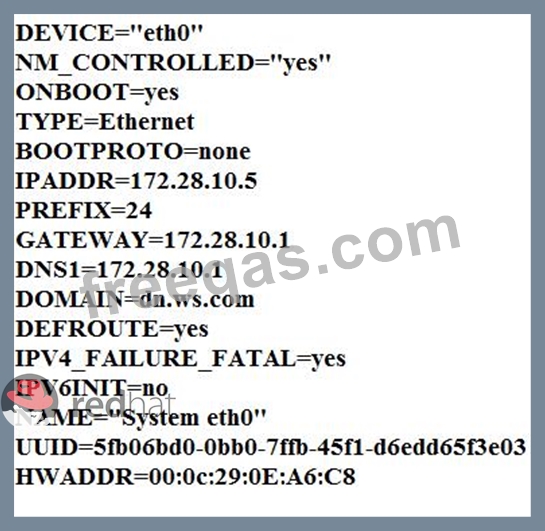
Configure your Host Name, IP Address, Gateway and DNS.
Host name: dtop5.dn.ws.com
IP Address: 172.28.10.5/4
Gateway: 172.28.10.1
DNS: 172.28.10.1

Correct Answer:
Configure Host Name
vim /etc/sysconfig/network NETWORKING=yes HOSTNAME=dtop5.dn.ws.com GATEWAY=172.28.10.1
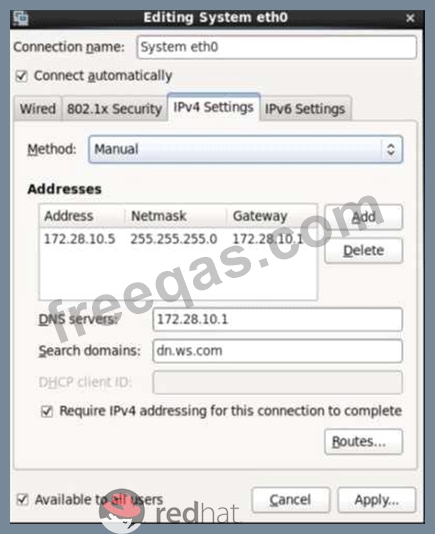
2. Configure IP Address, Gateway and DNS
Configure the network by Network Manager:

Note: Please remember to choose two options:
Connect automatically
Available to all users
Click "Apply", save and exit, and restart your network services:
# Service network restart
3. Validate these profiles:
a) Check gateway: # vim / etc / sysconfig / network
NETWORKING=yes
HOSTNAME=dtop5.dn.ws.com
GATEWAY=172.28.10.1
b) Check Host Name: # vim /etc/hosts

c) Check DNS: # vim /etc/resolv.conf
# Generated by NetworkManager
Search dn.ws.com
Nameserver 172.28.10.1
d) Check Gateway: # vim /etc/sysconfig/network-scripts/ifcfg-eth0
insert code
  • «
  • 1
  • 2
  • 3
  • 4
  • 5
  • 6
  • 7
  • 8
  • 9
  • 10
  • …
  • »
  • »»
[×]

Download PDF File

Enter your email address to download RedHat.EX200.v2022-09-11.q130 Dumps

Email:

FreeQAs

Our website provides the Largest and the most Latest vendors Certification Exam materials around the world.

Using dumps we provide to Pass the Exam, we has the Valid Dumps with passing guranteed just which you need.

  • DMCA
  • About
  • Contact Us
  • Privacy Policy
  • Terms & Conditions
©2025 FreeQAs

www.freeqas.com materials do not contain actual questions and answers from Cisco's certification exams.