Create a volume group, and set the size is 500M, the size of single PE is 16M. Create logical volume named lv0 in this volume group, set size is 20 PE, make it as ext3 file system, and mounted automatically under data.
Configure autofs.
Configure the autofs automatically mount to the home directory of LDAP, as required:
server.domain11.example.com use NFS to share the home to your system. This file system contains a pre configured home directory of user ldapuserX.
Home directory of ldapuserX is:
server.domain11.example.com /home/guests/ldapuser
Home directory of ldapuserX should automatically mount to the ldapuserX of the local /home/guests Home directory's write permissions must be available for users ldapuser1's password is password
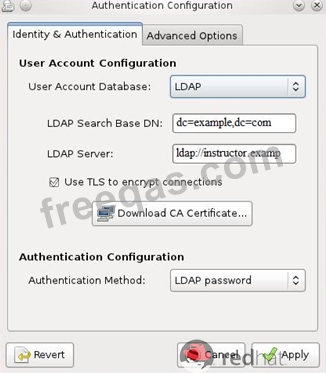
The system ldap.example.com provides an LDAP authentication service.
Your system should bind to this service as follows:
The base DN for the authentication service is dc=domain11, dc=example, dc=com LDAP is used to provide both account information and authentication information. The connection should be encrypted using the certificate at http://host.domain11.example.com/pub/domain11.crt When properly configured, ldapuserX should be able to log into your system, but will not have a home directory until you have completed the autofs requirement. Username: ldapuser11 Password: password
The user authentication has been provided by ldap domain in 192.168.0.254. According the following requirements to get ldapuser.
-LdapuserX must be able to login your system, X is your hostname number. But the ldapuser's home directory cannot be mounted, until you realize automatically mount by autofs server.
- All ldap user's password is "password".
CORRECT TEXT
Copy /etc/fstab to /var/tmp name admin, the user1 could read, write and modify it, while user2 without any permission.

