Install and configure ansible
User bob has been created on your control node. Give him the appropriate permissions on the control node. Install the necessary packages to run ansible on the control node.
Create a configuration file /home/bob/ansible/ansible.cfg to meet the following requirements:
* The roles path should include /home/bob/ansible/roles, as well as any other path that may be required for the course of the sample exam.
* The inventory file path is /home/bob/ansible/inventory.
* Ansible should be able to manage 10 hosts at a single time.
* Ansible should connect to all managed nodes using the bob user.
Create an inventory file for the following five nodes:
nodel.example.com
node2.example.com
node3.example.com
node4.example.com
node5.example.com
Configure these nodes to be in an inventory file where node1 is a member of group dev. nodc2 is a member of group test, nodc3 is a member of group proxy, nodc4 and node 5 are members of group prod. Also, prod is a member of group webservers.
Create Logical volumes with lvm.yml in all nodes according to following
requirements.
----------------------------------------------------------------------------------------
* Create a new Logical volume named as 'data'
* LV should be the member of 'research' Volume Group
* LV size should be 1500M
* It should be formatted with ext4 file-system.
--> If Volume Group does not exist then it should print the message "VG Not found"
--> If the VG can not accommodate 1500M size then it should print "LV Can not be
created with
following size", then the LV should be created with 800M of size.
--> Do not perform any mounting for this LV.
Create an empty encrypted file called myvault.yml in /home/sandy/ansible and set the password to notsafepw. Rekey the password to iwejfj2331.
Create a playbook called webdev.yml in 'home/sandy/ansible. The playbook will create a directory Avcbdev on dev host. The permission of the directory are 2755 and owner is webdev. Create a symbolic link from /Webdev to /var/www/html/webdev. Serve a file from Avebdev7index.html which displays the text "Development" Curl http://node1.example.com/webdev/index.html to test
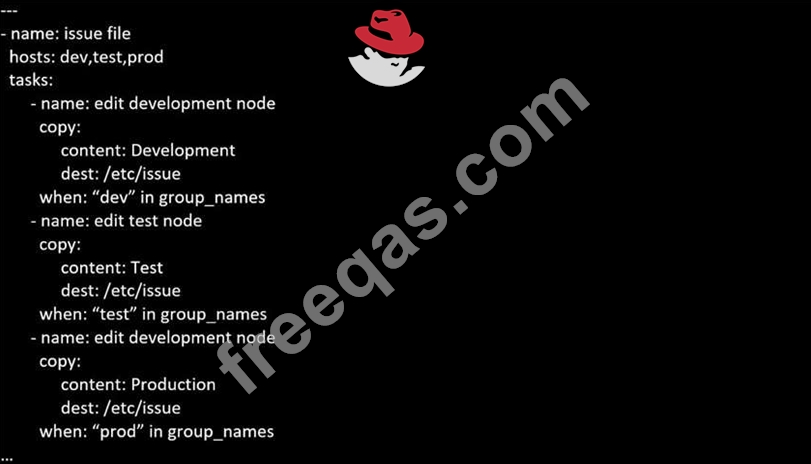
Create a playbook called issue.yml in /home/sandy/ansible which changes the file /etc/issue on all managed nodes: If host is a member of (lev then write "Development" If host is a member of test then write "Test" If host is a member of prod then write "Production"