Create a file in /home/sandy/ansible/ called report.yml. Using this playbook, get a file called report.txt (make it look exactly as below). Copy this file over to all remote hosts at /root/report.txt. Then edit the lines in the file to provide the real information of the hosts. If a disk does not exist then write NONE.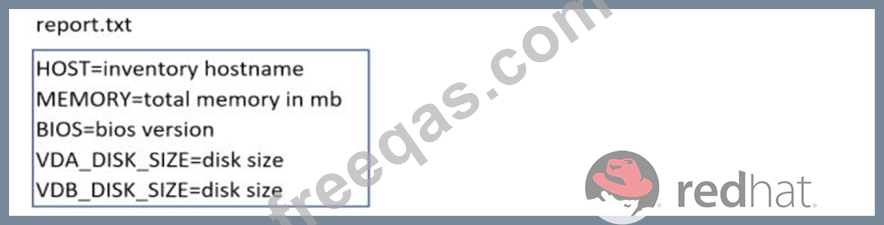
Modify file content.
------------------------
Create a playbook called /home/admin/ansible/modify.yml as follows:
* The playbook runs on all inventory hosts
* The playbook replaces the contents of /etc/issue with a single line of text as
follows:
--> On hosts in the dev host group, the line reads: "Development"
--> On hosts in the test host group, the line reads: "Test"
--> On hosts in the prod host group, the line reads: "Production"
Create and run an Ansible ad-hoc command.
--> As a system administrator, you will need to install software on the managed
nodes.
--> Create a shell script called yum-pack.sh that runs an Ansible ad-hoc command to
create yum-repository on each of the managed nodes as follows:
--> repository1
-----------
1. The name of the repository is EX407
2. The description is "Ex407 Description"
3. The base URL is http://content.example.com/rhel8.0/x86_64/dvd/BaseOS/
4. GPG signature checking is enabled
5. The GPG key URL is http://content.example.com/rhel8.0/x86_64/dvd/RPM-GPG-KEYredhat-
release
6. The repository is enabled
--> repository2
-----------
1. The name of the repository is EXX407
2. The description is "Exx407 Description"
3. The base URL is http://content.example.com/rhel8.0/x86_64/dvd/AppStream/
4. GPG signature checking is enabled
5. The GPG key URL is http://content.example.com/rhel8.0/x86_64/dvd/ RPM-GPG-KEYredhat-
release
6. The repository is enabled

