FreeQAs
 Request Exam  Contact
  • Home
  • View All Exams
  • New QA's
  • Upload
PRACTICE EXAMS:
  • Oracle
  • Fortinet
  • Juniper
  • Microsoft
  • Cisco
  • Citrix
  • CompTIA
  • VMware
  • ISC
  • SAP
  • EMC
  • PMI
  • HP
  • Salesforce
  • Other
  • Oracle
    Oracle
  • Fortinet
    Fortinet
  • Juniper
    Juniper
  • Microsoft
    Microsoft
  • Cisco
    Cisco
  • Citrix
    Citrix
  • CompTIA
    CompTIA
  • VMware
    VMware
  • ISC
    ISC
  • SAP
    SAP
  • EMC
    EMC
  • PMI
    PMI
  • HP
    HP
  • Salesforce
    Salesforce
  1. Home
  2. SAP Certification
  3. C_THR81_2505 Exam
  4. SAP.C_THR81_2505.v2025-11-26.q47 Dumps
  • «
  • 1
  • 2
  • 3
  • 4
  • 5
  • 6
  • 7
  • 8
  • 9
  • 10
  • …
  • »
  • »»
Download Now

Question 6

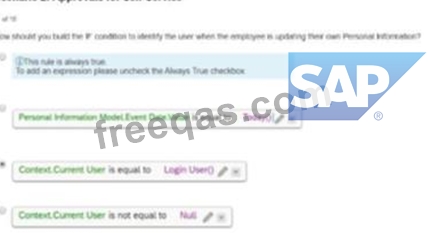
How should you build the IF condition to identity the user when the employee is updating their own Personal Information?
Correct Answer: C
To identify the user when the employee is updating their own personal information, the IF condition in Option C is correct. This configuration:
Checks if the Context.Current User is equal to the Login User.
Ensures that the rule applies only when the employee is making changes to their own personal data.
This approach is aligned with SAP SuccessFactors logic for self-service scenarios, enabling accurate identification of the user in such workflows.
Scenario 2: Approvals for Self-Service
insert code

Question 7

Due to confidentiality reasons, when the HR Business Partner (maintained in Job Relationship) is creating a change in salary for an employee, this action will need to be approved by the manager of the HR Business Partner creating the request.
How do you define this in the workflow when filling in the Approver Type, Approver Role, Context, and Relationship to Approver? Refer to the screenshot to answer the question

Correct Answer: D
To ensure that the salary change initiated by the HR Business Partner is approved by their manager, you need to configure the workflow with the following details:
Approver Type: Manager
Approver Role: Manager
Context: Initiator (this ensures the approval request is routed to the manager of the person initiating the workflow).
Relationship to Approver: From the initiator's position, the system derives the relationship to their manager.
Selecting Role: Manager - Source: Initiator in Step 1 aligns with these requirements.
Scenario 2: Approvals for Self-Service
insert code

Question 8

Which action will trigger a system validation for an in-progress workflow?

Correct Answer: D
insert code

Question 9

What are some of the position management application-specific rule scenarios? Note: There are 3 correct answers to this question.

Correct Answer: A,B,C
Application-specific rule scenarios in Position Management include:
* A. Create Right to Return for Incumbent:
* This rule supports the creation of a right-to-return record for an incumbent when a position- related action occurs, such as a temporary assignment.
* B. Update Rule for Mass Change Run:
* This rule automates updates during mass position changes, ensuring consistent application of business logic across multiple positions.
* C. Trigger Rules to Calculate Full-Time Equivalent:
* This rule calculates the FTE value based on position or job information attributes, ensuring accurate reporting and compliance.
These rules enhance the flexibility and functionality of position management processes.
insert code

Question 10

Which of the following are possible options when working with SAP SuccessFactors Employee Central employee identifiers? Note: There are 3 correct answers to this question.


Correct Answer: A,D,E
In SAP SuccessFactors Employee Central, employee identifiers are managed as follows:
A . Once generated, you CANNOT change a user id.
The User ID serves as a unique identifier for an employee's employment record. Once assigned, it cannot be altered.
D . A user can have multiple user ids.
An employee may possess multiple User IDs, especially in scenarios involving concurrent employment or global assignments. Each employment instance is associated with a distinct User ID.
E . A user can have only one person id external.
The Person ID External uniquely identifies an individual across all employment records within the system. An employee is assigned a single Person ID External, regardless of the number of employments.
Options B and C are incorrect:
B . A user can have only one user id.
This is incorrect because, as mentioned, an employee can have multiple User IDs corresponding to different employment instances.
C . Once generated, you CANNOT change a person id external.
This is incorrect. While the Person ID External is intended to be a stable identifier, it can be changed if necessary, though such changes should be managed carefully to maintain data integrity.
insert code
  • «
  • 1
  • 2
  • 3
  • 4
  • 5
  • 6
  • 7
  • 8
  • 9
  • 10
  • …
  • »
  • »»
[×]

Download PDF File

Enter your email address to download SAP.C_THR81_2505.v2025-11-26.q47 Dumps

Email:

FreeQAs

Our website provides the Largest and the most Latest vendors Certification Exam materials around the world.

Using dumps we provide to Pass the Exam, we has the Valid Dumps with passing guranteed just which you need.

  • DMCA
  • About
  • Contact Us
  • Privacy Policy
  • Terms & Conditions
©2026 FreeQAs

www.freeqas.com materials do not contain actual questions and answers from Cisco's certification exams.