FreeQAs
 Request Exam  Contact
  • Home
  • View All Exams
  • New QA's
  • Upload
PRACTICE EXAMS:
  • Oracle
  • Fortinet
  • Juniper
  • Microsoft
  • Cisco
  • Citrix
  • CompTIA
  • VMware
  • ISC
  • SAP
  • EMC
  • PMI
  • HP
  • Salesforce
  • Other
  • Oracle
    Oracle
  • Fortinet
    Fortinet
  • Juniper
    Juniper
  • Microsoft
    Microsoft
  • Cisco
    Cisco
  • Citrix
    Citrix
  • CompTIA
    CompTIA
  • VMware
    VMware
  • ISC
    ISC
  • SAP
    SAP
  • EMC
    EMC
  • PMI
    PMI
  • HP
    HP
  • Salesforce
    Salesforce
  1. Home
  2. Salesforce Certification
  3. MuleSoft-Integration-Architect-I Exam
  4. Salesforce.MuleSoft-Integration-Architect-I.v2026-07-22.q100 Dumps
  • ««
  • «
  • …
  • 8
  • 9
  • 10
  • 11
  • 12
  • 13
  • 14
  • 15
  • 16
  • 17
  • …
  • »
  • »»
Download Now

Question 56

An architect is designing a Mule application to meet the following two requirements:
1. The application must process files asynchronously and reliably from an FTPS server to a back-end database using VM intermediary queues for load-balancing Mule events.
2. The application must process a medium rate of records from a source to a target system using a Batch Job scope.
To make the Mule application more reliable, the Mule application will be deployed to two CloudHub 1.0 workers.
Following MuleSoft-recommended best practices, how should the Mule application deployment typically be configured in Runtime Manger to best support the performance and reliability goals of both the Batch Job scope and the file processing VM queues?

Correct Answer: A
* Requirements:
* Asynchronous and Reliable File Processing: The application must process files from an FTPS server to a back-end database using VM intermediary queues for load balancing.
* Batch Job Processing: The application must process records from a source to a target system using a Batch Job scope.
* Persistent VM Queues:
* Reliability: Persistent VM queues ensure that messages are not lost even if there is a system failure or restart. This is critical for reliable file processing and load balancing.
* Asynchronous Processing: Persistent queues allow for asynchronous processing, where messages can be stored and processed independently of the producer and consumer lifecycles.
* MuleSoft Best Practices:
* Persistent VM Queues for Load Balancing: Using persistent VM queues aligns with MuleSoft best practices for ensuring reliable message processing and load balancing between Mule events.
* High Availability: With CloudHub 1.0 workers, enabling persistent VM queues helps maintain high availability and reliability of the application.
* Batch Job Scope: Ensuring persistence for VM queues also benefits batch processing by maintaining consistency and ensuring all records are processed even in the event of disruptions.
* Configuration in Runtime Manager:
* Deployment Configuration: When deploying the Mule application in Runtime Manager, check the "Persistent VM queues" checkbox to enable this feature.
* Impact: This configuration ensures that the application meets its performance and reliability goals by safeguarding the integrity and continuity of the processing tasks.
References:
* MuleSoft Documentation on VM Queues: VM Queues
* MuleSoft Best Practices: MuleSoft Best Practices
* CloudHub Deployment Guide: CloudHub Deployment
insert code

Question 57

A team has completed the build and test activities for a Mule application that implements a System API for its application network.
Which Anypoint Platform component should the team now use to both deploy and monitor the System AP\ implementation?

Correct Answer: D
After completing the build and test activities for a Mule application that implements a System API, the team should use Runtime Manager to both deploy and monitor the System API implementation. Runtime Manager is a component of Anypoint Platform that provides capabilities for deploying, managing, and monitoring Mule applications and APIs. It allows teams to manage applications and APIs across various environments, ensuring they operate correctly and efficiently.
References:
* Anypoint Runtime Manager
* Deploying and Managing Applications with Runtime Manager
insert code

Question 58

A company is planning to migrate its deployment environment from on-premises cluster to a Runtime Fabric (RTF) cluster. It also has a requirement to enable Mule applications deployed to a Mule runtime instance to store and share data across application replicas and restarts.
How can these requirements be met?

Correct Answer: A
When migrating from an on-premises cluster to a Runtime Fabric (RTF) cluster, and needing to enable Mule applications to store and share data across application replicas and restarts, the use of Anypoint Object Store V2 is the most suitable option. Here's why and how to implement it:
* Understanding Object Store V2:
* Object Store V2 is designed to store and retrieve key-value pairs in a scalable and highly available manner. It is particularly useful for sharing state and data between different instances of applications running on RTF.
* Setting Up Anypoint Object Store V2:
* First, ensure that your MuleSoft Anypoint Platform account has access to Object Store V2.
* Configure your Mule application to use Object Store V2 by defining an object store in your Mule configuration file. This can be done using the objectstore element in your Mule flow.
* Configuration Steps:
* Add the Object Store connector to your Mule project.
* Define the object store configuration in your Mule flow as follows:
xml
<objectstore:config name="ObjectStoreV2" doc:name="ObjectStoreV2"/>
* Use the object store in your flows to store and retrieve data:
xml
<objectstore:store config-ref="ObjectStoreV2" key="#[key]" value="#[value]" /> <objectstore:retrieve config- ref="ObjectStoreV2" key="#[key]" target="variableName"/>
* Deploying on RTF:
* Deploy your Mule application to the RTF cluster. The RTF will handle scaling and ensure that the Object Store V2 is available to all instances of your application.
* Benefits:
* Object Store V2 ensures data is shared and persisted across different application replicas and restarts, which meets the requirement of storing and sharing data across application replicas in the RTF cluster.
References:
* MuleSoft Documentation on Object Store V2
* MuleSoft Documentation on Runtime Fabric
insert code

Question 59

Insurance organization is planning to deploy Mule application in MuleSoft Hosted runtime plane. As a part of requirement , application should be scalable . highly available. It also has regulatory requirement which demands logs to be retained for at least 2 years. As an Integration Architect what step you will recommend in order to achieve this?

Correct Answer: A
Correct answer is It is not possible to store logs for 2 years in CloudHub deployment. External log management system is required. CloudHub has a specific log retention policy, as described in the documentation: the platform stores logs of up to 100 MB per app & per worker or for up to 30 days, whichever limit is hit first. Once this limit has been reached, the oldest log information is deleted in chunks and is irretrievably lost. The recommended approach is to persist your logs to a external logging system of your choice (such as Splunk, for instance) using a log appender. Please note that this solution results in the logs no longer being stored on our platform, so any support cases you lodge will require for you to provide the appropriate logs for review and case resolution
insert code

Question 60

What aspect of logging is only possible for Mule applications deployed to customer-hosted Mule runtimes, but NOT for Mule applications deployed to CloudHub?
Correct Answer: D
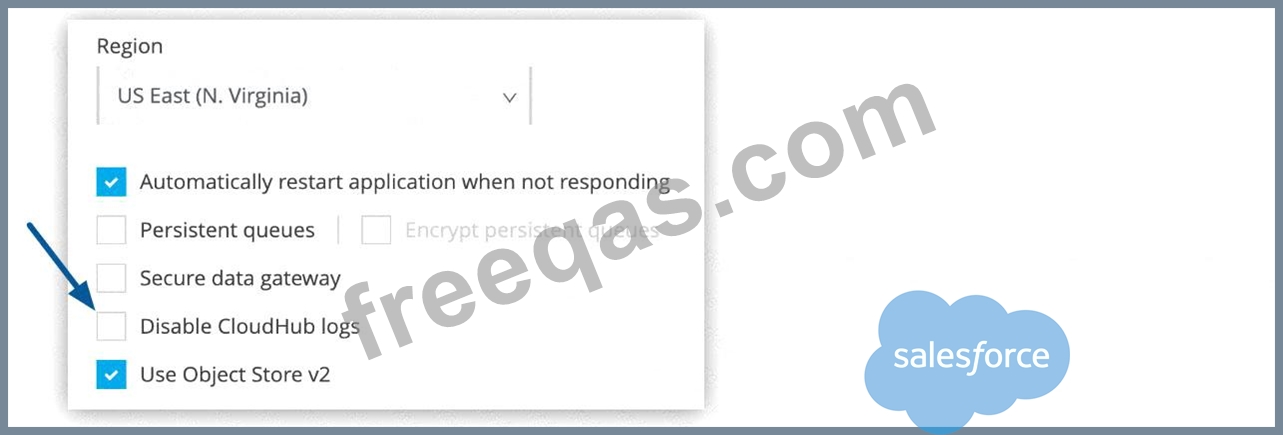
* Correct answer is To directly reference one shared and customized log4j2.xml file from multiple Mule applications. Key word to note in the answer is directly.
* By default, CloudHub replaces a Mule application's log4j2.xml file with a CloudHub log4j2.xml file. This specifies the CloudHub appender to write logs to the CloudHub logging service.
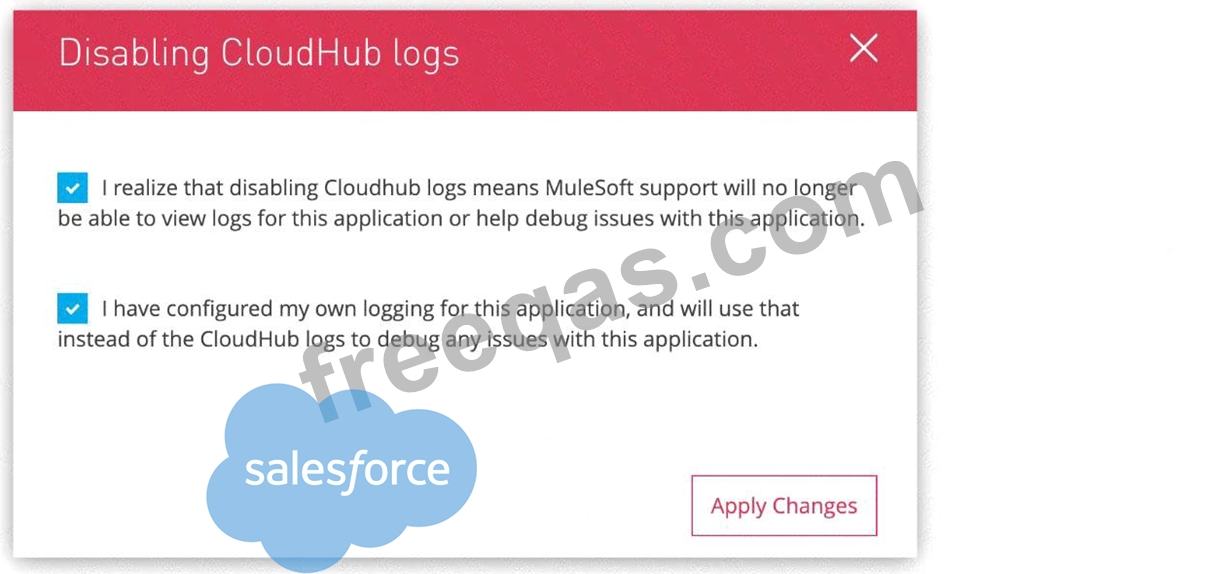
* You cannot modify CloudHub log4j2.xml file to add any custom appender. But there is a process in order to achieve this. You need to raise a request on support portal to disable CloudHub provided Mule application log4j2 file.
Graphical user interface, application, Word Description automatically generated

* Once this is done , Mule application's log4j2.xml file is used which you can use to send/export application logs to other log4j2 appenders, such as a custom logging system MuleSoft does not own any responsibility for lost logging data due to misconfiguration of your own log4j appender if it happens by any chance.
Graphical user interface, text, application, email Description automatically generated

* One more difference between customer-hosted Mule runtimes and CloudHub deployed mule instance is that
- CloudHub system log messages cannot be sent to external log management system without installing custom CH logging configuration through support
- where as Customer-hosted runtime can send system and application log to external log management system MuleSoft Reference:
https://docs.mulesoft.com/runtime-manager/viewing-log-data
https://docs.mulesoft.com/runtime-manager/custom-log-appender
insert code
  • ««
  • «
  • …
  • 8
  • 9
  • 10
  • 11
  • 12
  • 13
  • 14
  • 15
  • 16
  • 17
  • …
  • »
  • »»
[×]

Download PDF File

Enter your email address to download Salesforce.MuleSoft-Integration-Architect-I.v2026-07-22.q100 Dumps


Email:

FreeQAs

Our website provides the Largest and the most Latest vendors Certification Exam materials around the world.

Using dumps we provide to Pass the Exam, we has the Valid Dumps with passing guranteed just which you need.

  • DMCA
  • About
  • Contact Us
  • Privacy Policy
  • Terms & Conditions
©2026 FreeQAs

www.freeqas.com materials do not contain actual questions and answers from Cisco's certification exams.