FreeQAs
 Request Exam  Contact
  • Home
  • View All Exams
  • New QA's
  • Upload
PRACTICE EXAMS:
  • Oracle
  • Fortinet
  • Juniper
  • Microsoft
  • Cisco
  • Citrix
  • CompTIA
  • VMware
  • ISC
  • SAP
  • EMC
  • PMI
  • HP
  • Salesforce
  • Other
  • Oracle
    Oracle
  • Fortinet
    Fortinet
  • Juniper
    Juniper
  • Microsoft
    Microsoft
  • Cisco
    Cisco
  • Citrix
    Citrix
  • CompTIA
    CompTIA
  • VMware
    VMware
  • ISC
    ISC
  • SAP
    SAP
  • EMC
    EMC
  • PMI
    PMI
  • HP
    HP
  • Salesforce
    Salesforce
  1. Home
  2. Tableau Certification
  3. Desktop-Specialist Exam
  4. Tableau.Desktop-Specialist.v2026-05-03.q171 Dumps
  • «
  • 1
  • 2
  • 3
  • 4
  • 5
  • 6
  • 7
  • 8
  • 9
  • 10
  • …
  • »
  • »»
Download Now

Question 11

You can _______________ your data to combine two or more tables by appending values (rows) from one table to another
Correct Answer: D
Explanation
You can union your data to combine two or more tables by appending values (rows) from one table to another.
To union your data in Tableau data source, the tables must come from the same connection.
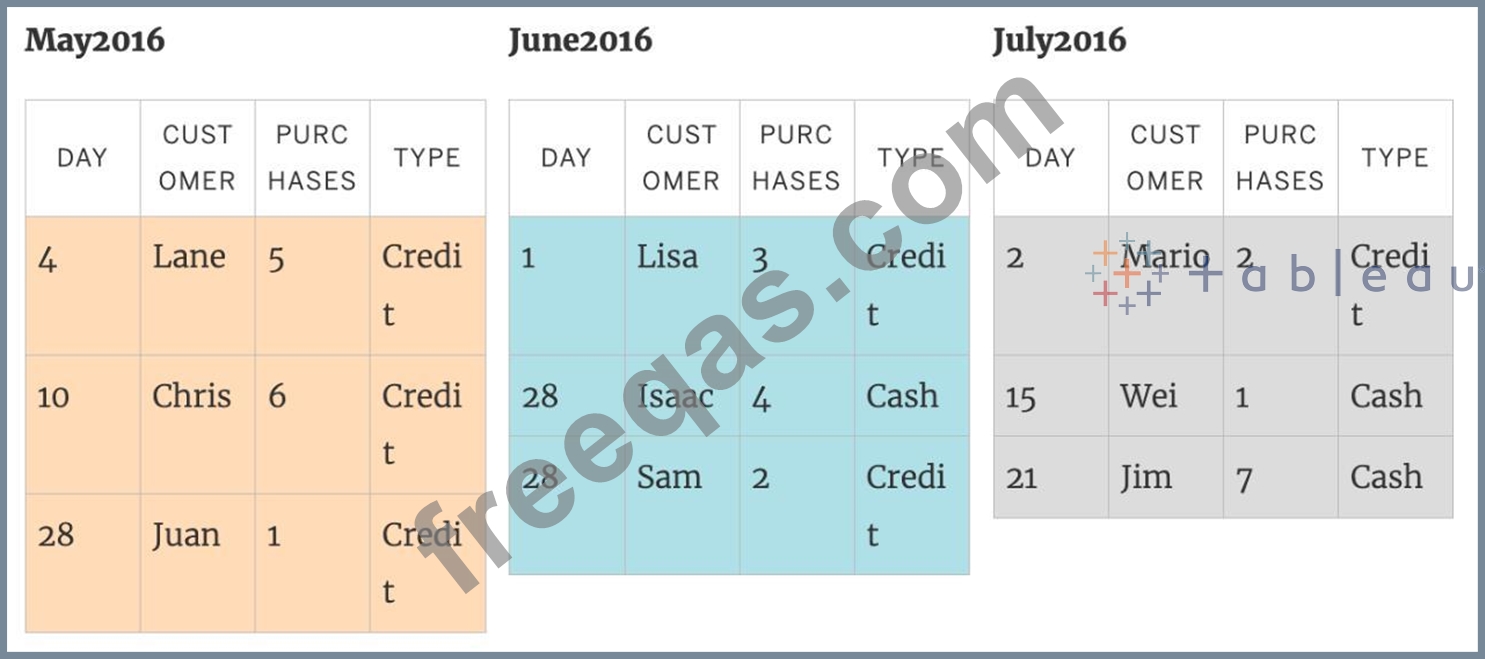
For example, suppose you have the following customer purchase information stored in three tables, separated by month. The table names are "May2016," "June2016," and "July2016."

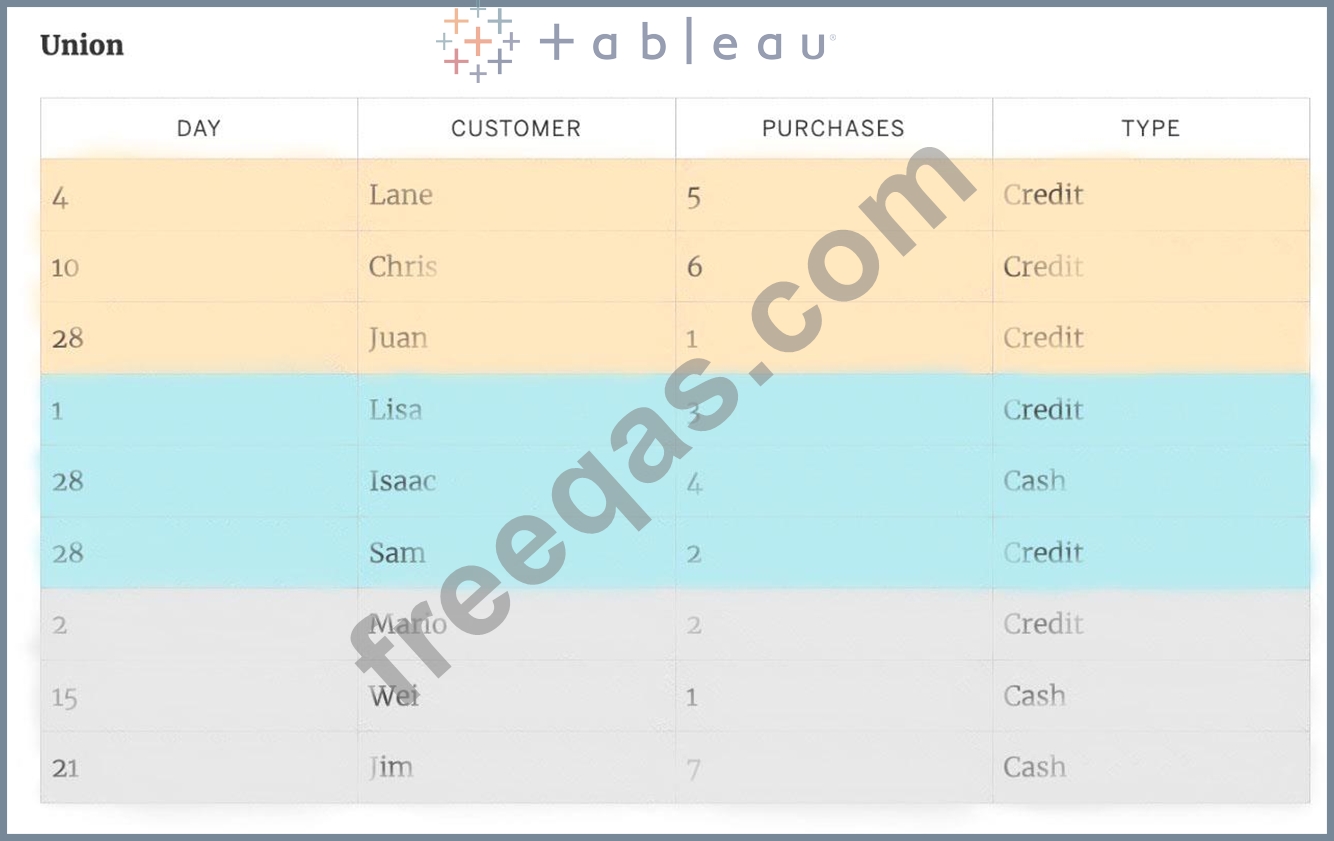
A union of these tables creates the following single table that contains all rows from all tables.
insert code

Question 12

You have a continuous numeric measure named Sales.
Which chart type is created when you double-click the Sales measure?

Correct Answer: D
When you double-click a continuous numeric measure named Sales in Tableau, it automatically creates a bar chart. Tableau's default behavior for a single measure is to display it as a bar chart, with the measure values represented on the Y-axis and an automatic range on the X-axis.
insert code

Question 13

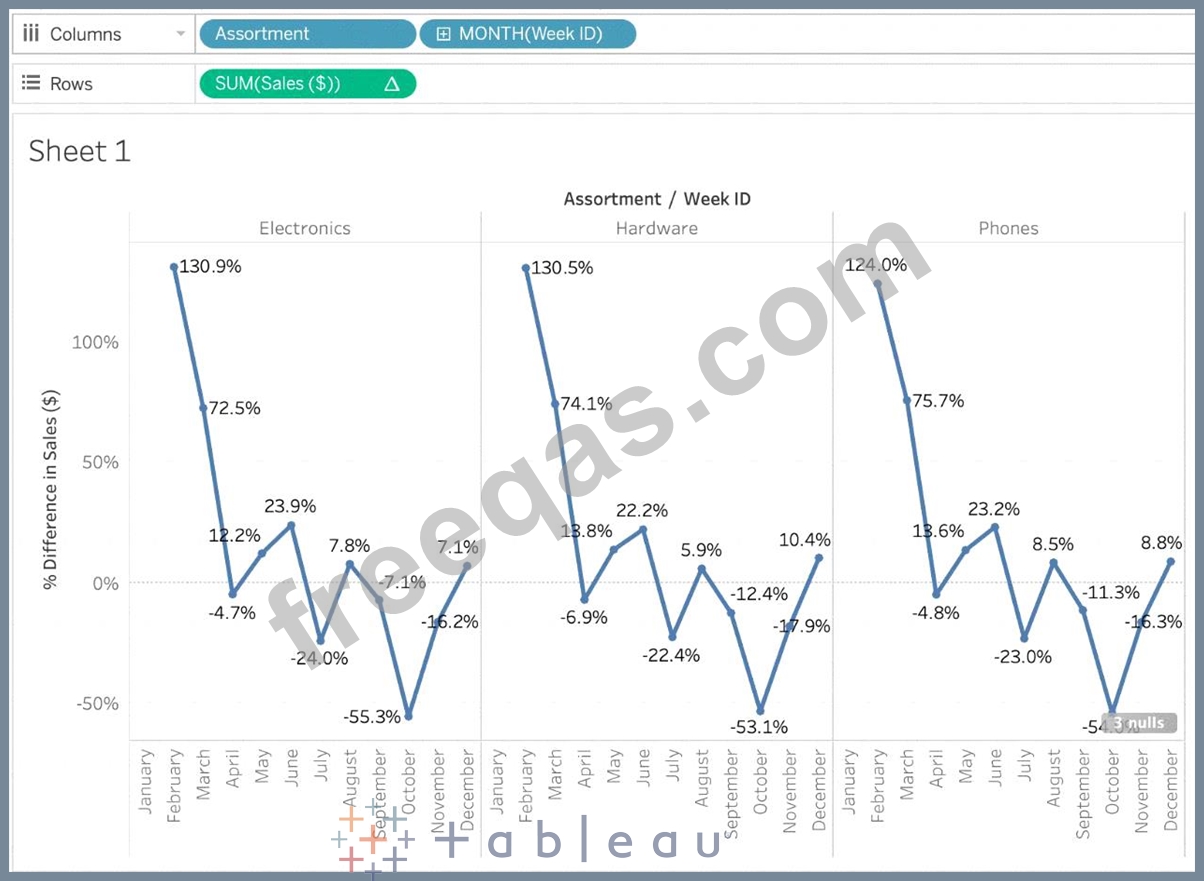
Using the Time Series Table, create a Line chart showing the Monthly Year over Year Growth for the Sales, broken down by Assortment. For the Electronics assortment, which Month had the most NEGATIVE value of Year over Year Growth?

Correct Answer: A
Follow along:
1) Drag Assortment and Year ID (choose Discrete Month) to Columns shelf, and Sales to the Columns Shelf.
For sales, click on the pill -> choose Quick Table calculation -> Year over Year growth.
The view should now look like:

It is clear that October with -55.3% had the lowest Year on Year growth.
insert code

Question 14

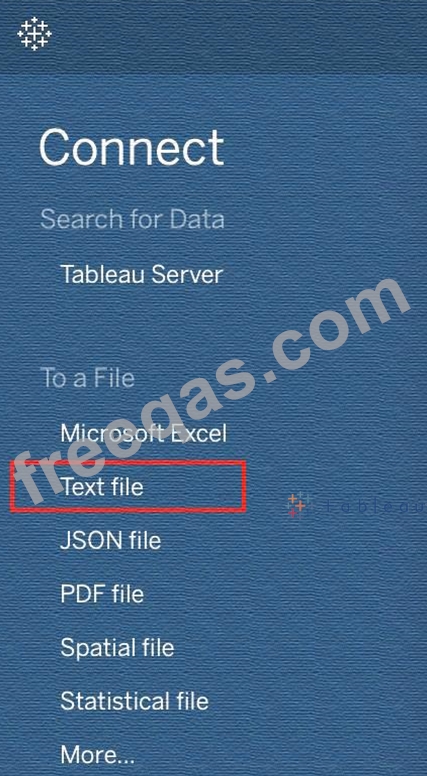
To connect Tableau to a CSV data source what type of connection should you use?
Correct Answer: C
Tableau recognises a CSV file as a TEXT file, and therefore it is the correct option.
The following are the steps to import a CSV file:
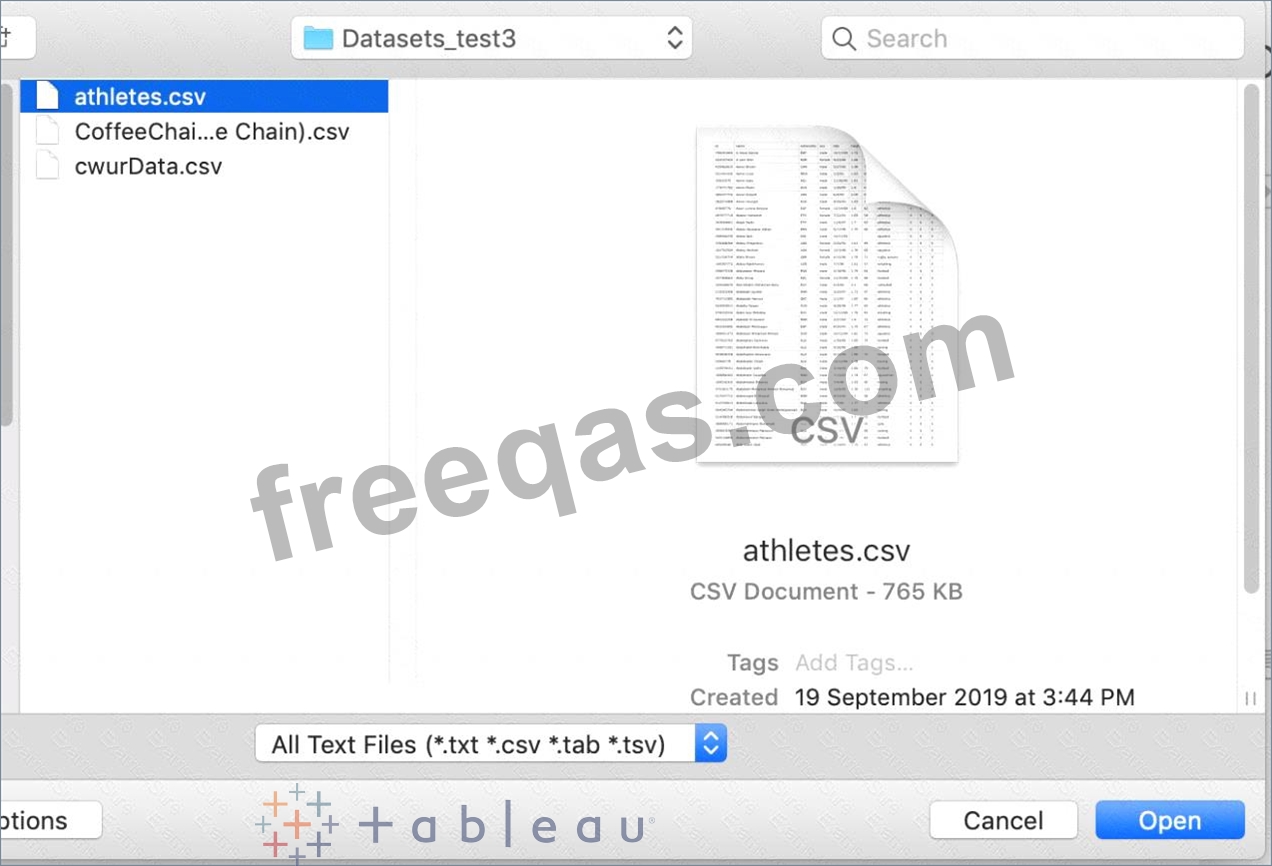
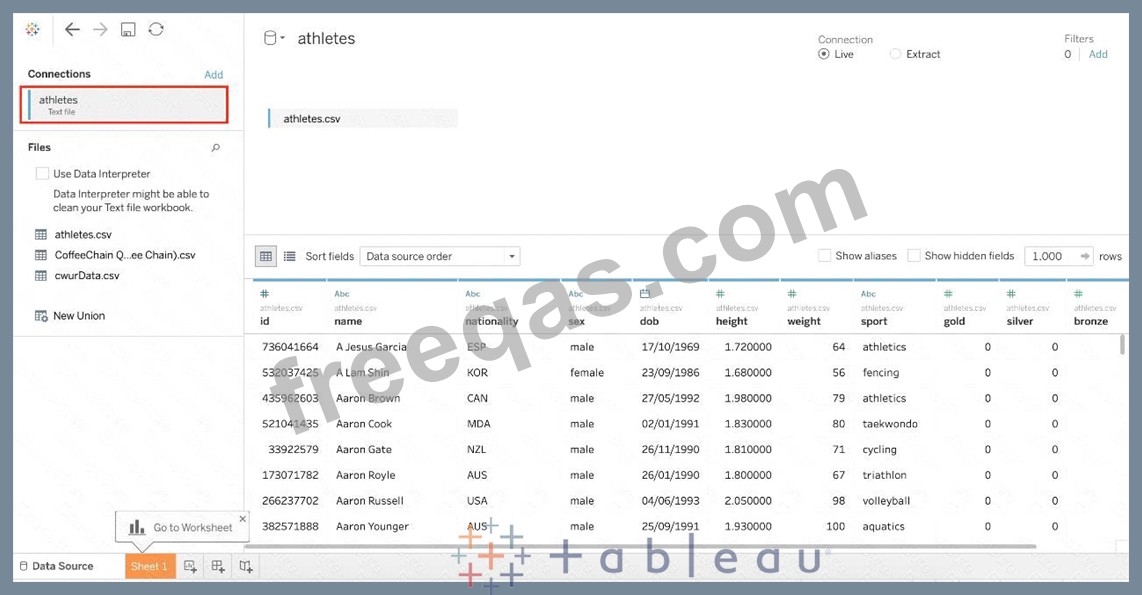
1) From the data connection screen, click on Text:

2) Choose the appropriate file, and click Open:

3) Finally, Tableau imports the data as shown below:
insert code

Question 15

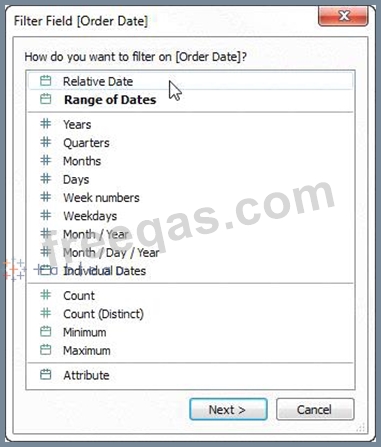
For a relative date filter, the default anchor is _________________
Correct Answer: B
Relative date filters dynamically update to show a time period relative to when you open the view, such as the current week, the year to date, or the past 10 days. Relative date filters make it easy to create views that always show the most recent data.
Step 1: Drag a date field to the filter shelf
Right-click (control-click on Mac) and drag a date field from the Data window to the Filters shelf. In the Filter Field dialog box, click Relative Date, and then click Next.

Step 2: Select a time unit
In the Filter dialog box, click Relative dates, and then select the unit of time for the filter. For example, to show only the three most recent weeks, select Weeks.

Here, you can clearly see that the default date is TODAY
insert code
  • «
  • 1
  • 2
  • 3
  • 4
  • 5
  • 6
  • 7
  • 8
  • 9
  • 10
  • …
  • »
  • »»
[×]

Download PDF File

Enter your email address to download Tableau.Desktop-Specialist.v2026-05-03.q171 Dumps

Email:

FreeQAs

Our website provides the Largest and the most Latest vendors Certification Exam materials around the world.

Using dumps we provide to Pass the Exam, we has the Valid Dumps with passing guranteed just which you need.

  • DMCA
  • About
  • Contact Us
  • Privacy Policy
  • Terms & Conditions
©2026 FreeQAs

www.freeqas.com materials do not contain actual questions and answers from Cisco's certification exams.