FreeQAs
 Request Exam  Contact
  • Home
  • View All Exams
  • New QA's
  • Upload
PRACTICE EXAMS:
  • Oracle
  • Fortinet
  • Juniper
  • Microsoft
  • Cisco
  • Citrix
  • CompTIA
  • VMware
  • ISC
  • SAP
  • EMC
  • PMI
  • HP
  • Salesforce
  • Other
  • Oracle
    Oracle
  • Fortinet
    Fortinet
  • Juniper
    Juniper
  • Microsoft
    Microsoft
  • Cisco
    Cisco
  • Citrix
    Citrix
  • CompTIA
    CompTIA
  • VMware
    VMware
  • ISC
    ISC
  • SAP
    SAP
  • EMC
    EMC
  • PMI
    PMI
  • HP
    HP
  • Salesforce
    Salesforce
  1. Home
  2. Tableau Certification
  3. TDS-C01 Exam
  4. Tableau.TDS-C01.v2024-01-19.q126 Dumps
  • «
  • 1
  • 2
  • 3
  • 4
  • 5
  • 6
  • 7
  • 8
  • 9
  • 10
  • …
  • »
  • »»
Download Now

Question 6

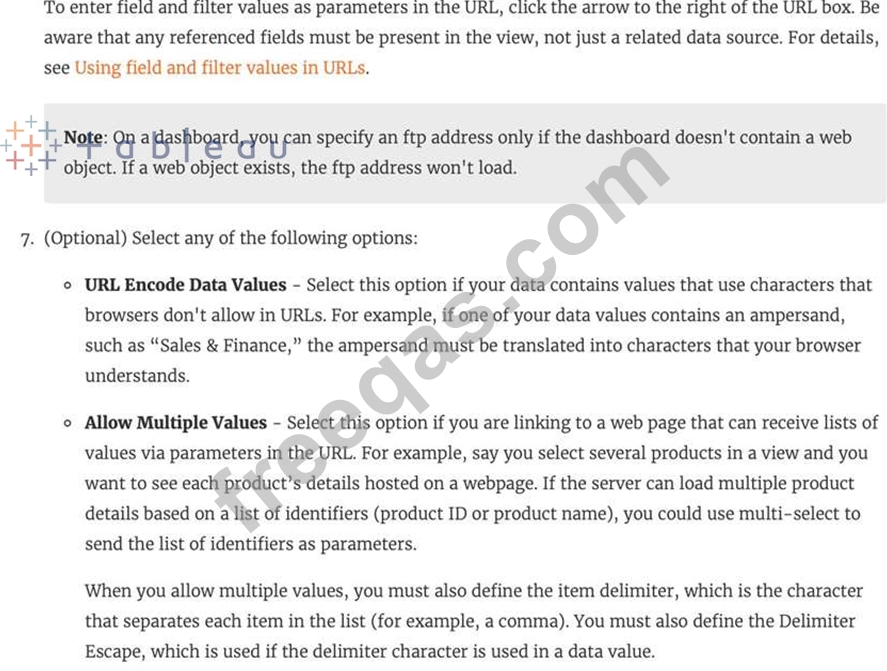
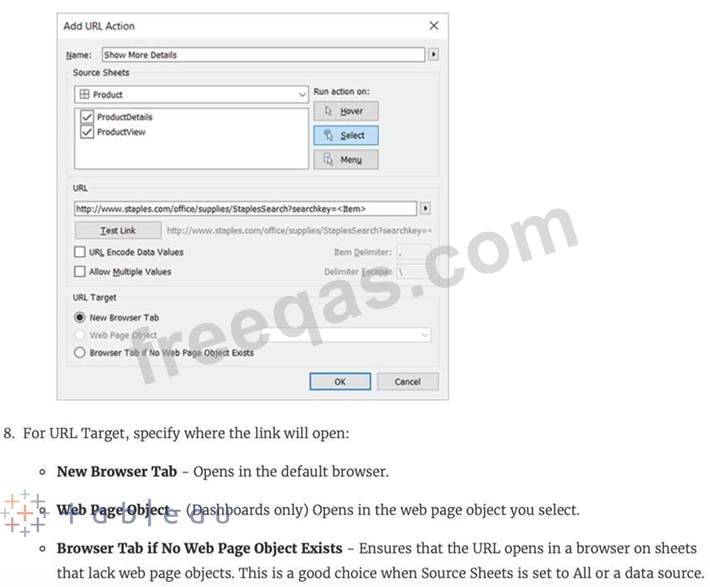
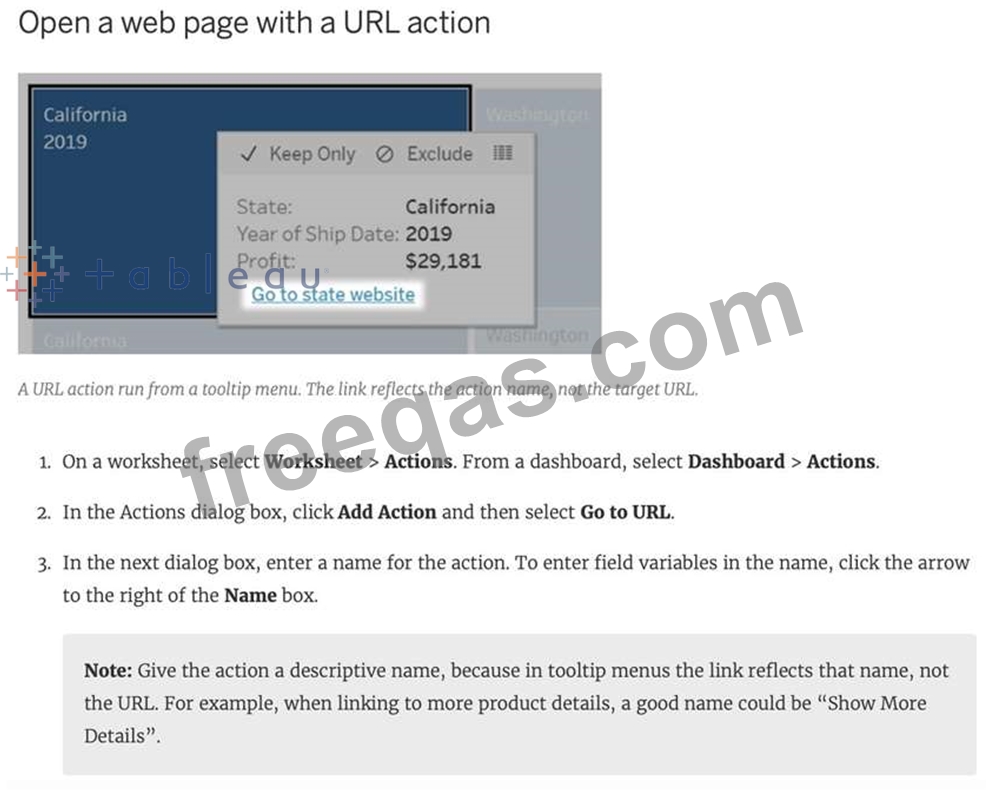
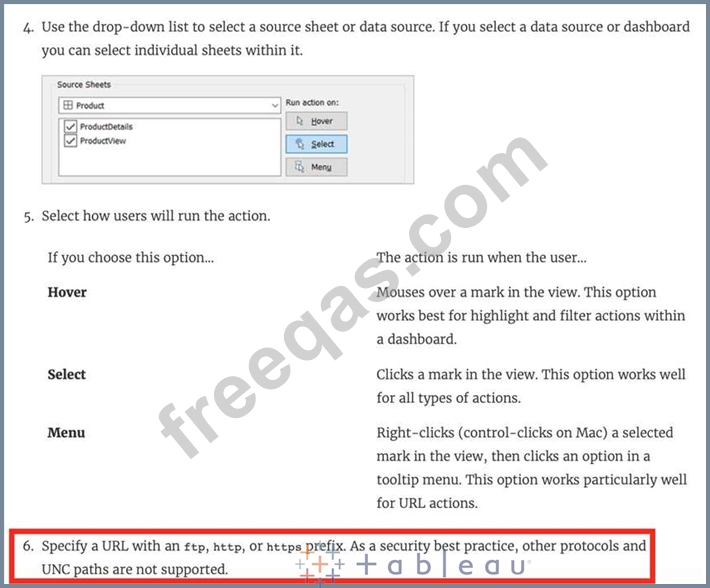
Which of the following URL prefixes are permitted when creating a URL Action in Tableau?
Correct Answer: B,C,D
A URL action is a hyperlink that points to a web page, file, or other web-based resource outside of Tableau. You can use URL actions to create an email or link to additional information about your data. To customize links based on your data, you can automatically enter field values as parameters in URLs.


insert code

Question 7

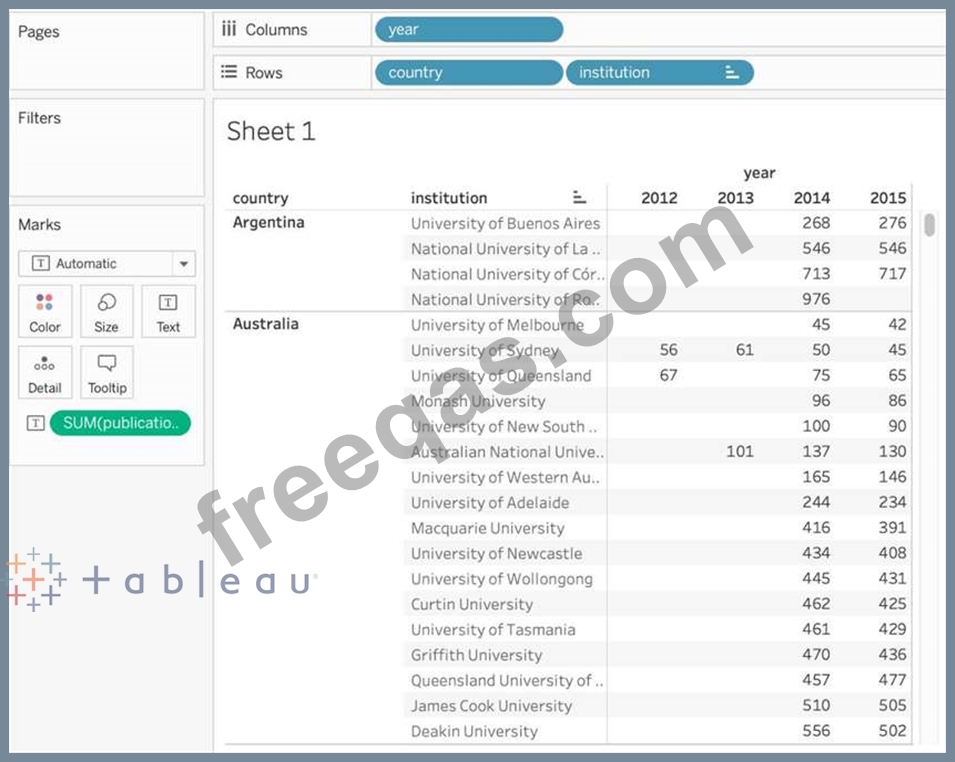
Using the cwurData table, create a cross-tab showing the number of Publications per Country broken down by Institution, and filtered by Country to only show United Kingdown (UK). For the University of Manchester, what percent of the total publications were contributed in 2014?
Correct Answer: D
Explanation
Phew! Tricky one for sure. This question tests multiple concepts and will help you revise them. We'll be using filters, as well as quick table calculations (percent of total) for this one.
1) Firstly, let's drag Country and Institution to the Rows shelf, and year (discrete) to the Columns shelf.
Then, drag Publications to the Text Icon in the Marks Shelf. The following is our view:
insert code

Question 8

Which of the following are the options to export the data used to build the view / visualisations?

Correct Answer: D
You can export the data in a Tableau data source, including all or part of the records from your original data. Alternatively, you can export only the portion of data used to generate the view.
Since the question mentions the data used to build the view, we'll focus on that :
*Export data in the view to Microsoft Access or .csv*
Export the data that is used to generate the view as an Access database (Windows only) or .csv file (Mac only).
1) In Tableau Desktop, select Worksheet > Export > Data.
2) Select a location and type a name for your Access database or .csv file.
3) Click Save.
4) If you're on Windows, the Export Data to Access dialog box displays to give you the option to immediately use the new Access database and continue working in Access without interrupting your work flow.
insert code

Question 9

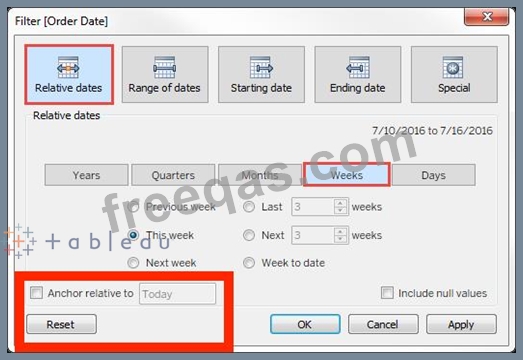
For a relative date filter, the default anchor is _________________
Correct Answer: B
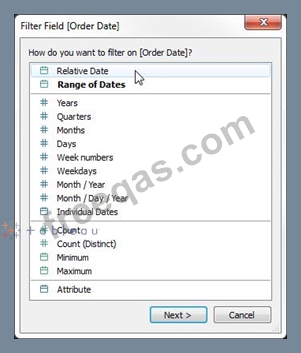
Relative date filters dynamically update to show a time period relative to when you open the view, such as the current week, the year to date, or the past 10 days. Relative date filters make it easy to create views that always show the most recent data.
Step 1: Drag a date field to the filter shelf
Right-click (control-click on Mac) and drag a date field from the Data window to the Filters shelf. In the Filter Field dialog box, click Relative Date, and then click Next.

Step 2: Select a time unit
In the Filter dialog box, click Relative dates, and then select the unit of time for the filter. For example, to show only the three most recent weeks, select Weeks.

Here, you can clearly see that the default date is TODAY
insert code

Question 10

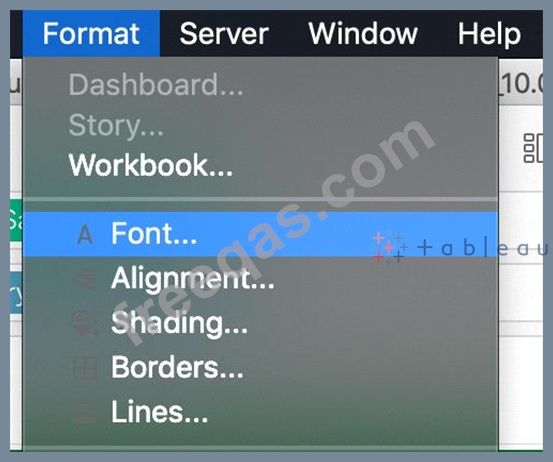
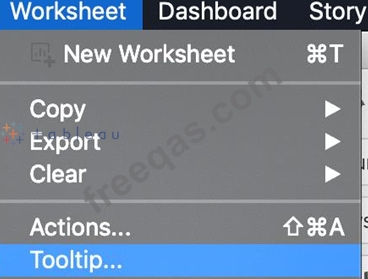
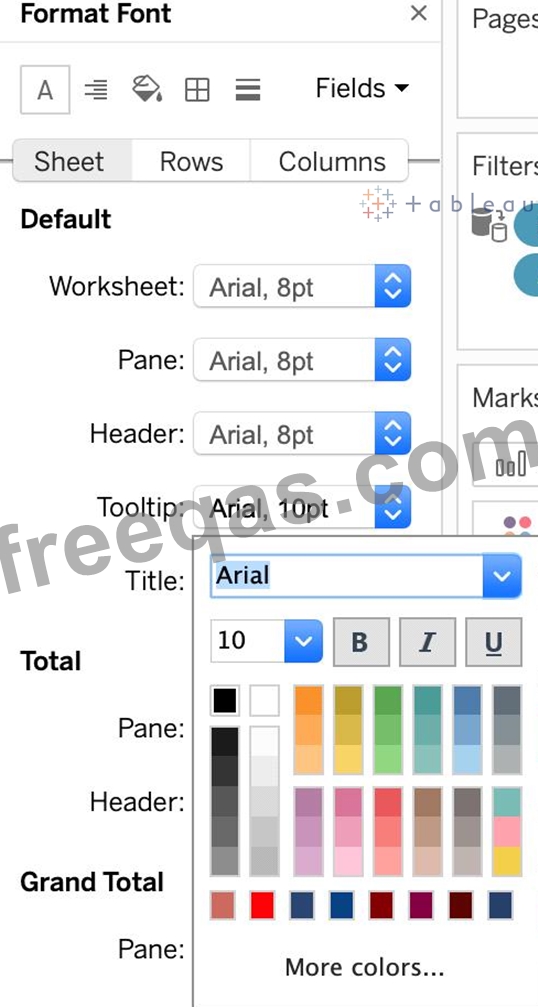
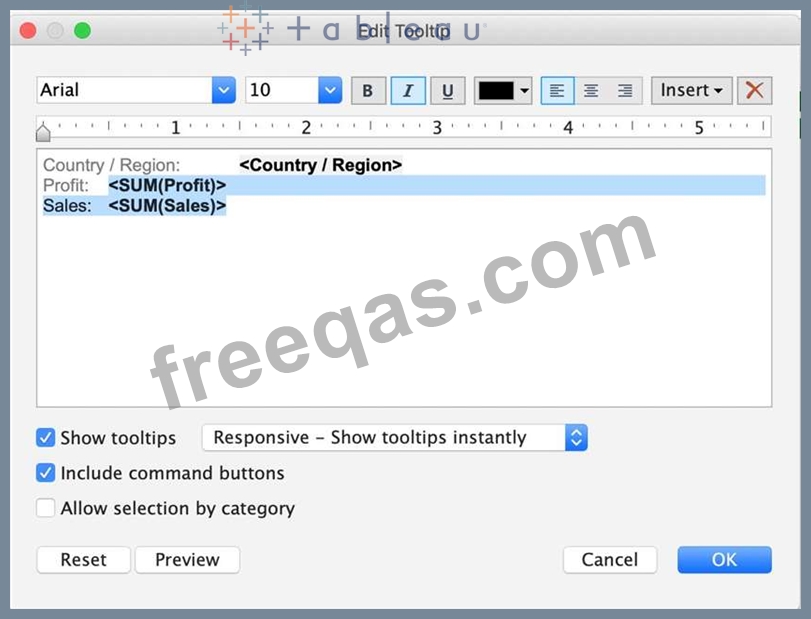
Which of the following are valid ways to italicize Tooltip content in Tableau?
Correct Answer: A,B,C
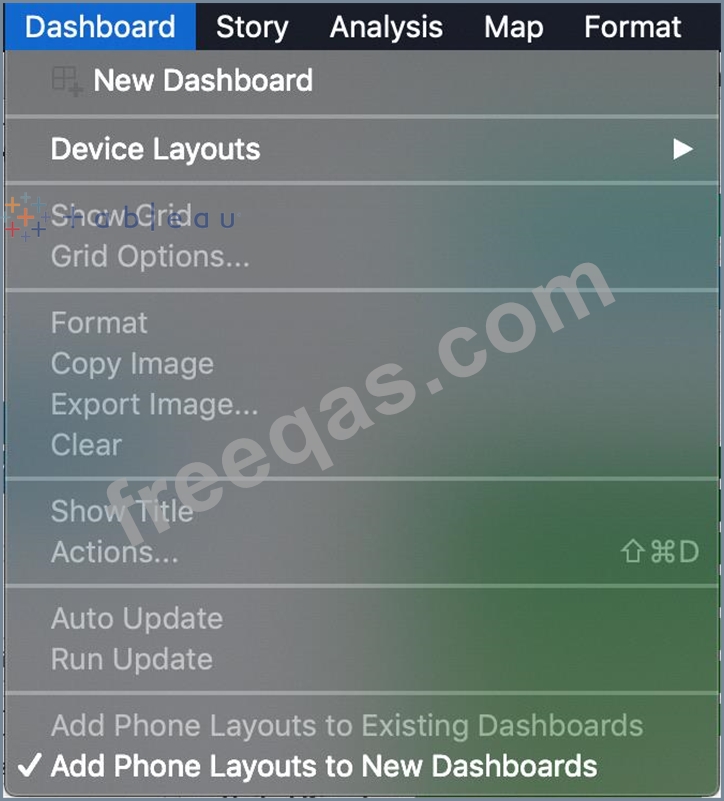
The only incorrect option is - Click on Dashboard in the Menu bar, select Tooltip, and then use the italics option.
This option doesn't exist. See below:

The rest of the options do exist, and therefore are correct:


insert code
  • «
  • 1
  • 2
  • 3
  • 4
  • 5
  • 6
  • 7
  • 8
  • 9
  • 10
  • …
  • »
  • »»
[×]

Download PDF File

Enter your email address to download Tableau.TDS-C01.v2024-01-19.q126 Dumps

Email:

FreeQAs

Our website provides the Largest and the most Latest vendors Certification Exam materials around the world.

Using dumps we provide to Pass the Exam, we has the Valid Dumps with passing guranteed just which you need.

  • DMCA
  • About
  • Contact Us
  • Privacy Policy
  • Terms & Conditions
©2026 FreeQAs

www.freeqas.com materials do not contain actual questions and answers from Cisco's certification exams.