FreeQAs
 Request Exam  Contact
  • Home
  • View All Exams
  • New QA's
  • Upload
PRACTICE EXAMS:
  • Oracle
  • Fortinet
  • Juniper
  • Microsoft
  • Cisco
  • Citrix
  • CompTIA
  • VMware
  • ISC
  • SAP
  • EMC
  • PMI
  • HP
  • Salesforce
  • Other
  • Oracle
    Oracle
  • Fortinet
    Fortinet
  • Juniper
    Juniper
  • Microsoft
    Microsoft
  • Cisco
    Cisco
  • Citrix
    Citrix
  • CompTIA
    CompTIA
  • VMware
    VMware
  • ISC
    ISC
  • SAP
    SAP
  • EMC
    EMC
  • PMI
    PMI
  • HP
    HP
  • Salesforce
    Salesforce
  1. Home
  2. UiPath Certification
  3. UiPath-ADAv1 Exam
  4. UiPath.UiPath-ADAv1.v2025-07-31.q108 Dumps
  • ««
  • «
  • …
  • 14
  • 15
  • 16
  • 17
  • 18
  • 19
  • 20
  • 21
  • 22
  • 23
  • »
Download Now

Question 96

A developer has created a string array variable as shown below:
UserNames = {"Jane", "Jack", "Jill", "John"}
Which expression should the developer use in a Log Message activity to print the elements of the array separated by the string ", "?

Correct Answer: B
Explanation
The String.Join method takes two parameters: a separator and an array of strings. It returns a new string that concatenates the elements of the array using the separator. The correct syntax is String.Join(separator, array).
Therefore, option B is the correct answer.
References:
Automation Developer Associate Training course, Section 1: Data Manipulation, Lecture: Data Manipulation with Strings in Studio How to use Array of string forum post, Answer by @balupad14
insert code

Question 97

Which UiPath activity is best suited for making dynamic decisions in a workflow based on multiple possible values of a variable?

Correct Answer: C
Comprehensive and Detailed In-Depth Explanation:
When a workflow needs to make dynamic decisions based on multiple possible values, the Flow Switch activity is the best choice.
Step-by-Step Execution Guide:
1## Drag and Drop a Flow Switch Activity in UiPath Studio
2## Set the Expression - Define the variable that determines the execution path.
3## Configure Cases - Add multiple possible values and specify corresponding actions.
Example Scenario: Order Processing System
A company wants to route customer orders based on order type:
* "Electronics" # Assign order to Electronics Department
* "Clothing" # Assign order to Clothing Department
* "Grocery" # Assign order to Grocery Department
vb
CopyEdit
Dim OrderType As String = "Electronics"
Using a Flow Switch, we set up:
# Case "Electronics" # Call Electronics Processing Workflow
# Case "Clothing" # Call Clothing Processing Workflow
# Case "Grocery" # Call Grocery Processing Workflow
# Default Case # Log "Invalid Order Type"
This allows dynamic decision-making in a clear, maintainable way.
Why the other options are incorrect?
# A. If Activity - If is limited to two conditions (True/False). It does not support multiple branching paths.
# B. Flow Decision - Similar to If Activity, Flow Decision only supports binary conditions.
# D. While Loop - A loop is used for repeating actions, not decision-making.
# Reference:
* UiPath Documentation: Flow Switch Activity
* UiPath Academy: Control Flow in UiPath
insert code

Question 98

Which of the following functionalities does UiPath Assistant provide?

Correct Answer: B
UiPath Assistant is a desktop tool that enables users to easily access, manage, and run automation workflows on their machines. It provides the following functionalities:
Viewing all the available automations that the user can run, either from Orchestrator or locally.
Adding automations to the launchpad for quick and easy access.
Creating custom folders and sections to organize the automations according to the user's preferences.
Running automations with a single click or using keyboard shortcuts.
Launching robot-powered apps and managing action center tasks directly from the assistant.
Customizing the assistant's appearance, name, and avatar to suit the user's personality.
Viewing the status and progress of the running automations, as well as the history and logs of the past executions.
Connecting to Orchestrator and synchronizing the automations and settings with the cloud.
Accessing the help and feedback options, as well as the interactive guided tour.
References:
Software Robot Assistant - Desktop Automation | UiPath
Robot - About UiPath Assistant - UiPath Documentation Portal
insert code

Question 99

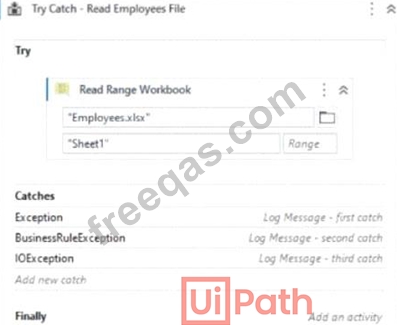
Based on the image provided, which catch block will be executed if the Employees Excel file is open during runtime?
Correct Answer: B
Comprehensive and Detailed In-Depth Explanation:
When a UiPath bot tries to read an Excel file that is open in another application, it encounters an IOException (Input/Output Exception).
Step-by-Step Execution Guide: Handling IOException in UiPath
1## Try to Read an Open Excel File
vb
CopyEdit
Read Range Workbook: "Employees.xlsx"
2## If the file is already open, IOException occurs3## The "IOException" Catch Block Handles the Error Real-World Use Case: Ensuring File Availability Before Reading
# Scenario:A bot is scheduled to read employee records every morning at 8 AM.# If an employee accidentally leaves the Excel file open, the bot will fail.# To prevent failure, the bot:
* Tries to read the file.
* If IOException occurs, sends an email alert instead of failing.
vb
CopyEdit
Try
Read Range Workbook: "Employees.xlsx"
Catch ex As IOException
Send Email: "Please close the Employees file!"
# This makes the automation resilient!
Why the other options are incorrect?
# A. None - An exception will occur if the file is open.# C. BusinessRuleException - This is for custom business logic errors, not file access issues.# D. Exception - The IOException block specifically catches this error before reaching the generic Exception block.
# Reference:
* UiPath Documentation: Handling Exceptions
insert code

Question 100

A developer has created an automation process that includes:
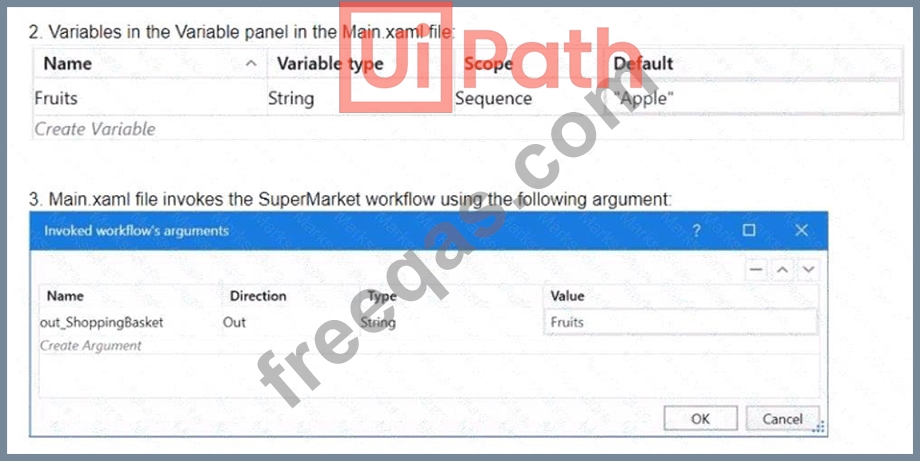


Based on the information shown in the exhibits, what is the output of the Write Line activity in the Main xaml file?

Correct Answer: B
The Write Line activity is used to write a specified text to the Output panel. The text can be a string literal, a variable, or an expression. In this case, the Write Line activity in the Main xaml file has the text
"out_ShoppingBasket + ", "Orange"". The out_ShoppingBasket is a variable of type String, which is declared in the Main xaml file and has the default value of "Apple". The variable is passed as an argument to the SuperMarket xaml file, where it is assigned a new value of "Orange". The argument direction is Out, which means that the value of the argument is passed back to the Main xaml file after the execution of the SuperMarket xaml file. Therefore, the value of the out_ShoppingBasket variable in the Main xaml file is changed from "Apple" to "Orange". The expression "out_ShoppingBasket + ", "Orange"" concatenates the value of the out_ShoppingBasket variable with a comma and a space, followed by the string literal "Orange".
The result of this expression is "Orange, Orange". The Write Line activity writes this text to the Output panel.
Therefore, the answer is B. Orange. References: Write Line, Variables, Arguments
insert code
  • ««
  • «
  • …
  • 14
  • 15
  • 16
  • 17
  • 18
  • 19
  • 20
  • 21
  • 22
  • 23
  • »
[×]

Download PDF File

Enter your email address to download UiPath.UiPath-ADAv1.v2025-07-31.q108 Dumps

Email:

FreeQAs

Our website provides the Largest and the most Latest vendors Certification Exam materials around the world.

Using dumps we provide to Pass the Exam, we has the Valid Dumps with passing guranteed just which you need.

  • DMCA
  • About
  • Contact Us
  • Privacy Policy
  • Terms & Conditions
©2026 FreeQAs

www.freeqas.com materials do not contain actual questions and answers from Cisco's certification exams.
