FreeQAs
 Request Exam  Contact
  • Home
  • View All Exams
  • New QA's
  • Upload
PRACTICE EXAMS:
  • Oracle
  • Fortinet
  • IBM
  • Juniper
  • Microsoft
  • Cisco
  • Citrix
  • CompTIA
  • VMware
  • ISC
  • SAP
  • EMC
  • PMI
  • HP
  • Salesforce
  • Other
  • Oracle
    Oracle
  • Fortinet
    Fortinet
  • IBM
    IBM
  • Juniper
    Juniper
  • Microsoft
    Microsoft
  • Cisco
    Cisco
  • Citrix
    Citrix
  • CompTIA
    CompTIA
  • VMware
    VMware
  • ISC
    ISC
  • SAP
    SAP
  • EMC
    EMC
  • PMI
    PMI
  • HP
    HP
  • Salesforce
    Salesforce
  1. Home
  2. VMware Certification
  3. 2V0-41.23 Exam
  4. VMware.2V0-41.23.v2024-04-26.q104 Dumps
  • ««
  • «
  • …
  • 13
  • 14
  • 15
  • 16
  • 17
  • 18
  • 19
  • 20
  • 21
  • 22
  • »
Download Now

Question 86

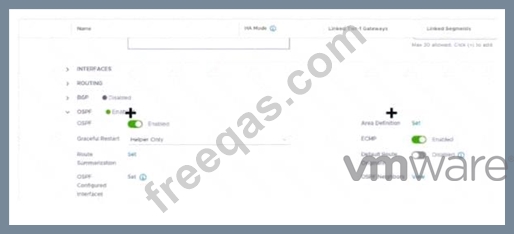
Refer to the exhibit.
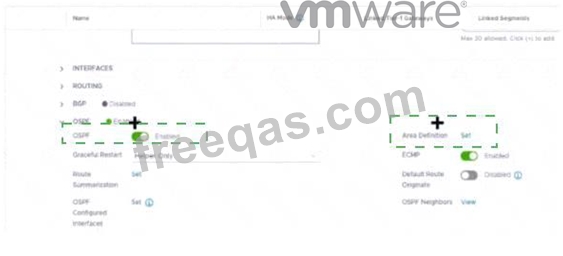
Which two items must be configured to enable OSPF for the Tler-0 Gateway in the Image? Mark your answers by clicking twice on the image.
Correct Answer:

Explanation
The correct answer is to enable the OSPF toggle and to add an Area Definition for the Tier-0 gateway in the image. These two items are required to configure OSPF on the Tier-0 gateway, as explained in the web search results123.
To mark your answers by clicking twice on the image, you can double-click on the toggle switch next to OSPF to turn it on. The switch should change from gray to blue, indicating that the option is enabled. Then, you can double-click on the Set button next to Area Definition to add an area definition. A pop-up window should appear where you can specify the area ID and type.
1. Click the OSPF toggle to enable OSPF 2. In the Area Definition field, click Set to add an area definition
https://docs.vmware.com/en/VMware-NSX-T-Data-Center/3.2/administration/GUID-5BEC626C-5312-467D-B8
insert code

Question 87

Which two of the following features are supported for the Standard NSX Application Platform Deployment? (Choose two.)

Correct Answer: C,D
The NSX Application Platform Deployment features are divided into three form factors: Evaluation, Standard, and Advanced. Each form factor determines which NSX features can be activated or installed on the platform1. The Evaluation form factor supports only NSX Intelligence, which provides network visibility and analytics for NSX-T environments2. The Standard form factor supports both NSX Intelligence and NSX Network Detection and Response, which provides network threat detection and response capabilities for NSX-T environments3. The Advanced form factor supports all four features: NSX Intelligence, NSX Network Detection and Response, NSX Malware Prevention, and NSX Metrics1.
insert code

Question 88

Which NSX CLI command is used to change the authentication policy for local users?

Correct Answer: D
Explanation
According to the VMware NSX Documentation4, the set auth-policy command is used to change the authentication policy settings for local users, such as password length, lockout period, and maximum authentication failures. The other commands are either used to view the authentication policy settings (B), change the CLI session timeout (A), or change the hardening policy settings.
insert code

Question 89

Which steps are required to activate Malware Prevention on the NSX Application Platform?

Correct Answer: D
Explanation
To activate Malware Prevention on the NSX Application Platform, the steps are:
In the NSX Manager UI, select System and in the Configuration section, select NSX Application Platform.
Navigate to the Features section, locate the NSX Malware Prevention feature card, and click Activate or anywhere in the card.
In the NSX Malware Prevention activation window, select one of the available cloud regions from which you can access the NSX Advanced Threat Prevention cloud service.
Click Run Prechecks. This precheck process can take some time as the system validates that the minimum license requirement is met and that it is eligible for use with the NSX Advanced Threat Prevention cloud service. The system also validates that the selected cloud region is reachable.
Click Activate. This step can take some time1. Therefore, the correct answer is D. The other options are incorrect because they involve activating or deploying NSX Network Detection and Response, which is a different feature from Malware Prevention. References: Activate NSX Malware Prevention
insert code

Question 90

Which statement is true about an alarm in a Suppressed state?

Correct Answer: D
Explanation
An alarm can be suppressed for a specific duration in hours.
According to the VMware NSX documentation, an alarm can be in one of the following states: Open, Acknowledged, Suppressed, or Resolved12 An alarm in a Suppressed state means that the status reporting for this alarm has been disabled by the user for a user-specified duration12 When a user moves an alarm into a Suppressed state, they are prompted to specify the duration in hours. After the specified duration passes, the alarm state reverts to Open. However, if the system determines the condition has been corrected, the alarm state changes to Resolved13 To learn more about how to manage alarm states in NSX, you can refer to the following resources:
VMware NSX Documentation: Managing Alarm States 1
VMware NSX Documentation: View Alarm Information 2
VMware NSX Intelligence Documentation: Manage NSX Intelligence Alarm States 3
https://docs.vmware.com/en/VMware-NSX-Intelligence/1.2/user-guide/GUID-EBD3C5A8-F9AB-4A22-BA40-9
insert code
  • ««
  • «
  • …
  • 13
  • 14
  • 15
  • 16
  • 17
  • 18
  • 19
  • 20
  • 21
  • 22
  • »
[×]

Download PDF File

Enter your email address to download VMware.2V0-41.23.v2024-04-26.q104 Dumps

Email:

FreeQAs

Our website provides the Largest and the most Latest vendors Certification Exam materials around the world.

Using dumps we provide to Pass the Exam, we has the Valid Dumps with passing guranteed just which you need.

  • DMCA
  • About
  • Contact Us
  • Privacy Policy
  • Terms & Conditions
©2026 FreeQAs

www.freeqas.com materials do not contain actual questions and answers from Cisco's certification exams.
