-- Exhibit-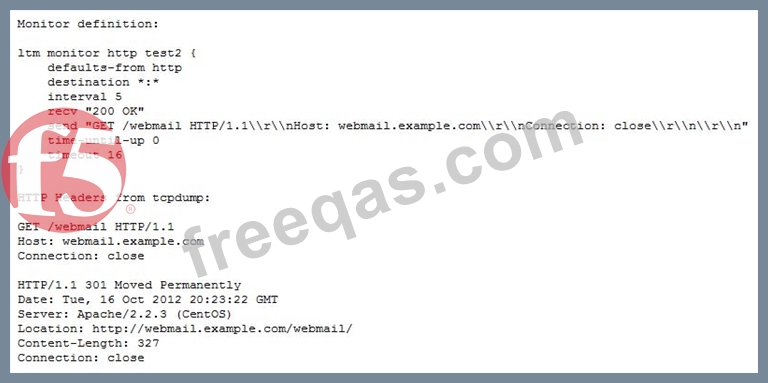
-- Exhibit -Refer to the exhibit.
An HTTP monitor always marks the nodes in the pool as down. The monitor's definition and the HTTP headers from the monitor request and response are provided.
What is the issue?
Which command line interface command will check if the BIG-IP platform contains a packet velocity ASIC (PVA)?
-- Exhibit -
-- Exhibit -
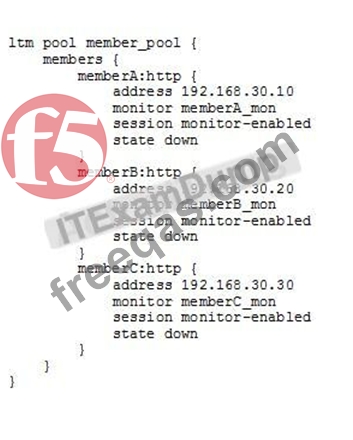
Refer to the exhibits.
How should the LTM Specialist minimize the configuration?
-- Exhibit -
-- Exhibit -Refer to the exhibit. Users receive an error when attempting to connect to the website https://website.com. The
website has a DNS record of 195.56.67.90. The upstream ISP has confirmed that there is nothing
wrong with the routing between the user and the LTM device.
The following tcpdump outputs have been captured:
External Vlan, filtered on IP 168.210.232.5
00:25:07.598519 IP 168.210.232.5.33159 > 195.56.67.90.https: S 1920647964:1920647964(0) win 8192 <mss 1450,nop,nop,sackOK>
00:25:07.598537 IP 195.56.67.90.https > 168.210.232.5.33159: S 2690691360:2690691360(0) ack 1920647965 win 4350 <mss 1460,sackOK,eol>
00:25:07.598851 IP 168.210.232.5.33160 > 195.56.67.90.https: S 2763858764:2763858764(0) win 8192 <mss 1450,nop,nop,sackOK>
00:25:07.598858 IP 195.56.67.90.https > 168.210.232.5.33160: S 1905576176:1905576176(0) ack 2763858765 win 4350 <mss 1460,sackOK,eol>
Internal Vlan, filtered on IP 168.210.232.5
00:31:46.171124 IP 168.210.232.5.33202 > 192.168.100.20.http: S 2389057240:2389057240(0) win 4380 <mss 1460,nop,wscale 0,sackOK,eol>
What is the problem?
An LTM device pool has suddenly been marked down by a monitor. The pool consists of members 10.0.1.1:443 and 10.0.1.2:443 and are verified to be listening. The affected virtual server is 10.0.0.1:80.
Which two tools should the LTM Specialist use to troubleshoot the associated HTTPS pool monitor via the command line interface? (Choose two.)

