FreeQAs
 Request Exam  Contact
  • Home
  • View All Exams
  • New QA's
  • Upload
PRACTICE EXAMS:
  • Oracle
  • Fortinet
  • Juniper
  • Microsoft
  • Cisco
  • Citrix
  • CompTIA
  • VMware
  • ISC
  • SAP
  • EMC
  • PMI
  • HP
  • Salesforce
  • Other
  • Oracle
    Oracle
  • Fortinet
    Fortinet
  • Juniper
    Juniper
  • Microsoft
    Microsoft
  • Cisco
    Cisco
  • Citrix
    Citrix
  • CompTIA
    CompTIA
  • VMware
    VMware
  • ISC
    ISC
  • SAP
    SAP
  • EMC
    EMC
  • PMI
    PMI
  • HP
    HP
  • Salesforce
    Salesforce
  1. Home
  2. F5 Certification
  3. F5CAB5 Exam
  4. F5.F5CAB5.v2026-07-18.q66 Dumps
  • ««
  • «
  • …
  • 2
  • 3
  • 4
  • 5
  • 6
  • 7
  • 8
  • 9
  • 10
  • 11
  • …
  • »
  • »»
Download Now

Question 26

A traffic group includes four devices. The failover method is HA order. The failover order is:
* BIGIP-D
* BIGIP-B
* BIGIP-C
* BIGIP-A
Auto fallback is enabled. BIGIP-D has been forced to standby. BIGIP-B was active before being rebooted.
Which device is active when BIGIP-B is up after the reboot?

Correct Answer: C
To understand which device becomes active, we must look at how the BIG-IP system handles HA Order and Auto Fallback within a traffic group.
* HA Order Mechanism: When a traffic group is configured with an "HA Order" list, the system prefers to host the traffic group on the highest-ranking available device in that list (1 being the highest).
* The Impact of "Forced to Standby": BIGIP-D is the first choice in the order, but it has been "Forced to Standby." This state is persistent and manual; until an administrator releases the "Force to Standby" state, the device is ineligible to host the traffic group, effectively removing it from the top of the preference list.
* Auto Fallback: When "Auto Fallback" is enabled, the traffic group will automatically migrate back to a higher-priority device in the HA order as soon as that device becomes available and is in a healthy
"Standby" state.
* The Scenario Logic: 1. BIGIP-D is ineligible (Forced Offline/Standby).
2. BIGIP-B is the next highest device in the HA Order (Rank 2).
3. While BIGIP-B was rebooting, the traffic group would have failed over to BIGIP-C (Rank 3).
4. Once BIGIP-B finishes booting and joins the cluster in a "Standby" state, the Auto Fallback setting triggers.
5. Because BIGIP-B is higher in the HA Order than the current active device (BIGIP-C) and the only device above it (BIGIP-D) is ineligible, the traffic group fails back to BIGIP-B.
insert code

Question 27

A BIG-IP device sends out the following SNMP trap: big-ipo.f5.com - bigipExternalLinkChange Link: 1.0 is DOWN. Where in the BIG-IP Configuration utility should the BIG-IP Administrator verify the current status of Link 1.0?

Correct Answer: D
Comprehensive and Detailed Explanation From BIG-IP Administration Support and Troubleshooting documents: Identifying network-level performance issues often starts with investigating hardware-level alerts78. In F5 terminology, a "Link" like "1.0" or "1.1" refers to a physical interface on the appliance79. When an SNMP trap reports that a link is "DOWN," it indicates a loss of signal or an administrative shutdown of the physical port80. To verify this, the administrator must navigate to Network > Interfaces > Interface List81. This screen provides real-time status, showing whether the interface is "up," "down," or "uninitialized," as well as any media speed or duplex mismatches that could be causing performance degradation82. Troubleshooting this is the first step in resolving "pool member down" or "VLAN failsafe" issues, as a down interface will take down any VLANs associated with it, immediately halting all traffic flow for the services relying on that physical path.
insert code

Question 28

Refer to the exhibit.

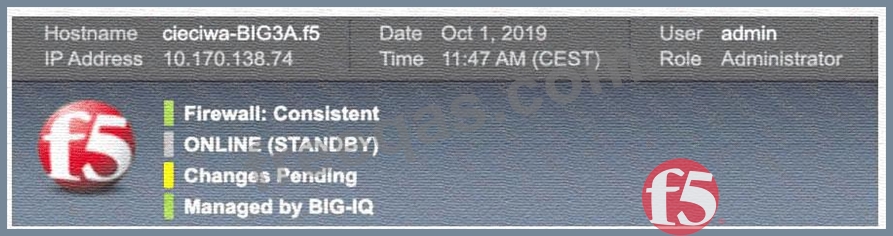
The BIG-IP Administrator has modified an iRule on one device of an HA pair. The BIG-IP Administrator notices there is NO traffic on the BIG-IP device in which they are logged into. What should the BIG-IP Administrator do to verify if the iRule works correctly?

Correct Answer: D
Based on the provided exhibits, the BIG-IP device is currently in a Standby state ("ONLINE (STANDBY)") and has a sync status of "Changes Pending" (Yellow icon).
* Understanding Device State and Traffic: In an Active/Standby High Availability (HA) pair, traffic is processed by the Active device. The exhibit confirms the administrator is logged into the Standby device, which explains why there is "NO traffic" currently observed on this specific unit.
* Configuration Synchronization (ConfigSync): When an administrator modifies a local object, such as an iRule, on one member of a device group, the changes must be synchronized to the other members to ensure consistency. The "Changes Pending" status indicates that the local configuration on this device is newer than the configuration on other group members.
* Push vs. Pull: * Push: Sends the configuration from the current device to the other members of the device group.
* Pull: Overwrites the current device's configuration with the configuration from another member of the group.
* Resolving the Scenario: Since the administrator modified the iRule on "this device," they must Push the configuration to the group so the Active device receives the updated iRule. To verify the iRule works, the administrator can then monitor the traffic on the Active device or initiate a manual failover to make "this device" Active, allowing it to process traffic with the new iRule.
Option D is the correct administrative workflow: synchronize the changes to the group (Push) and then monitor the traffic flow to validate the new logic.
insert code

Question 29

A BIG-IP Administrator receives reports from users that SSL connections to the BIG-IP device are failing. Upon checking the log files, the administrator notices: SSL transaction (TPS) rate limit reached. stats show a maximum of 1200 client-side SSL TPS and 800 server-side SSL TPS. What is the minimum SSL license limit required to handle this peak?

Correct Answer: D
Troubleshooting failed SSL handshakes involves interpreting the resource limits defined by the system's license8888. The log message SSL transaction (TPS) rate limit reached indicates the BIG-IP is dropping SSL connections because it has exceeded its licensed "Transactions Per Second" capacity. When analyzing stats to determine the correct license level, the administrator must focus on "Client-side" SSL TPS. This represents the initial encrypted handshakes between users and the BIG-IP virtual servers91. In this scenario, the peak client-side demand is 1200 TPS. While the 800 server-side transactions represent re-encryption toward the backend, F5's primary SSL TPS license limits typically apply to the client-facing side of the traffic flow. Therefore, to resolve the intermittent connectivity issues and ensure the virtual server works reliably during peaks, the license must be upgraded to at least 1200 TPS949596969696. 9798Confirming this peak via statistics and comparing it to the current license is a standard troubleshooting step for SSL performance issues.
insert code

Question 30

resume is enabled and a health check first fails and then passes?

Correct Answer: A
Comprehensive and Detailed Explanation From BIG-IP Administration Support and Troubleshooting documents: The "Manual Resume" feature is a safety mechanism used when a pool is not working as expected due to flapping services or unstable backend applications. Normally, when a health monitor fails, the pool member is marked "Offline" (Red), and when the monitor passes, it automatically returns to "Available" (Green)47. However, if "Manual Resume" is enabled, the BIG-IP will not automatically put the member back into rotation after a failure48. Even if the health check begins to pass again, the member remains in an "Offline (Disabled)" state49. This requires an administrator to manually intervene and re-enable the member. This is a common point of confusion when troubleshooting; a member may show passing health checks but still not receive traffic because it is waiting for a manual administrative "resume" command. This feature is intended to prevent "unhealthy" servers from receiving traffic until an engineer has confirmed the root cause of the initial failure was resolved.
insert code
  • ««
  • «
  • …
  • 2
  • 3
  • 4
  • 5
  • 6
  • 7
  • 8
  • 9
  • 10
  • 11
  • …
  • »
  • »»
[×]

Download PDF File

Enter your email address to download F5.F5CAB5.v2026-07-18.q66 Dumps

Email:

FreeQAs

Our website provides the Largest and the most Latest vendors Certification Exam materials around the world.

Using dumps we provide to Pass the Exam, we has the Valid Dumps with passing guranteed just which you need.

  • DMCA
  • About
  • Contact Us
  • Privacy Policy
  • Terms & Conditions
©2026 FreeQAs

www.freeqas.com materials do not contain actual questions and answers from Cisco's certification exams.