FreeQAs
 Request Exam  Contact
  • Home
  • View All Exams
  • New QA's
  • Upload
PRACTICE EXAMS:
  • Oracle
  • Fortinet
  • Juniper
  • Microsoft
  • Cisco
  • Citrix
  • CompTIA
  • VMware
  • ISC
  • SAP
  • EMC
  • PMI
  • HP
  • Salesforce
  • Other
  • Oracle
    Oracle
  • Fortinet
    Fortinet
  • Juniper
    Juniper
  • Microsoft
    Microsoft
  • Cisco
    Cisco
  • Citrix
    Citrix
  • CompTIA
    CompTIA
  • VMware
    VMware
  • ISC
    ISC
  • SAP
    SAP
  • EMC
    EMC
  • PMI
    PMI
  • HP
    HP
  • Salesforce
    Salesforce
  1. Home
  2. Forcepoint Certification
  3. DSPM-Deploy-and-Administer Exam
  4. Forcepoint.DSPM-Deploy-and-Administer.v2026-05-24.q14 Dumps
  • «
  • 1
  • 2
  • 3
  • 4
  • »
Download Now

Question 1

Which of these is NOT a valid benefit of configuring Data Mapping in Forcepoint DSPM?

Correct Answer: A
The correct answer is A. Resolves Incident Reporting . Data Mapping in Forcepoint DSPM is a governance configuration capability within Policy Center > Compliance Hub , not an incident-resolution mechanism.
Forcepoint defines Data Mapping, also referred to as Security Posture Policy Controls , as the building blocks for the Data Asset Inventory framework. It allows administrators to define the fields available in the Data Asset Inventory so data owners can assign metadata tags to critical data. Examples include retention period, business owner, regulatory scope, review status, and project name .
Those functions clearly support the valid benefits in the option set. Data Mapping improves data management by standardizing asset metadata. It enhances compliance by capturing regulatory scope and review-related fields. It also streamlines internal processes by giving departments a consistent structure for documenting ownership, retention, review status, and business context. Forcepoint also notes that only one data mapping configuration is available, so it should be designed generically enough for all departments, reinforcing its role as an enterprise-wide governance framework.
Incident reporting is handled separately through DSPM incident and controls-orchestration workflows. Data Mapping may enrich incident context, but it does not "resolve" incident reporting. References/topics:
Compliance Hub, Data Mapping, Security Posture Policy Controls, Data Asset Inventory, Metadata Governance .
insert code

Question 2

Which of the following statements describe real-world application of pattern matching in Forcepoint DSPM?
Select two.

Correct Answer: B,C
The correct answers are B and C . Forcepoint DSPM pattern matching is used to identify specific information inside documents during scans. Forcepoint defines pattern matching as functionality that identifies "particular pieces of information in a document" by using regular expressions that match file content. A credit-card-like numeric string is a direct fit because it represents structured sensitive data that can be detected using a predictable format and then associated with compliance obligations such as PCI-related handling.
Option C is also valid because Forcepoint DSPM supports custom identification of sensitive business data, including intellectual property and trade secrets. A regular expression can be configured to detect proprietary product identifiers, engineering codes, project names, or other technical markers associated with confidential product development. Forcepoint's pattern terminology defines a Pattern as the RegEx plus the rules associated with detection, and allows classification, compliance, and distribution tags to be applied when the pattern is detected.
Options A , D , and E describe general regex use cases outside Forcepoint DSPM pattern matching. They focus on scripting, log parsing, and web-form validation rather than data discovery, classification, and governance. References/topics: Pattern Matching, RegEx, Classification Tags, Compliance Tags, Sensitive Data Discovery .
insert code

Question 3

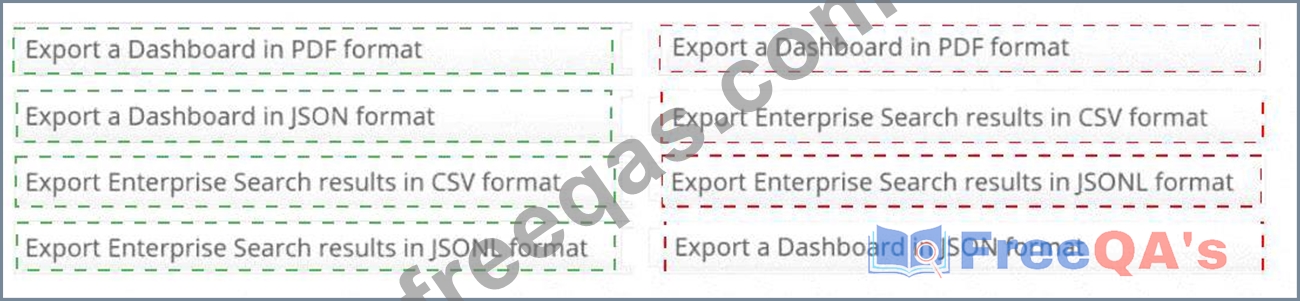
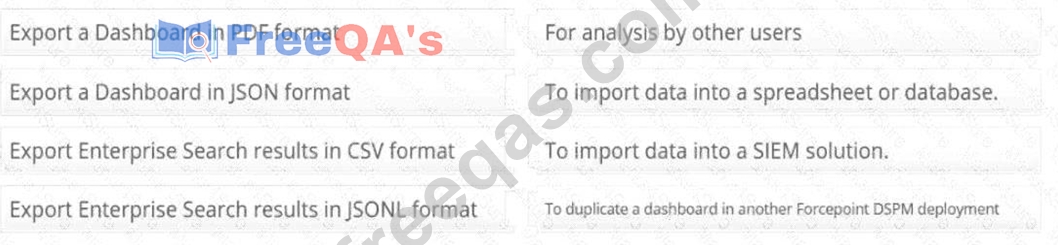
Match each export option with an appropriate use case:

Correct Answer:

Explanation:
Export a Dashboard in PDF format # For analysis by other users
Export a Dashboard in JSON format # To duplicate a dashboard in another Forcepoint DSPM deployment Export Enterprise Search results in CSV format # To import data into a spreadsheet or database Export Enterprise Search results in JSONL format # To import data into a SIEM solution Forcepoint DSPM uses different export formats for different operational purposes. A Dashboard PDF export is intended for human-readable sharing, review, and offline analysis. PDF is best when the dashboard needs to be distributed to managers, auditors, analysts, or department stakeholders who need a static visual report rather than a reusable configuration object. Forcepoint documents dashboard export capability as supporting PDF and JSON export from the dashboard interface.
A Dashboard JSON export preserves the dashboard definition rather than just the visual output. This makes JSON the correct format when the goal is to duplicate or migrate a dashboard into another Forcepoint DSPM deployment, because the dashboard structure, layout, panels, widgets, and configuration can be reused.
For Enterprise Search , CSV is the correct format for spreadsheet or database workflows. CSV is tabular, broadly compatible, and suited for Excel-style analysis, reporting, joins, and external data review. Forcepoint documents Enterprise Search export as producing CSV or JSON downloads of filtered data.
JSONL is most appropriate for SIEM ingestion because each line can represent an individual structured event or record, making it easier for log pipelines and event-processing systems to parse at scale. References/topics:
Analytics Export, Dashboard Export, Enterprise Search Export, CSV, JSON/JSONL, SIEM Integration
.
insert code

Question 4

Which of the following are actions that can be performed from the Enterprise Search page? Select three.

Correct Answer: A,B,E
The correct selections are Revoking user permissions , Exporting reports , and Manually verifying ML classification . The Enterprise Search page is the primary file-level investigation view in Forcepoint DSPM.
It lists scanned and cataloged files, allows filtering through standard filters or GQL, and provides operational actions against the returned results. Forcepoint states that Enterprise Search allows users to filter file data, save frequently used filters, customize columns, and generate meaningful reports. It also provides an EXPORT button that creates a CSV or JSON download of the filtered data.
Revoking permissions is also supported as a data-governance action. Forcepoint documents that administrators can view or modify file permissions and access rights from the file Actions menu, and supporting documentation identifies required permissions for revoke operations in Microsoft repositories.
Manual classification validation is explicitly available from the Enterprise Search hamburger menu.
Forcepoint states that to adjust a file's machine-learning classification, the user selects Manually verify classification , modifies the ML-suggested classification, and saves the change.
The incorrect choices are outside this specific Enterprise Search action set. Moving risky files to a private folder is not the standard named Enterprise Search action in this workflow, and assigned risk is not manually changed from the page. References/topics: Enterprise Search, Exporting Data, Permissions & Access Rights, Manual ML Classification Verification .
insert code

Question 5

What is the primary purpose of the Scan Status dashboard in Forcepoint DSPM?

Correct Answer: D
The correct answer is D. To monitor the progress of ongoing data scans . The Scan Status dashboard is used to track scan execution and understand where a scan is in the discovery and classification lifecycle.
Forcepoint's scan analytics documentation describes scan status views that show the current discovery-stage status, last status update, discovered-file count, and detailed scan analytics for a selected data-source configuration. It also explains that the Scan Progress tab shows the selected scan configuration, discovery- stage status, last discovered file time, scan start time, scan number, classification status, and classification timing.
This makes the dashboard operationally useful for administrators who need to verify that scans are running, determine whether discovery or classification is still in progress, and identify whether scan activity has stalled or produced errors. It is not intended to display encrypted files, track department membership, or monitor network traffic. Department-level visibility is handled through Compliance Hub and Data Asset Inventory workflows, while network activity monitoring is outside the scope of the Scan Status dashboard. References
/topics: Dashboard, Scan Status, Scan Analytics, Scan Progress, Discovery Status, Classification Status, Data Source Scanning .
insert code
  • «
  • 1
  • 2
  • 3
  • 4
  • »
[×]

Download PDF File

Enter your email address to download Forcepoint.DSPM-Deploy-and-Administer.v2026-05-24.q14 Dumps

Email:

FreeQAs

Our website provides the Largest and the most Latest vendors Certification Exam materials around the world.

Using dumps we provide to Pass the Exam, we has the Valid Dumps with passing guranteed just which you need.

  • DMCA
  • About
  • Contact Us
  • Privacy Policy
  • Terms & Conditions
©2026 FreeQAs

www.freeqas.com materials do not contain actual questions and answers from Cisco's certification exams.