FreeQAs
 Request Exam  Contact
  • Home
  • View All Exams
  • New QA's
  • Upload
PRACTICE EXAMS:
  • Oracle
  • Fortinet
  • Juniper
  • Microsoft
  • Cisco
  • Citrix
  • CompTIA
  • VMware
  • ISC
  • SAP
  • EMC
  • PMI
  • HP
  • Salesforce
  • Other
  • Oracle
    Oracle
  • Fortinet
    Fortinet
  • Juniper
    Juniper
  • Microsoft
    Microsoft
  • Cisco
    Cisco
  • Citrix
    Citrix
  • CompTIA
    CompTIA
  • VMware
    VMware
  • ISC
    ISC
  • SAP
    SAP
  • EMC
    EMC
  • PMI
    PMI
  • HP
    HP
  • Salesforce
    Salesforce
  1. Home
  2. Forcepoint Certification
  3. DSPM-Deploy-and-Administer Exam
  4. Forcepoint.DSPM-Deploy-and-Administer.v2026-05-24.q14 Dumps
  • «
  • 1
  • 2
  • 3
  • 4
Download Now

Question 11

Match the type of detector with its primary function.

Correct Answer:

Explanation:
Path Detectors = Monitor storage locations of sensitive data
Content Detectors = Analyze data within files for sensitive data
Attribute Detectors = Identify meta-data within documents
Forcepoint DSPM separates detector logic into path, content, and attribute-based functions so classification can be driven by where data is stored, what the file contains, and what scan-derived attributes describe the file. Path Detectors evaluate file path information, including directory location, filename, and extension.
Forcepoint describes them as identifying and classifying files based on directory location and file extensions, which aligns with monitoring storage locations where sensitive data resides.
Content Detectors inspect the actual contents of files. Forcepoint states that content detectors analyze file content and categorize based on keywords, phrases, positive and negative terms, or patterns, making them the correct match for analyzing data within files for sensitive data.
Attribute Detectors operate on scan-result attributes rather than raw text content alone. Forcepoint describes them as defining criteria for "critical" and "sensitive" based on attributes in scan results, including ML output or path/content detector hits. This maps most closely to identifying metadata or scan-derived characteristics within documents. References/topics: Detectors, Path Detectors, Content Detectors, Attribute Detectors, AI Mesh, Classification Model .
insert code

Question 12

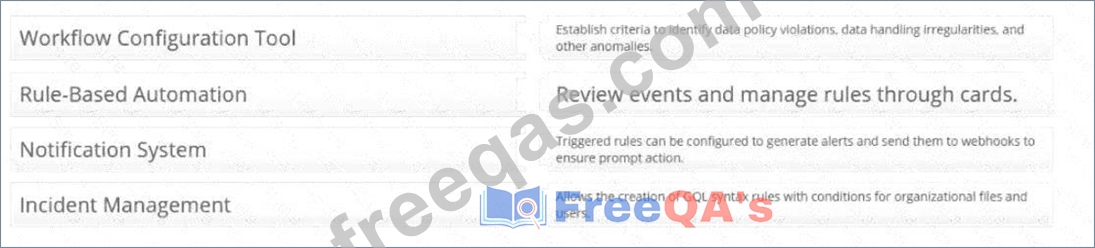
Provide the matching definitions for these Forcepoint DSPM Controls Orchestration terms:

Correct Answer:

Explanation:
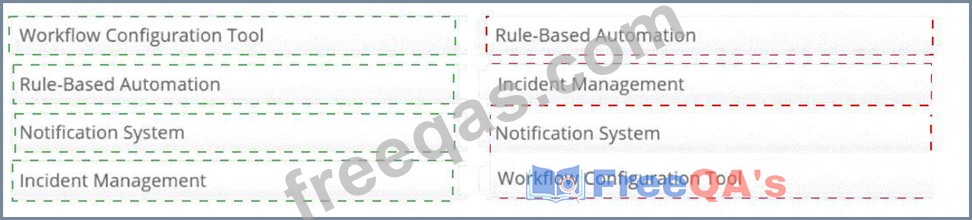
Workflow Configuration Tool # Allows the creation of GQL syntax rules with conditions for organizational files and users.
Rule-Based Automation # Establish criteria to identify data policy violations, data handling irregularities, and other anomalies.
Notification System # Triggered rules can be configured to generate alerts and send them to webhooks to ensure prompt action.
Incident Management # Review events and manage rules through cards.
Controls Orchestration in Forcepoint DSPM is the policy automation layer used to convert data-risk criteria into reviewable operational events. The Workflow Configuration Tool is represented by the rule-building interface under Policy Center > Controls Orchestration , where administrators define datasets, ownership, rule conditions, and GQL logic for organizational files, trustees, or agent activities. Forcepoint states that rules are created to identify data matching specific criteria and are applied during scans of the selected dataset.
Rule-Based Automation describes the criteria-driven detection model. Administrators establish rules that identify policy violations, data-handling irregularities, or other anomalies that require attention. Notification System maps to the ability to configure triggered rules to send external notifications, including webhook- based alerts, when matching data is detected. Incident Management maps to the Incidents workflow:
Forcepoint states that each rule is automatically added as a card in the Incidents tab, and selecting the card takes the user back to the associated rule. References/topics: Policy Center, Controls Orchestration, GQL Conditions, Notifications, Webhooks, Incidents .
insert code

Question 13

Which of the following are steps in creating a data classification and handling policy? Select four.

Correct Answer: A,C,D,E
The correct selections are A, C, D, and E . A data classification and handling policy is a governance artifact that defines how data assets are categorized, owned, protected, reviewed, and aligned to legal or regulatory requirements. In Forcepoint DSPM, this sits within Policy Center and Compliance Hub , which are designed to support data classification, policy creation, security-control implementation, compliance, and risk reduction. Forcepoint states that Policy Center streamlines policy creation and prompts organizational representatives to provide information needed to build a governance framework aligned to organizational goals.
Specifying asset requirements maps to Data Mapping, where organizations define Data Asset Inventory fields and metadata such as retention period, business owner, regulatory scope, review status, and project name. Incorporating industry-specific regulations is required because departmental policy design must reflect obligations such as GDPR, HIPAA, and PCI DSS. Defining classification levels aligns to Taxonomy, where sensitivity levels such as Confidential, General Business, Public, and Highly Confidential are configured. Outlining roles and responsibilities aligns to assigning policy owners, department heads, representatives, and accountable stakeholders. Network traffic protocols are not a core step in creating a data classification and handling policy; they belong to network architecture or transport-control design, not data governance policy creation.
insert code

Question 14

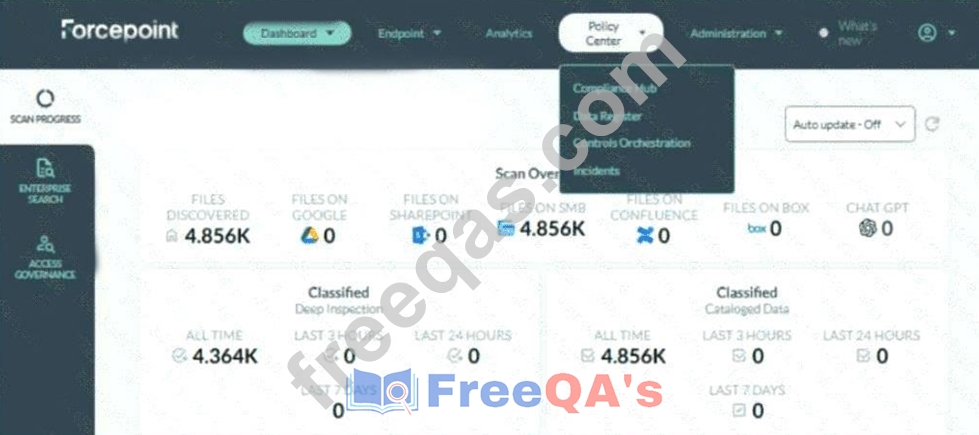
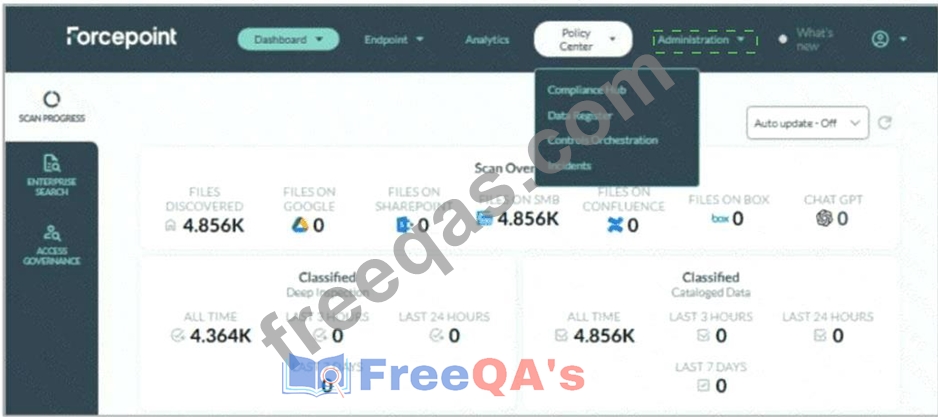
Adam needs to update the taxonomy tags in Forcepoint DSPM to match his company's policies. Where on the UI are taxonomy tags managed?

Correct Answer:

Explanation:
Administration > Taxonomy
Taxonomy tags are managed from the Administration menu, specifically under Administration > Taxonomy . In the screenshot, Adam should not select Policy Center ; the currently open menu shows Compliance Hub, Data Register, Controls Orchestration, and Incidents, but taxonomy management is not located there. The correct UI action is to open the Administration drop-down on the top navigation bar and select Taxonomy .
Forcepoint's DSPM documentation states that the Taxonomy page displays predefined AI Mesh tags, which cannot be removed, and also allows administrators to add custom tags for pattern matching and detection rules. It further explains that taxonomy mapping can connect AI Mesh tags with data-source taxonomies so mapped tags can be written back as the organization's own labels.
This location is important because taxonomy governs the classification language DSPM applies to scanned data. By updating taxonomy tags, Adam aligns DSPM classification output with the company's internal handling policies, sensitivity labels, and compliance terminology. Forcepoint also notes that new taxonomy tags are created from the Taxonomy tab under the Administration section, and that applied tags are visible in the Data Asset Inventory. References/topics: Administration, Taxonomy, AI Mesh Tags, Classification Tags, Pattern Matching, Detection Rules .
insert code
  • «
  • 1
  • 2
  • 3
  • 4
[×]

Download PDF File

Enter your email address to download Forcepoint.DSPM-Deploy-and-Administer.v2026-05-24.q14 Dumps

Email:

FreeQAs

Our website provides the Largest and the most Latest vendors Certification Exam materials around the world.

Using dumps we provide to Pass the Exam, we has the Valid Dumps with passing guranteed just which you need.

  • DMCA
  • About
  • Contact Us
  • Privacy Policy
  • Terms & Conditions
©2026 FreeQAs

www.freeqas.com materials do not contain actual questions and answers from Cisco's certification exams.