After a generated a repot, you notice the information you were expecting to see in not included in it. However, you confirm that the logs are there: Which two actions should you perform? (Choose two.)
Correct Answer: A,D
When a generated report does not include the expected information despite the logs being present, there are several factors to check to ensure accurate data representation in the report. * Option A - Check the Time Frame Covered by the Report: * Reports are generated based on a specified time frame. If the time frame does not encompass the period when the relevant logs were collected, those logs will not appear in the report. Ensuring the time frame is correctly set to cover the intended logs is crucial for accurate report content. * Conclusion: Correct. * Option B - Disable Auto-Cache: * Auto-cache is a feature in FortiAnalyzer that helps optimize report generation by using cached data for frequently used datasets. Disabling auto-cache is generally not necessary unless there is an issue with outdated data being used. In most cases, it does not directly impact whether certain logs are included in a report. * Conclusion: Incorrect. * Option C - Increase the Report Utilization Quota: * The report utilization quota controls the resource limits for generating reports. While insufficient quota might prevent a report from generating or completing, it does not typically cause specific log entries to be missing. Therefore, this option is not directly relevant to missing data within the report. * Conclusion: Incorrect. * Option D - Test the Dataset: * Datasets in FortiAnalyzer define which logs and fields are pulled into the report. If a dataset is misconfigured, it could exclude certain logs. Testing the dataset helps verify that the correct data is being pulled and that all required logs are included in the report parameters. * Conclusion: Correct. Conclusion: * Correct answer: A. Check the time frame covered by the report and D. Test the dataset. * These actions directly address the issues that could cause missing information in a report when logs are available but not displayed. References: FortiAnalyzer 7.4.1 documentation on report generation settings, time frames, and dataset configuration.
Question 12
What are two benefits of using fabric connectors? (Choose two.)
Correct Answer: B,C
Question 13
What is the purpose of output variables?
Correct Answer: A
Question 14
Which statement correctly describes one Difference between templates and reports?
Correct Answer: D
Question 15
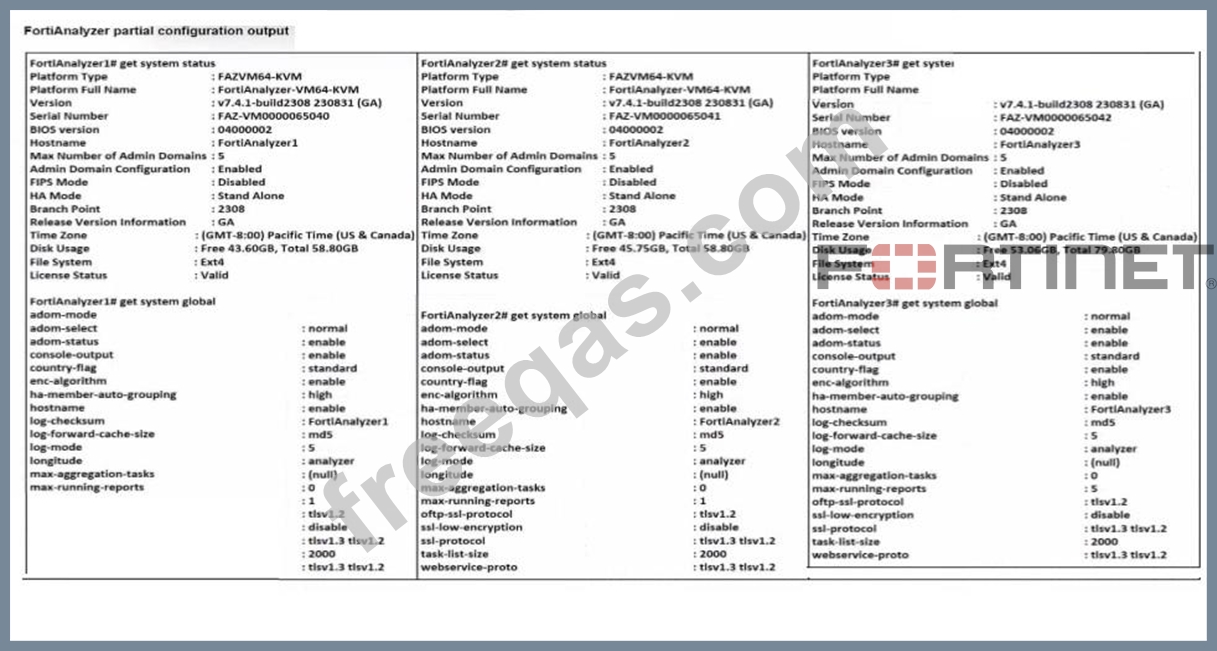
Exhibit. Based on the partial outputs displayed, which devices can be members of a FotiAnalyzer Fabric?
Correct Answer: D
In a FortiAnalyzer Fabric, devices can participate in a cluster or grouping if they meet specific compatibility criteria. Based on the outputs provided, let's evaluate these criteria: * Version Compatibility: * All three devices, FortiAnalyzer1, FortiAnalyzer2, and FortiAnalyzer3, are running version v7. 4.1-build0238, which is the same across the board. This version alignment is crucial because FortiAnalyzer Fabric requires that devices run compatible firmware versions for seamless communication and management. * Platform Type and Configuration: * All three devices are configured as Standalone in the HA mode, which allows them to operate independently but does not restrict their participation in a FortiAnalyzer Fabric. Each device is also on the FAZVM64-KVM platform type, ensuring hardware compatibility. * Global Settings: * Key settings such as adm-mode, adm-status, and adom-mode are consistent across all devices (adm-mode: normal, adm-status: enable, adom-mode: normal), which aligns with requirements for fabric integration and role assignment flexibility. * Each device also has the log-forward-cache-size set, which is relevant for forwarding logs within a fabric environment. Based on the above analysis, all devices (FortiAnalyzer1, FortiAnalyzer2, and FortiAnalyzer3) meet the requirements to be part of a FortiAnalyzer Fabric. * FortiAnalyzer 7.4.1 documentation outlines that devices within a FortiAnalyzer Fabric should be on the same or compatible firmware versions and hardware platforms, and they must be configured for integration. Given that all devices match the version, platform, and mode criteria, they can all be part of the FortiAnalyzer Fabric.