A network engineer is deploying FortiGate devices using zero-touch provisioning (ZTP). The devices must automatically connect to FortiManager and receive their configurations upon first boot. However, after powering on the devices, they fail to register with FortiManager. What could be a possible cause of this issue?
Correct Answer: C
During zero-touch provisioning, the FortiGate must establish communication with FortiManager over TCP port 541 to register and receive configuration. If this connectivity is not reachable, the device cannot complete the ZTP process.
Question 72
Refer to the exhibit. The FortiManager device is set to central management mode for FortiSwitch devices. How are configuration changes applied to multiple FortiSwitch devices?
Correct Answer: A
Question 73
What is the primary outcome when a device is quarantined on a FortiGate-managed network? Response:
Correct Answer: C
Question 74
Which field in a RADIUS accounting message is used by FortiAuthenticator for RSSO group assignment? Response:
Correct Answer: C
Question 75
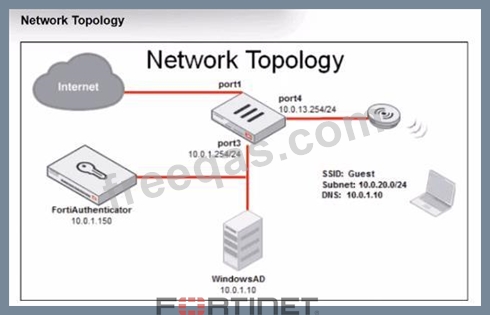
Refer to the exhibit. Review the exhibits to analyze the network topology, SSID settings, and firewall policies. FortiGate is configured to use an external captive portal for authentication to grant access to a wireless network. During testing, it was found that users attempting to connect to the SSID cannot access the captive portal login page. What configuration change should be made to resolve this issue to allow users to access the captive portal?
Correct Answer: D
From the exhibits: * SSID "Guest" * Security mode:Open * Captive Portal: Enabled, portal typeAuthentication # External * External portal URL: https://fac.trainingad.training.lab/guest (FortiAuthenticator) * Exempt destinations/services:FortiAuthenticator and WindowsAD * Firewall policy * From theGuest interface/zonetoport1 (Internet) * Source user group:guest.portal(authenticated users) The flow for anexternal captive portalis: * Client associates to theopen Guest SSID. * Client makes an HTTP(S) request. * FortiGate intercepts and redirects the client to theexternal portal. * Client must be able toreach FortiAuthenticator's IP(and AD if the portal needs it)before authentication. In this setup: * Theexempt destinationsetting tells the captive portal logicnot to require authenticationfor traffic going to FortiAuthenticator and WindowsAD. * However, there still must be a firewall policy that allows traffic from the Guest SSID subnet to those exempt destinations. The existing firewall policy uses theguest.portal user groupas a source condition, which only matchesafter successful portal authentication. Before login, the client has no user identity, so: * Traffic from the unauthenticated Guest client # FortiAuthenticator isnot matchedby that policy. * It hits theimplicit deny, so the browser never reaches the login page. To fix this, the administrator must: * Create or modify a firewall policy thatallows traffic from the Guest SSID subnet/interface to FortiAuthenticator and WindowsAD without requiring user authentication. That is exactly what optionDdescribes. Why the others are wrong: * A. Change SSID security mode to WPA2-Enterprise- External captive portals are normally used with openSSIDs; WPA2-Enterprise uses 802.1X, not captive portal. * B. Disable HTTPS redirection- Redirection is required so users are sent to the portal; disabling it doesn't solve reachability. * C. Exclude FortiAuthenticator and Windows AD from filtering- They're already listed asexempt destinationsin the SSID configuration; the missing piece is thefirewall policy, not the exemption.