FreeQAs
 Request Exam  Contact
  • Home
  • View All Exams
  • New QA's
  • Upload
PRACTICE EXAMS:
  • Oracle
  • Fortinet
  • Juniper
  • Microsoft
  • Cisco
  • Citrix
  • CompTIA
  • VMware
  • ISC
  • SAP
  • EMC
  • PMI
  • HP
  • Salesforce
  • Other
  • Oracle
    Oracle
  • Fortinet
    Fortinet
  • Juniper
    Juniper
  • Microsoft
    Microsoft
  • Cisco
    Cisco
  • Citrix
    Citrix
  • CompTIA
    CompTIA
  • VMware
    VMware
  • ISC
    ISC
  • SAP
    SAP
  • EMC
    EMC
  • PMI
    PMI
  • HP
    HP
  • Salesforce
    Salesforce
  1. Home
  2. Fortinet Certification
  3. FCSS_LED_AR-7.6 Exam
  4. Fortinet.FCSS_LED_AR-7.6.v2026-11-25.q100 Dumps
  • ««
  • «
  • …
  • 8
  • 9
  • 10
  • 11
  • 12
  • 13
  • 14
  • 15
  • 16
  • 17
  • …
  • »
  • »»
Download Now

Question 56

An LDAP server has been successfully configured on FortiGate, which forwards authentication requests to a Windows Active Directory (AD) server. Users can authenticate using PAP, but authentication fails with MSCHAPv2. Why is it not recommended to use PAP for authentication?

Correct Answer: A
PAP (Password Authentication Protocol) transmits the user's password in cleartext without encryption, making it vulnerable to interception and eavesdropping attacks on the network.
MSCHAPv2 (Microsoft Challenge Handshake Authentication Protocol version 2) uses a challenge-response mechanism where the password is hashed and never sent directly, providing stronger security.
PAP's lack of encryption is why many administrators avoid it for authentication, especially when dealing with Active Directory or other secure identity sources.
insert code

Question 57

Refer to the exhibits.


Examine the FortiManager configuration and FortiGate CLI output shown in the exhibit.
The NAC feature is being tested with a device connected to port2 on managed FortiSwitch S224SPTF19005867. The NAC policy has been applied to port2, and traffic was generated from the test device. However, the traffic from the test device does not match the NAC policy and remains in the onboarding VLAN.
What are two possible reasons why the test device is not being correctly classified by the NAC policy?
(Choose two.)

Correct Answer: A,B
From the FortiManager NAC policy:
Category =Device
Match criteria includeMAC addressandOperating System = Linux
Action =Assign VLAN "Students"
From the FortiGate CLI:
diagnose switch-controller switch-info mac-table ...
MAC: 70:88:6b:8c:4a:ce VLAN: 4089 Port: port2
diagnose switch-controller mac-device mac onboarding
VLAN 4089 MAC 70:88:6b:8c:4a:ce
So the device is stuck inVLAN 4089, which is theonboarding VLAN. No NAC policy is matched.
For a NAC policy to match, FortiGate needsdevice-identity information, which comes fromdevice detection on the VLAN / FortiLink interfaceplus theattributes that the policy expects(OS, MAC, etc.).
A). Device detection is not enabled on VLAN 4089.
If device detection is disabled on the interface/VLAN where the endpoint lives, FortiGate cannot learn OS / device info.
Without this, the NAC engine cannot compare against the NAC policy (which relies on OS and other attributes), so the device remains in the onboarding VLAN.#This is a valid root cause.
B). The device operating system detected by FortiGate is not Linux.
The NAC policy explicitly requiresOperating System = Linux.
If the endpoint is actually Windows/macOS, or the OS fingerprint is still "Unknown", the policy will never match, and the device stays in onboarding.#Also a valid reason.
C). Management communication between FortiGate and FortiSwitch is down.
CLI output (switch-info mac-table and mac-device) proves FortiGate is talking to the switch and sees MAC
/VLAN/port information.#Not a valid reason.
D). The MAC address configured on the NAC policy is incorrect.
The exhibits show the MAC in the NAC policy matches the MAC appearing in the MAC table.#Not the cause here.
insert code

Question 58

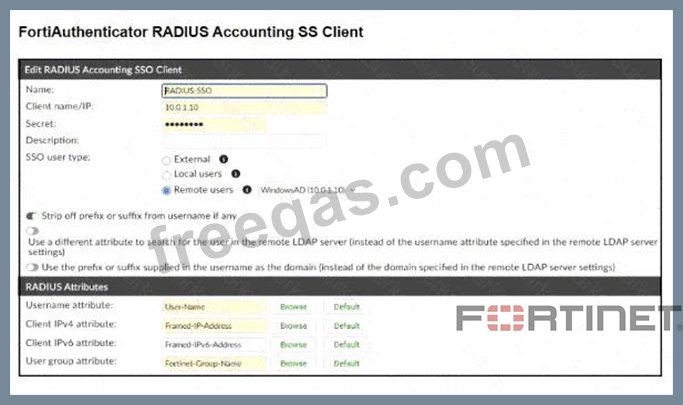
Refer to the exhibits.


A company has multiple FortiGate devices deployed and wants to centralize user authentication and authorization. The administrator decides to use FortiAuthenticator to convert RSSO messages to FSSO, allowing all FortiGate devices to receive user authentication updates.
After configuring FortiAuthenticator to receive RADIUS accounting messages, users can authenticate, but FortiGate does not enforce the correct policies based on user groups. Upon investigation, the administrator discovers that FortiAuthenticator is receiving RADIUS accounting messages from the RADIUS server and successfully queries LDAP for user group information. But, FSSO updates are not being sent to FortiGate devices and FortiGate firewall policies based on FSSO user groups are not being applied.
What is the most likely reason FortiGate is not receiving FSSO updates?

Correct Answer: A
In this design, FortiAuthenticator receivesRADIUS accounting (RSSO) messages, looks up the user in LDAP to get group information, theninjects FSSO logon eventstoward all FortiGate devices.
From the exhibits we know:
FortiAuthenticatoris receiving RADIUS accountingfrom the RADIUS server.
LDAP queries are successful and return group membership.
But FortiGatedoes not receive FSSO logons, so identity-based policies are not applied.
For FortiAuthenticator to create an FSSO logon, the RADIUS accounting record must be correctlyparsed into at least:
Username
Client IP address
These are mapped from the RADIUS attributes in theRADIUS Accounting SSO clientconfiguration (for example, User-Name and Framed-IP-Address). If these are not defined or mapped incorrectly, FortiAuthenticator can see the accounting packet butcannot build a valid FSSO session, so no update is sent to FortiGate.
Thus the most likely root cause is:
#The RADIUS Username and Client IPv4 attributes are not correctly definedfor that RADIUS Accounting SSO client (optionA).
Other options conflict with the scenario:
B- LDAP is already successfully returning groups.
C- FSSO user group attribute is separate; even without it, FSSO logons would still be created (just without group mapping).
D- The interfaceisreceiving RADIUS accounting, so it is clearly enabled.
insert code

Question 59

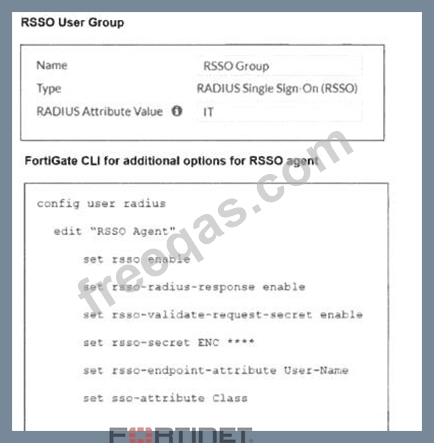
Refer to the exhibits.


You have configured RADIUS single sign-on (RSSO) on a FortiGate device, ensuring that all settings are correct and the integration with the RADIUS server is correctly established. Communication between FortiGate and the RADIUS server is happening through port3. After testing, you notice that while user authentication and RSSO activity are functioning as expected, the RADIUS server does not display session logs or detailed usage information. What is the most likely reason for this issue?

Correct Answer: C
The correct answer is C.
The key clue is in the port3 interface exhibit: the RADIUSAccounting administrative access option is not enabled.
The LAN Edge 7.6 Architect study guide states:
"First, you must enable RADIUS Accounting in the Administrative Access section on the FortiGate interface where you expect to receive RSSO messages." The FortiOS Administration Guide says the same thing more explicitly:
"In the Administrative Access section select the RADIUS Accounting checkbox. This will open listening for port 1813 on this interface. The FortiGate will then be ready to receive RADIUS accounting messages." The study guide also explains what those accounting messages contain:
"These messages are sent by RADIUS clients to report user session details such as start time, stop time, interim updates, and other relevant session information." So if port3 is the interface used for this communication, but RADIUSAccounting is not enabled on that interface, the accounting records carrying session and usage details are not handled correctly on that interface.
That makes C the best answer.
Why the other options are incorrect:
A). Incorrect. If the RADIUS shared password were wrong, RSSO authentication would not be functioning correctly. The study guide says the shared secret must match the one on the RADIUS accounting server B). Incorrect. set rsso-radius-response enable is recommended so FortiGate sends responses to the accounting sender. Fortinet documentation says this should be enabled because otherwise some RADIUS servers may resend the same accounting message repeatedly, but it does not describe this as the main cause of missing session-detail visibility D). Incorrect. A mismatch between sso-attribute and the RSSO group's RADIUS Attribute Value would affect user-to-group matching on FortiGate. But the question says authentication and RSSO activity are already functioning as expected, so this is not the most likely cause Final verified conclusion:
Because port3 is the interface carrying the RSSO communication and the exhibit shows RADIUSAccounting is not enabled there, the most likely issue is:
C). Misconfigured interface port3
insert code

Question 60

Refer to the exhibits.


Examine the FortiGate RSSO configuration shown in the exhibit.
FortiGate is set up to use RSSO for user authentication. It is currently receiving RADIUS accounting messages through port3. The incoming RADIUS accounting messages contain the username in the User- Name attribute and group membership in the Class attribute. You must ensure that the users are authenticated through these RADIUS accounting messages and accurately mapped to their respective RSSO user groups.
Which three critical configurations must you implement on the FortiGate device? (Choose three.)

Correct Answer: A,D,E
The problem states:
* FortiGate receivesRADIUS accounting messagesonport3.
* User-Nameattribute contains the username.
* Classattribute contains the group membership.
* Goal: authenticate users through RSSO and map them to the correct user groups.
To achieve this, three critical components must be configured:
#A. RADIUS Attribute Value in the RSSO group must match the Class attribute This is mandatory because:
* RSSO user groups on FortiGate match users based onthe value inside the RADIUS attribute(usually Class).
* For group assignment to work, FortiGate must compare:
RSSO User Group # RADIUS Class Attribute Value
This isexactly how FortiGate maps RSSO users to groups.
#D. RSSO agent's sso-attribute must be set to Class
Thesso-attributedefineswhich RADIUS attribute contains the group information.
Because group membership is carried in:
#Class attribute
You must configure:
config user radius
set sso-attribute Class
end
This tells FortiGate:
"Use the Class attribute to derive user group membership."
#E. rsso-endpoint-attribute must be set to User-Name
This identifieswhich RADIUS attributecarries the actualusername.
In this scenario:
* RADIUS accounting messages contain the username inUser-Name.
* So the correct setting is:
config user radius
set rsso-endpoint-attribute User-Name
end
This ensures the RSSO user object uses the correct username.
#Incorrect Options Explained
B). Assign RSSO user groups to all firewall policies
Not required.
You only assign them to policies where RSSO authentication is used.
C). Device detection and Security Fabric Connection should be enabled on port3 Totally irrelevant to RSSO.
RSSO only needs RADIUS accounting, not device detection or Fabric services.
insert code
  • ««
  • «
  • …
  • 8
  • 9
  • 10
  • 11
  • 12
  • 13
  • 14
  • 15
  • 16
  • 17
  • …
  • »
  • »»
[×]

Download PDF File

Enter your email address to download Fortinet.FCSS_LED_AR-7.6.v2026-11-25.q100 Dumps

Email:

FreeQAs

Our website provides the Largest and the most Latest vendors Certification Exam materials around the world.

Using dumps we provide to Pass the Exam, we has the Valid Dumps with passing guranteed just which you need.

  • DMCA
  • About
  • Contact Us
  • Privacy Policy
  • Terms & Conditions
©2026 FreeQAs

www.freeqas.com materials do not contain actual questions and answers from Cisco's certification exams.