Refer to the exhibit. On FortiGate, a RADIUS server is configured to forward authentication requests to FortiAuthenticator, which acts as a RADIUS proxy. FortiAuthenticator then relays these authentication requests to a remote Windows AD server using LDAP. While testing authentication using the CLI command diagnose test authserver. the administrator observed that authentication succeeded with PAP but failed when using MS-CHAFV2. Which two solutions can the administrator implement to enable MS-CHAPv2 authentication? (Choose two.)
Correct Answer: C,D
Question 7
What logs or tools can be used to troubleshoot wireless AP communication issues in FortiGate? (Choose two) Response:
Correct Answer: C,D
Question 8
What is the default trunking protocol supported by FortiSwitch? Response:
Correct Answer: C
Question 9
What are the advantages of dynamic VLAN assignment in LAN edge designs? (Choose two) Response:
Correct Answer: B,C
Question 10
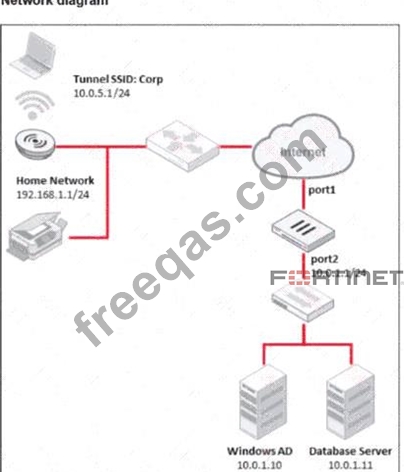
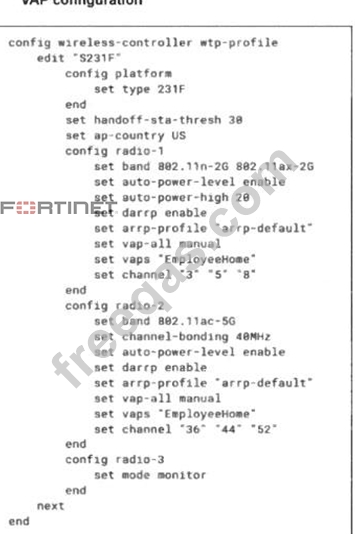
Refer to the exhibits. The exhibits show the WTP profile and VAP CLI configurations on FortiGate managing a remote AP. The AP is designed to grant a remote employee access to company network resources, including the database and AD servers. The employee can reach company resources but is unable to access a local printer at home. What two solutions are required to fix this issue? (Choose two answers)
Correct Answer: A,D
The correct answers are A and D. The study guide explains that in tunnel mode, traffic for local resources at the AP site will hairpin back to FortiGate unless split tunneling is configured: "In tunnel mode, all traffic from the SSID is sent to the FortiGate Wi-Fi controller. If you locate the AP in a remote office, all the traffic is sent to FortiGate, even if it is destined for a remote office resource. The packets sent to a local resource, such as an office printer, will hairpin, crossing the WAN link needlessly." It then gives the fix: "When you enable split tunneling on an SSID profile, you can configure a different egress point for the traffic. You can split traffic; some traffic is sent to the local network, and some tunnels back to the managing FortiGate... You can configure the subnets in an ACL... You can also configure the AP to automatically add its own subnet to the ACL." The next page states: "The traffic is tunneled or bridged depending on the subnets configured in the split-tunneling-acl list. If the split-tunneling-acl-local-ap-subnet option is enabled, the local subnet of the AP is dynamically added to the list." That directly supports: * A: adding the local home subnet to the split tunneling ACL * D: enabling split-tunneling-acl-local-ap-subnet Why the other options are incorrect: B). Incorrect. Changing the SSID to local bridging would stop the corporate traffic model shown in the scenario. The employee already can reach company resources, which indicates tunnel mode is working. The issue is only access to a local home printer, which the study guide solves with split tunneling, not by converting the SSID to bridge mode C). Incorrect. intra-vap-privacy controls host isolation between clients on the same SSID. The problem here is reaching a local subnet resource behind the remote AP, which is a split tunneling issue, not host isolation. Final verified conclusion: To allow the remote employee to continue reaching company resources while also accessing the local home printer, the required fixes are: * add the local home subnet to the split tunneling ACL * enable automatic inclusion of the AP local subnet in the split tunneling ACL So the correct answers are A and D.