You plan to deploy a container to an Azure App Service API app named api1. You host the source code for api1 in a GitHub repository. The container uses the API key at runtime to connect to a backend service.
The container must be able to retrieve the API key at runtime without exposing it in the source repository or Git commit history. The API key must not be stored in application configuration directly. The API key must be accessed securely from Azure Key Vault.
You need to ensure that the API key is stored securely in Azure Key Vault and is available to the container at runtime without being exposed in source control or Git commit history.
Solution: Store the API key as a GitHub repository secret.
Does the solution meet the goal?
Case Study 2 - Proseware Inc.
Background
Proseware Inc. develops AI-powered knowledge management solutions for enterprise customers.
The company is modernizing its platform to support semantic search, intelligent document retrieval, and real-time partner integrations.
The engineering team uses Python and Azure SDKs. The architecture is being redesigned to support containerized microservices, vector search workloads, and serverless backend processing.
Planned Application Architecture
Microservices are containerized by using Docker.
Code for containerized microservices and Azure Function apps is developed locally but stored in a GitHub repository.
Custom images for containerized microservices are stored in Azure Container Registry (ACR).
Base images are stored in Docker Hub. Custom images must be rebuilt automatically whenever their base images are updated.
Azure Cosmos DB for NoSQL stores documents, metadata, and vector embeddings.
Azure Functions generate vector embeddings of Azure Cosmos DB for NoSQL-hosted documents and send messages to Service Bus to trigger search index updates.
Azure Container Apps (ACA) apps host backend API services that provide semantic search across Azure Cosmos DB for NoSQL documents. API services process Service Bus messages and update search indexes.
Azure Kubernetes Service (AKS) processes batch vector embedding regeneration for existing Azure Cosmos DB for NoSQL documents (whenever the embedding model is changed).
An extranet-facing containerized webhook allows business partners to submit documents to be processed by internal AI workflows for semantic search and retrieval.
Monitoring
Telemetry generated by Azure resources is sent to Azure Monitor.
A Log Analytics workspace is used to collect ACA apps logs, AKS container logs, and Azure Functions apps logs.
Monitoring of Azure Functions is currently implemented by using Azure Application Insights SDK instrumentation.
Business Requirements
Embeddings for new or updated Azure Cosmos DB for NoSQL-hosted documents must be automatically generated.
Backend API services must scale automatically during business hours.
Cold start delay of backend APIs must be minimized.
Secrets must be stored outside of container images.
Developers must be able to correlate telemetry across Azure Functions hosts and apps.
All tracing must be implemented by using OpenTelemetry SDK instrumentation.
Development efforts must be minimized.
Technical Requirements
Container images must be built automatically and validated before code updates are merged into the main branch.
Image build automation must run inside the Azure Container Registry, eliminating dependency on local developer machines and external build services.
Dependency of image builds on local developer machines must be eliminated.
Event-driven scaling in ACA must occur based on the number of pending messages in the Azure Service Bus queue.
Azure Cosmos DB for NoSQL RU consumption must be minimized.
Vector similarity search must use embeddings stored in Azure Cosmos DB for NoSQL.
The partner-facing containerized webhook service must run on Azure App Service.
Secrets must NOT be stored in container images, source control, or application configuration directly. They must be accessed securely at runtime.
All secrets must be stored centrally in Azure Key Vault and accessed at runtime through a managed identity.
Azure App Service must supply secrets at runtime without relying on external services.
Resources and workloads must be deployed by using Bicep templates through an automated, version-controlled pipeline. Local and command-line deployments must be eliminated to ensure repeatable, auditable deployments.
Known Issues
RU consumption spikes during vector similarity queries.
You need to configure Azure Functions to generate vector embeddings according to planned environment application architecture.
Which trigger type should you use?
An Azure Storage Blob upload must trigger backend processing.
The solution must:
* Avoid polling.
* Minimize latency.
* Trigger automatically when the upload occurs.
You need to ensure that processing starts as soon as a file is uploaded.
Which trigger should you implement?
An application deployed to AKS depends on an internal API hosted in the same cluster. All pods are healthy and report Ready status, but requests between the services time out.
You need to determine whether the issue is related to Kubernetes service configuration or application code.
What should you do first?
Hotspot Question
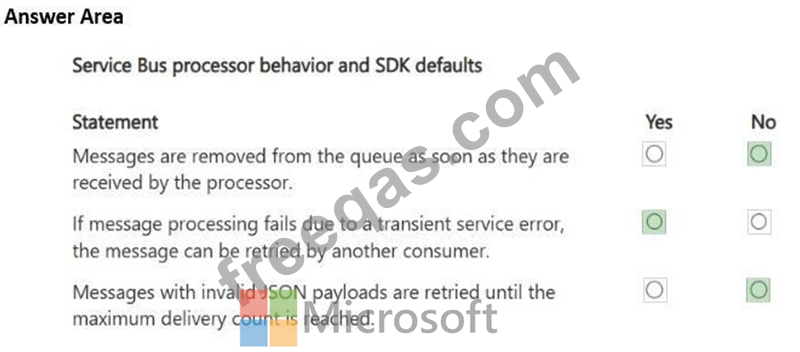
You are reviewing the message-processing code in a backend worker service.
You review the following Python code that initializes and starts a Service Bus processor.
For each of the following statements, select Yes if the statement is true. Otherwise, select No.
NOTE: Each correct selection is worth one point.