FreeQAs
 Request Exam  Contact
  • Home
  • View All Exams
  • New QA's
  • Upload
PRACTICE EXAMS:
  • Oracle
  • Fortinet
  • Juniper
  • Microsoft
  • Cisco
  • Citrix
  • CompTIA
  • VMware
  • ISC
  • SAP
  • EMC
  • PMI
  • HP
  • Salesforce
  • Other
  • Oracle
    Oracle
  • Fortinet
    Fortinet
  • Juniper
    Juniper
  • Microsoft
    Microsoft
  • Cisco
    Cisco
  • Citrix
    Citrix
  • CompTIA
    CompTIA
  • VMware
    VMware
  • ISC
    ISC
  • SAP
    SAP
  • EMC
    EMC
  • PMI
    PMI
  • HP
    HP
  • Salesforce
    Salesforce
  1. Home
  2. Microsoft Certification
  3. AI-200 Exam
  4. Microsoft.AI-200.v2026-11-23.q122 Dumps
  • ««
  • «
  • …
  • 14
  • 15
  • 16
  • 17
  • 18
  • 19
  • 20
  • 21
  • 22
  • 23
  • …
  • »
  • »»
Download Now

Question 86

Note: This question is part of a series of questions that present the same scenario. Each question in the series contains a unique solution that might meet the stated goals.
You are using Azure Monitor Application Insights to investigate a production API. You open the Logs blade and set the time range to Last 24 hours.
An engineer recommends the following query to count requests by result code and sort the results from most frequent to least frequent:
requests
| summarize request_count = count() by resultCode
| order by request_count desc
You need to determine whether the query returns the number of requests grouped by result code and sorted from most to least frequent.
Solution: The result codes are sorted alphabetically.
Does the solution meet the goal?

Correct Answer: B
The solution does not meet the goal because the query does not sort by resultCode. The summarize operator groups request records by each distinct resultCode value and calculates the number of requests in each group by using count().
The resulting table contains a resultCode column and a calculated request_count column. The next statement:
| order by request_count desc
sorts the output by request_count in descending order , which places the most frequently occurring result code first and the least frequent last.
Therefore, the output is sorted by frequency , not alphabetically or numerically by the resultCode field.
If alphabetical sorting by result code were required, the query would instead use a statement such as:
| order by resultCode asc
That is not what the provided query does.
Because the Logs blade is already scoped to the Last 24 hours , the query operates over that selected time range unless additional time filtering is explicitly added.
Study Guide references: Azure Monitor Logs; Application Insights requests table; KQL summarize; count() aggregation; order by; descending sort semantics.
insert code

Question 87

Case Study 1 - Fabrikam Inc.
Background
Fabrikam Inc. is a global retail analytics company that provides AI-driven demand forecasting and product recommendation services to online retailers. The company is modernizing its solution to run entirely on Microsoft Azure.
The platform ingests transaction data, generates embeddings for semantic retrieval, performs vector similarity search, and returns product recommendations through containerized microservices. Developers use Python and Azure SDKs. Operations teams manage container orchestration, scaling, monitoring, and security.
The solution must meet strict performance, scalability, and security requirements.
Current environment
Application architecture
The Recommendation engine is a customer-facing HTTP API running as a containerized Python application. The engine is deployed to Azure Container Apps (ACA).
Embeddings are stored in Azure Database for PostgreSQL by using pgvector.
Semantic retrieval uses metadata filtering combined with vector similarity search.
Azure Managed Redis is used as a caching layer.
Front-end and API workloads are deployed to Azure Container Apps (ACA).
Batch model retraining workloads run in Azure Kubernetes Service (AKS).
Container and CI/CD
Container images are stored in Azure Container Registry (ACR).
CI/CD uses ACR Tasks to build images on commit.
ACA environments support revision management.
AKS workloads are deployed by using Kubernetes manifest files stored in Git.
Monitoring
Logs are collected in Azure Monitor.
Teams inspect container logs and Kubernetes events when troubleshooting.
Developers write KQL queries to analyze latency spikes.
Business requirements
Customer experience: Maintain a seamless, low-latency recommendation experience for end- users, even during unpredictable seasonal traffic spikes.
Operational cost efficiency: Minimize compute expenditures by deallocating resources during periods of inactivity and by preventing runaway scaling costs.
Data integrity and freshness: Ensure that product recommendations always reflect the most current catalog metadata and pricing to prevent customer dissatisfaction.
Security and compliance: Adhere to a Zero Trust security model by eliminating long-lived credentials and centralizing the management of all sensitive secrets.
Global scalability: Support the rapid ingestion of millions of new product embeddings daily without degrading query performance for existing retailers.
Technical requirements
Performance: Semantic search latency must remain under 200 milliseconds at peak load.
Database optimization: Use pgvector for embeddings and implement metadata filtering to reduce compute overhead. Configure compute and memory appropriately for vector workloads to ensure high-dimensional index residency in RAM and efficient mathematical throughput. Vector similarity calculations must be performed only against products that satisfy mandatory metadata constraints.
Database performance: Database connections must support high concurrency with minimal latency through the implementation of connection optimization.
Data load strategy: To ensure maximum ingestion throughput, secondary indexes must be applied only after bulk loading of embeddings is complete.
Caching: Redis cache entries must expire automatically after 10 minutes. Implement a reactive mechanism to invalidate cache entries upon metadata updates.
Identity: Use managed identities for all service-to-service and service-to-database authentication.
Plain-text credentials in configuration files are strictly prohibited.
Secret management: All secrets must be stored centrally. Secrets must be rotated automatically by using a centralized lifecycle policy.
Scaling: Use Kubernetes event-driven autoscaling (KEDA) for event-driven scaling. The Recommendation API must scale based on HTTP traffic, while batch jobs must scale based on queue length and support scale-to-zero.
CI/CD: All images must be stored in Azure Container Registry. Use ACR Tasks to automate image builds triggered by source code commits.
Monitoring: Use KQL to analyze performance telemetry and troubleshoot microservice connectivity failures. Inspect logs and events when troubleshooting AKS and ACA.
Hotspot Question
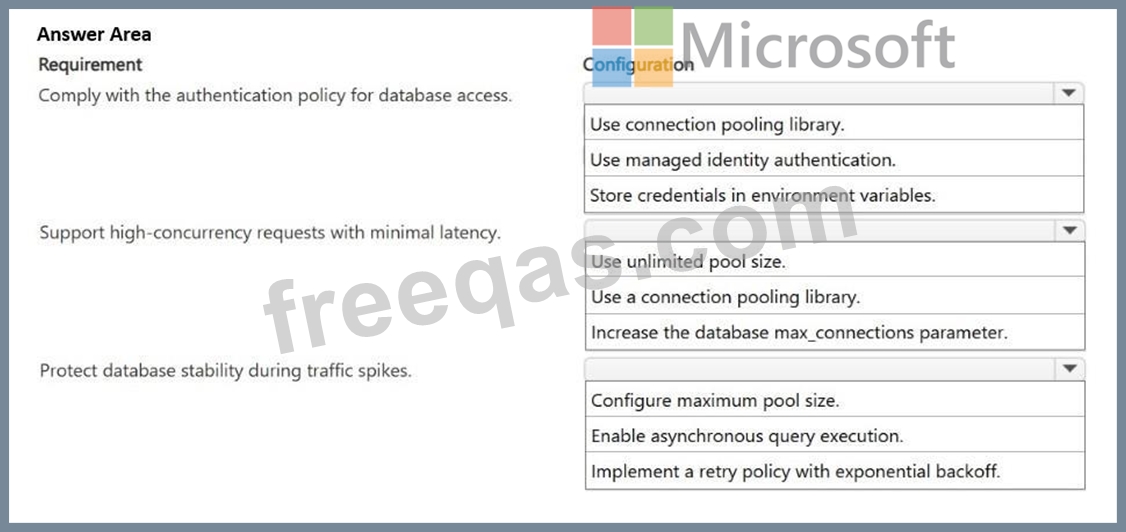
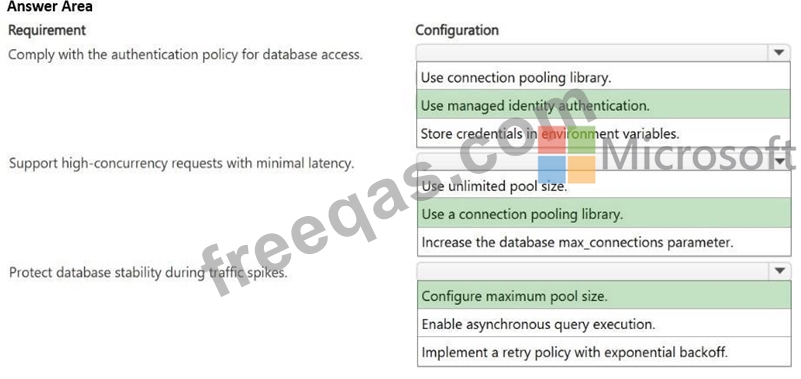
You need to optimize secure database connectivity from the containerized Recommendation API.
How should you configure the application? To answer, select the appropriate options in the answer area.
NOTE: Each correct selection is worth one point.
Correct Answer:

Explanation:
Box 1: Use managed identity authentication.
Scenario: Identity: Use managed identities for all service-to-service and service-to-database authentication. Plain-text credentials in configuration files are strictly prohibited.' Box 2: Use a connection pooling library Scenario: Environment: Embeddings are stored in Azure Database for PostgreSQL by using pgvector.
To support high-concurrency requests with minimal latency on Azure Database for PostgreSQL, the best action is to use a connection pooling library (or leverage Azure's built-in PgBouncer feature).
Eliminates Connection Overhead:
PostgreSQL utilizes a process-per-connection model. Forking a new backend process for every incoming request introduces substantial CPU and memory overhead, severely degrading latency under high concurrency. A connection pool keeps a warm set of reusable database sessions active.
Optimized for Azure: Microsoft provides a built-in managed PgBouncer integration for Azure Database for PostgreSQL. Enabling it in transaction mode allows the database to accept thousands of concurrent client connections while keeping actual backend processes lean and stable Box 3: Configure a maximum pool size Configure a maximum pool size is the best action to directly protect database stability during sudden traffic spikes.
Prevents Resource Exhaustion: Traffic spikes naturally lead to a surge in connection requests.
Unchecked connections consume substantial RAM and CPU overhead, which can crash the database or trigger severe latency. Limiting the pool size stops the "thundering herd" problem Acts as a Shock Absorber: When the pool hits its maximum limit, extra client requests are safely queued at the application or connection pooling layer (like Azure's built-in PgBouncer proxy) rather than overwhelming the database backend Reference:
https://docs.azure.cn/en-us/postgresql/connectivity/concepts-pgbouncer
https://learn.microsoft.com/en-au/answers/questions/5884412/best-practise-azure-postgresql-flexible-server-max
insert code

Question 88

You are developing a serverless Java application on Azure. You create a new Azure Key Vault to work with secrets from a new Azure Functions application.
The application must meet the following requirements:
Reference the Azure Key Vault without requiring any changes to the Java code.
Dynamically add and remove instances of the Azure Functions host based on the number of incoming application events.
Ensure that instances are perpetually warm to avoid any cold starts.
Connect to a VNet.
Authentication to the Azure Key Vault instance must be removed if the Azure Function application is deleted.
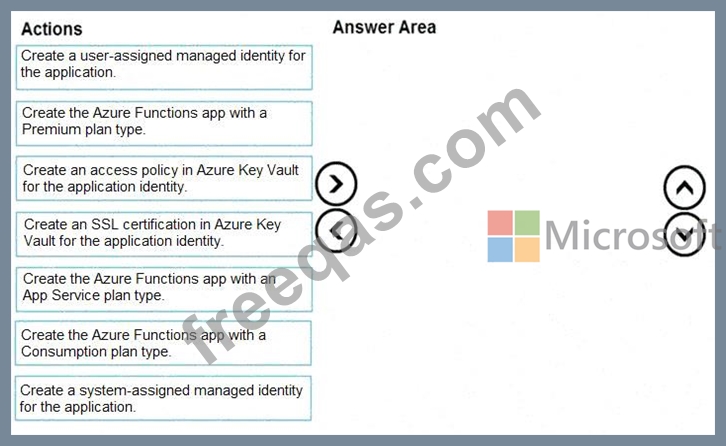
You need to grant the Azure Functions application access to the Azure Key Vault.
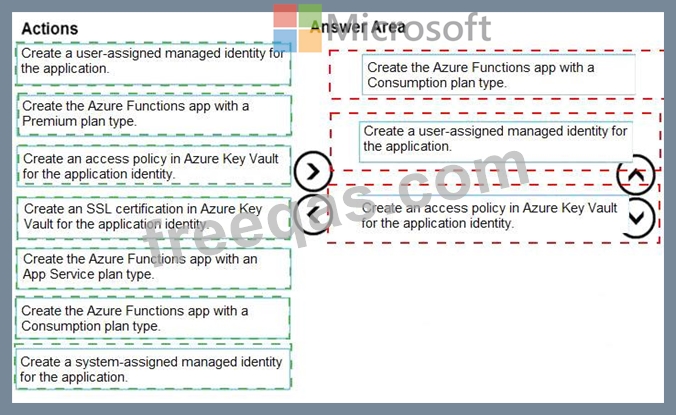
Which three actions should you perform in sequence? To answer, move the appropriate actions from the list of actions to the answer area and arrange them in the correct order.
Correct Answer:

Explanation:

Step 1: Create the Azure Functions app with a Consumption plan type.
Use the Consumption plan for serverless.
Step 2: Create a system-assigned managed identity for the application.
Create a system-assigned managed identity for your application.
Key Vault references currently only support system-assigned managed identities. User-assigned identities cannot be used.
Step 3: Create an access policy in Key Vault for the application identity.
Create an access policy in Key Vault for the application identity you created earlier. Enable the " Get " secret permission on this policy. Do not configure the " authorized application " or applicationId settings, as this is not compatible with a managed identity.
Reference:
https://docs.microsoft.com/en-us/azure/app-service/app-service-key-vault-references
insert code

Question 89

An application deployed to AKS depends on an internal API hosted in the same cluster. All pods are healthy and report Ready status, but requests between the services time out.
You need to determine whether the issue is related to Kubernetes service configuration or application code.
What should you do first?

Correct Answer: B
Inspect Service and Endpoints objects is the best step to start with.
The symptoms describe pods that are healthy and passing their readiness probes (meaning they are Ready), but traffic is failing to reach them and timing out. In Kubernetes, a Service routes traffic to pods by matching labels to create an Endpoints object.
Checking these objects immediately verifies if the Kubernetes network routing layer is intact.If the Endpoints object is empty or missing, the Service selector does not match the Pod labels. Traffic has nowhere to go, causing a timeout.
If the Endpoints list correctly displays the Pod IP addresses, the Kubernetes routing layer is working, shifting the blame toward the application code (e.g., misconfigured listening ports) or network policies.
Reference:
https://www.xtivia.com/blog/kubernetes-container-health-checks/
insert code

Question 90

You deploy a production Azure Function app that connects to an Azure SQL Database.
The solution must provide the following functionality:
- Prevent secrets from being exposed in source control.
- Support secret rotation without redeploying the function app.
- Avoid downtime during credential updates.
You need to configure secure and maintainable secret management.
What should you configure?


Correct Answer: A
To meet all requirements, you should configure Application settings with Key Vault references.
Source Control Protection: The Function App source code and configuration files only store a reference URI (e.g., @Microsoft.KeyVault(SecretUri=...)) rather than the actual connection string, keeping secrets entirely out of source control.
Seamless Secret Rotation: Azure Key Vault handles secret rotation natively. When a database password changes, you simply update the secret in Key Vault.
Zero Downtime: By using versionless Key Vault references (omitting the specific version GUID from the URI), the Azure Function App will automatically fetch the latest secret version within 24 hours without requiring a code redeployment or app restart.
References:
https://oneuptime.com/blog/post/2026-02-16-how-to-configure-managed-identity-for-azure-app-service-to-access-key-vault-secrets-without-credentials/view
insert code
  • ««
  • «
  • …
  • 14
  • 15
  • 16
  • 17
  • 18
  • 19
  • 20
  • 21
  • 22
  • 23
  • …
  • »
  • »»
[×]

Download PDF File

Enter your email address to download Microsoft.AI-200.v2026-11-23.q122 Dumps

Email:

FreeQAs

Our website provides the Largest and the most Latest vendors Certification Exam materials around the world.

Using dumps we provide to Pass the Exam, we has the Valid Dumps with passing guranteed just which you need.

  • DMCA
  • About
  • Contact Us
  • Privacy Policy
  • Terms & Conditions
©2026 FreeQAs

www.freeqas.com materials do not contain actual questions and answers from Cisco's certification exams.