FreeQAs
 Request Exam  Contact
  • Home
  • View All Exams
  • New QA's
  • Upload
PRACTICE EXAMS:
  • Oracle
  • Fortinet
  • IBM
  • Juniper
  • Microsoft
  • Cisco
  • Citrix
  • CompTIA
  • VMware
  • ISC
  • SAP
  • EMC
  • PMI
  • HP
  • Salesforce
  • Other
  • Oracle
    Oracle
  • Fortinet
    Fortinet
  • IBM
    IBM
  • Juniper
    Juniper
  • Microsoft
    Microsoft
  • Cisco
    Cisco
  • Citrix
    Citrix
  • CompTIA
    CompTIA
  • VMware
    VMware
  • ISC
    ISC
  • SAP
    SAP
  • EMC
    EMC
  • PMI
    PMI
  • HP
    HP
  • Salesforce
    Salesforce
  1. Home
  2. Microsoft Certification
  3. AZ-204 Exam
  4. Microsoft.AZ-204.v2024-05-19.q385 Dumps
  • ««
  • «
  • …
  • 9
  • 10
  • 11
  • 12
  • 13
  • 14
  • 15
  • 16
  • 17
  • 18
  • …
  • »
  • »»
Download Now

Question 61

You are working for Contoso, Ltd.
You define an API Policy object by using the following XML markup:

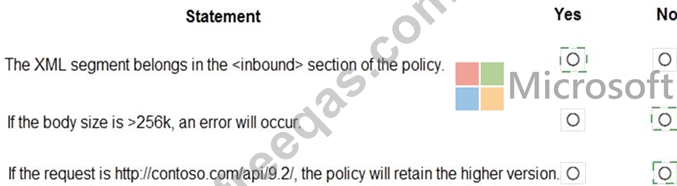
For each of the following statements, select Yes if the statement is true. Otherwise, select No.
NOTE:Each correct selection is worth one point.
Correct Answer:

Explanation

Box 1: Yes
Use the set-backend-service policy to redirect an incoming request to a different backend than the one specified in the API settings for that operation. Syntax: <set-backend-service base-url="base URL of the backend service" /> Box 2: No The condition is on 512k, not on 256k.
Box 3: No
The set-backend-service policy changes the backend service base URL of the incoming request to the one specified in the policy.
Reference:
https://docs.microsoft.com/en-us/azure/api-management/api-management-transformation-policies
insert code

Question 62

You are preparing to deploy a medical records application to an Azure virtual machine (VM). The application will be deployed by using a VHD produced by an on-premises build server.
You need to ensure that both the application and related data are encrypted during and after deployment to Azure.
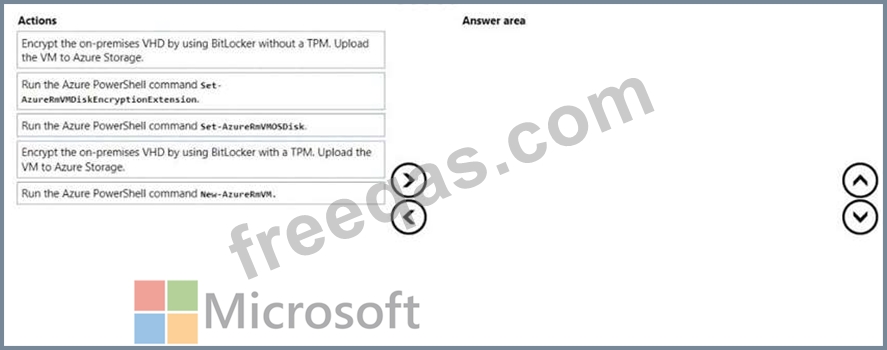
Which three actions should you perform in sequence? To answer, move the appropriate actions from the list of actions to the answer area and arrange them in the correct order.
Correct Answer:

Explanation

Step 1: Encrypt the on-premises VHD by using BitLocker without a TPM. Upload the VM to Azure Storage Step 2: Run the Azure PowerShell command Set-AzureRMVMOSDisk To use an existing disk instead of creating a new disk you can use the Set-AzureRMVMOSDisk command.
Example:
$osDiskName = $vmname+'_osDisk'
$osDiskCaching = 'ReadWrite'
$osDiskVhdUri = "https://$stoname.blob.core.windows.net/vhds/"+$vmname+"_os.vhd"
$vm = Set-AzureRmVMOSDisk -VM $vm -VhdUri $osDiskVhdUri -name $osDiskName -Create Step 3: Run the Azure PowerShell command Set-AzureRmVMDiskEncryptionExtension Use the Set-AzVMDiskEncryptionExtension cmdlet to enable encryption on a running IaaS virtual machine in Azure.
Incorrect:
Not TPM: BitLocker can work with or without a TPM. A TPM is a tamper resistant security chip on the system board that will hold the keys for encryption and check the integrity of the boot sequence and allows the most secure BitLocker implementation. A VM does not have a TPM.
References:
https://www.itprotoday.com/iaaspaas/use-existing-vhd-azurerm-vm
insert code

Question 63

You are developing a microservices solution. You plan to deploy the solution to a multinode Azure Kubernetes Service (AKS) cluster.
You need to deploy a solution that includes the following features:
* reverse proxy capabilities
* configurable traffic routing
* TLS termination with a custom certificate
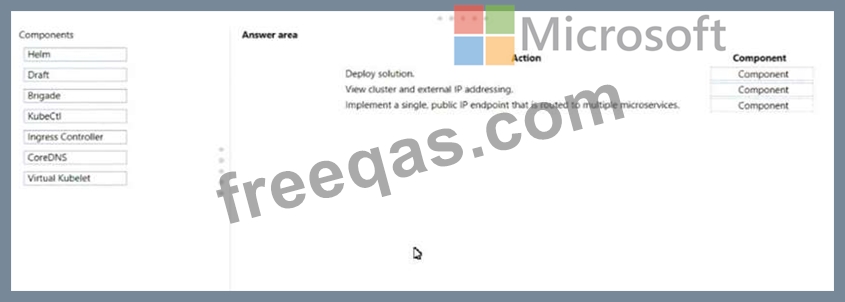
Which components should you use? To answer, drag the appropriate components to the correct requirements.
Each component may be used once, more than once, or not at all. You may need to drag the split bar between panes or scroll to view content.
NOTE: Each correct selection is worth one point.
Correct Answer:

Explanation

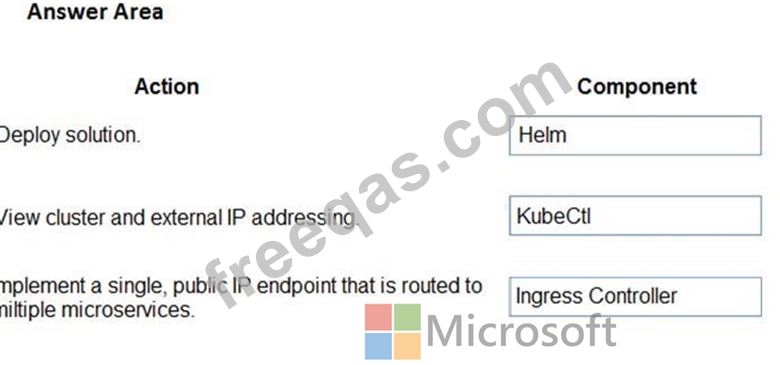
Box 1: Helm
To create the ingress controller, use Helm to install nginx-ingress.
Box 2: kubectl
To find the cluster IP address of a Kubernetes pod, use the kubectl get pod command on your local machine, with the option -o wide .
Box 3: Ingress Controller
An ingress controller is a piece of software that provides reverse proxy, configurable traffic routing, and TLS termination for Kubernetes services. Kubernetes ingress resources are used to configure the ingress rules and routes for individual Kubernetes services.
Reference:
https://docs.microsoft.com/bs-cyrl-ba/azure/aks/ingress-basic
https://www.digitalocean.com/community/tutorials/how-to-inspect-kubernetes-networking
insert code

Question 64

You develop and deploy a Java RESTful API to Azure App Service.
You open a browser and navigate to the URL for the API. You receive the following error message:

You need to resolve the error.
What should you do?

Correct Answer: C
Explanation
We need to enable Cross-Origin Resource Sharing (CORS).
References:
https://medium.com/@xinganwang/a-practical-guide-to-cors-51e8fd329a1f
insert code

Question 65

You are maintaining an existing application that uses an Azure Blob GPv1 Premium storage account. Data older than three months is rarely used.
Data newer than three months must be available immediately. Data older than a year must be saved but does not need to be available immediately.
You need to configure the account to support a lifecycle management rule that moves blob data to archive storage for data not modified in the last year.
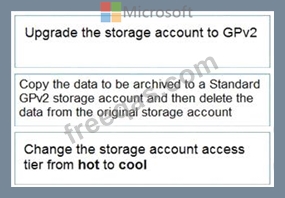
Which three actions should you perform in sequence? To answer, move the appropriate actions from the list of actions to the answer area and arrange them in the correct order.

Correct Answer:

Explanation

Step 1: Upgrade the storage account to GPv2
Object storage data tiering between hot, cool, and archive is supported in Blob Storage and General Purpose v2 (GPv2) accounts. General Purpose v1 (GPv1) accounts don't support tiering.
You can easily convert your existing GPv1 or Blob Storage accounts to GPv2 accounts through the Azure portal.
Step 2: Copy the data to be archived to a Standard GPv2 storage account and then delete the data from the original storage account Step 3: Change the storage account access tier from hot to cool Note: Hot - Optimized for storing data that is accessed frequently.
Cool - Optimized for storing data that is infrequently accessed and stored for at least 30 days.
Archive - Optimized for storing data that is rarely accessed and stored for at least 180 days with flexible latency requirements, on the order of hours.
Only the hot and cool access tiers can be set at the account level. The archive access tier can only be set at the blob level.
Reference:
https://docs.microsoft.com/en-us/azure/storage/blobs/storage-blob-storage-tiers
insert code
  • ««
  • «
  • …
  • 9
  • 10
  • 11
  • 12
  • 13
  • 14
  • 15
  • 16
  • 17
  • 18
  • …
  • »
  • »»
[×]

Download PDF File

Enter your email address to download Microsoft.AZ-204.v2024-05-19.q385 Dumps

Email:

FreeQAs

Our website provides the Largest and the most Latest vendors Certification Exam materials around the world.

Using dumps we provide to Pass the Exam, we has the Valid Dumps with passing guranteed just which you need.

  • DMCA
  • About
  • Contact Us
  • Privacy Policy
  • Terms & Conditions
©2026 FreeQAs

www.freeqas.com materials do not contain actual questions and answers from Cisco's certification exams.
