FreeQAs
 Request Exam  Contact
  • Home
  • View All Exams
  • New QA's
  • Upload
PRACTICE EXAMS:
  • Oracle
  • Fortinet
  • IBM
  • Juniper
  • Microsoft
  • Cisco
  • Citrix
  • CompTIA
  • VMware
  • ISC
  • SAP
  • EMC
  • PMI
  • HP
  • Salesforce
  • Other
  • Oracle
    Oracle
  • Fortinet
    Fortinet
  • IBM
    IBM
  • Juniper
    Juniper
  • Microsoft
    Microsoft
  • Cisco
    Cisco
  • Citrix
    Citrix
  • CompTIA
    CompTIA
  • VMware
    VMware
  • ISC
    ISC
  • SAP
    SAP
  • EMC
    EMC
  • PMI
    PMI
  • HP
    HP
  • Salesforce
    Salesforce
  1. Home
  2. Microsoft Certification
  3. AZ-204 Exam
  4. Microsoft.AZ-204.v2024-05-19.q385 Dumps
  • ««
  • «
  • …
  • 69
  • 70
  • 71
  • 72
  • 73
  • 74
  • 75
  • 76
  • 77
  • 78
  • »
Download Now

Question 361

A company is developing a mobile app for field service employees using Azure App Service Mobile Apps as the backend.
The company's network connectivity varies throughout the day. The solution must support offline use and synchronize changes in the background when the app is online app.
You need to implement the solution.
How should you complete the code segment? To answer, select the appropriate options in the answer area.
NOTE: Each correct selection is worth one point.

Correct Answer:

Explanation

Box 1: var todoTable = client GetSyncTable<TodoItem>()
To setup offline access, when connecting to your mobile service, use the method GetSyncTable instead of GetTable (example):
IMobileServiceSyncTable todoTable = App.MobileService.GetSyncTable(); / Box 2: await todoTable.PullAsync("allTodoItems",todo.Table.CreateQuery()); Your app should now use IMobileServiceSyncTable (instead of IMobileServiceTable) for CRUD operations.
This will save changes to the local database and also keep a log of the changes. When the app is ready to synchronize its changes with the Mobile Service, use the methods PushAsync and PullAsync (example):
await App.MobileService.SyncContext.PushAsync();
await todoTable.PullAsync();
References:
https://azure.microsoft.com/es-es/blog/offline-sync-for-mobile-services/
insert code

Question 362

You need to configure the ContentUploadService deployment.
Which two actions should you perform? Each correct answer presents part of the solution.
NOTE: Each correct selection is worth one point.

Correct Answer: C
Explanation
Scenario: All Internal services must only be accessible from Internal Virtual Networks (VNets) There are three Network Location types - Private, Public and Domain Reference:
https://devblogs.microsoft.com/powershell/setting-network-location-to-private/
insert code

Question 363

You are developing an Azure Durable Function to manage an online ordering process.
The process must call an external API to gather product discount information.
You need to implement Azure Durable Function.
Which Azure Durable Function types should you use? Each correct answer presents part of the solution NOTE: Each correct selection is worth ore point

Correct Answer: A,B
https://learn.microsoft.com/en-us/azure/azure-functions/durable/durable-functions-types-features-overview
insert code

Question 364

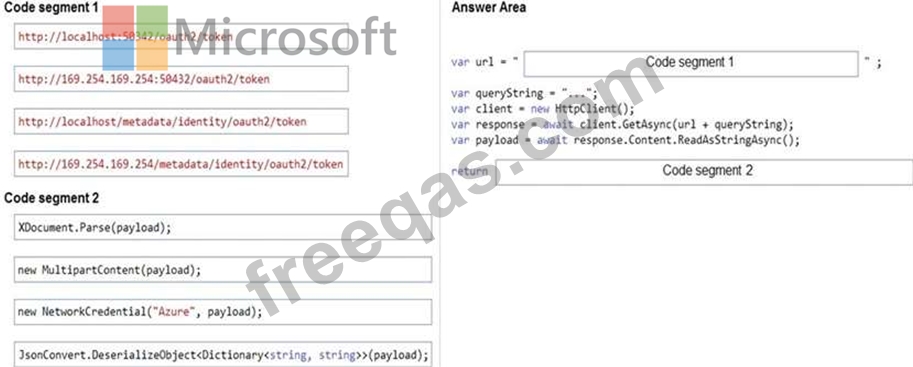
You are developing a web service that will run on Azure virtual machines that use Azure Storage. You configure all virtual machines to use managed identities.
You have the following requirements:
Secret-based authentication mechanisms are not permitted for accessing an Azure Storage account.
Must use only Azure Instance Metadata Service endpoints.
You need to write code to retrieve an access token to access Azure Storage. To answer, drag the appropriate code segments to the correct locations. Each code segment may be used once or not at all. You may need to drag the split bar between panes or scroll to view content.
NOTE: Each correct selection is worth one point.
Correct Answer:

Reference:
https://docs.microsoft.com/en-us/azure/active-directory/managed-identities-azure-resources/how-to-use-vm-token
https://docs.microsoft.com/en-us/azure/service-fabric/how-to-managed-identity-service-fabric-app-code
insert code

Question 365

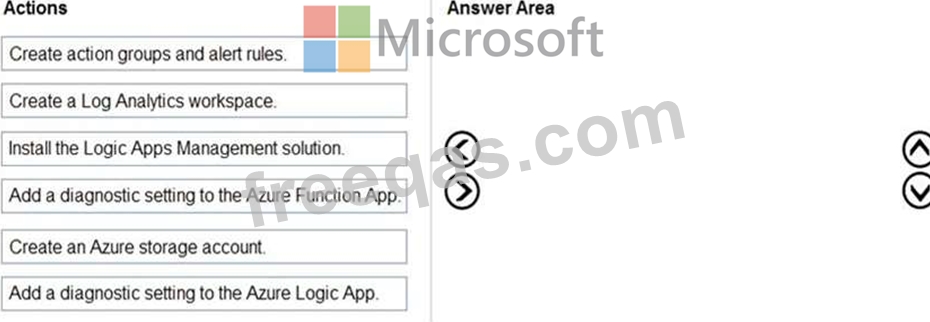
You develop and deploy an Azure Logic App that calls an Azure Function app. The Azure Function App includes an OpenAPI (Swagger) definition and uses an Azure Blob storage account. All resources are secured by using Azure Active Directory (Azure AD).
The Logic App must use Azure Monitor logs to record and store information about runtime data and events. The logs must be stored in the Azure Blob storage account.
You need to set up Azure Monitor logs and collect diagnostics data for the Azure Logic App.
Which three actions should you perform in sequence? To answer, move the appropriate actions from the list of actions to the answer area and arrange them in the correct order.
Correct Answer:

1 - Create a Log Analytics workspace
2 - Install the Logic Apps Management solution
3 - Add a diagnostic setting to the Azure Logic App.
Reference:
https://docs.microsoft.com/en-us/azure/logic-apps/monitor-logic-apps-log-analytics
insert code
  • ««
  • «
  • …
  • 69
  • 70
  • 71
  • 72
  • 73
  • 74
  • 75
  • 76
  • 77
  • 78
  • »
[×]

Download PDF File

Enter your email address to download Microsoft.AZ-204.v2024-05-19.q385 Dumps

Email:

FreeQAs

Our website provides the Largest and the most Latest vendors Certification Exam materials around the world.

Using dumps we provide to Pass the Exam, we has the Valid Dumps with passing guranteed just which you need.

  • DMCA
  • About
  • Contact Us
  • Privacy Policy
  • Terms & Conditions
©2026 FreeQAs

www.freeqas.com materials do not contain actual questions and answers from Cisco's certification exams.
