FreeQAs
 Request Exam  Contact
  • Home
  • View All Exams
  • New QA's
  • Upload
PRACTICE EXAMS:
  • Oracle
  • Fortinet
  • IBM
  • Juniper
  • Microsoft
  • Cisco
  • Citrix
  • CompTIA
  • VMware
  • ISC
  • SAP
  • EMC
  • PMI
  • HP
  • Salesforce
  • Other
  • Oracle
    Oracle
  • Fortinet
    Fortinet
  • IBM
    IBM
  • Juniper
    Juniper
  • Microsoft
    Microsoft
  • Cisco
    Cisco
  • Citrix
    Citrix
  • CompTIA
    CompTIA
  • VMware
    VMware
  • ISC
    ISC
  • SAP
    SAP
  • EMC
    EMC
  • PMI
    PMI
  • HP
    HP
  • Salesforce
    Salesforce
  1. Home
  2. Microsoft Certification
  3. AZ-204 Exam
  4. Microsoft.AZ-204.v2024-05-19.q385 Dumps
  • ««
  • «
  • …
  • 69
  • 70
  • 71
  • 72
  • 73
  • 74
  • 75
  • 76
  • 77
  • 78
  • »
Download Now

Question 376

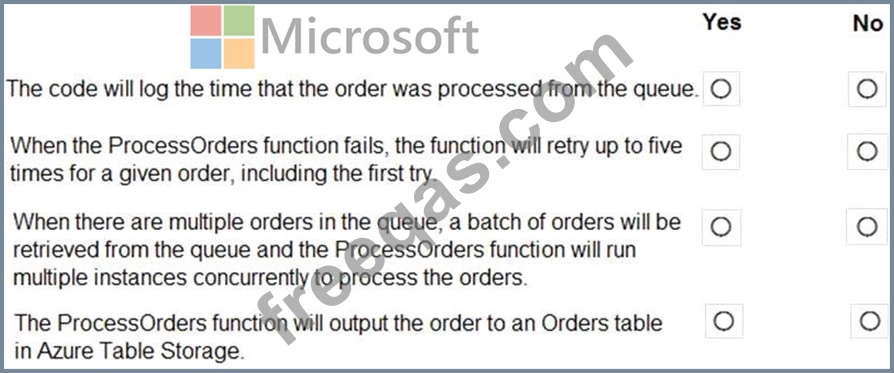
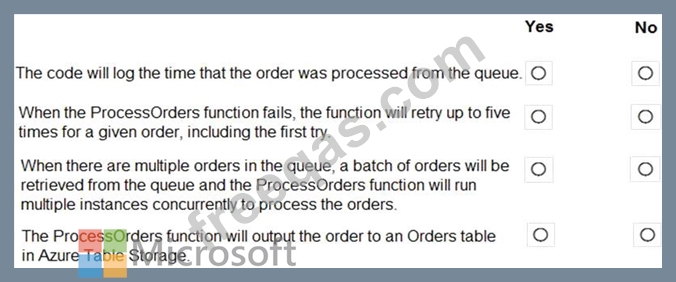
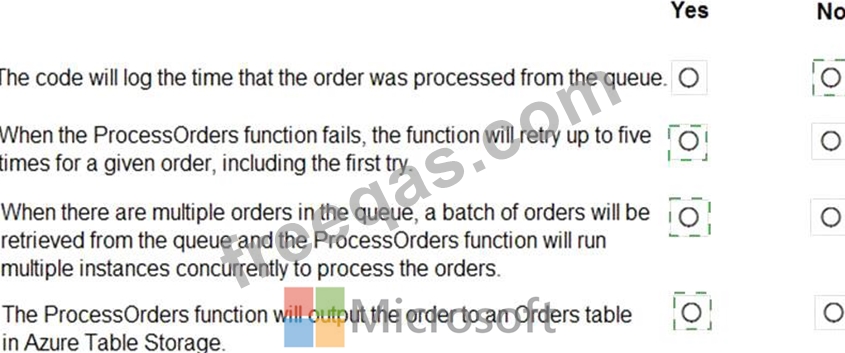
You are developing an Azure Function App by using Visual Studio. The app will process orders input by an Azure Web App. The web app places the order information into Azure Queue Storage.
You need to review the Azure Function App code shown below.

NOTE: Each correct selection is worth one point.
Correct Answer:

Explanation

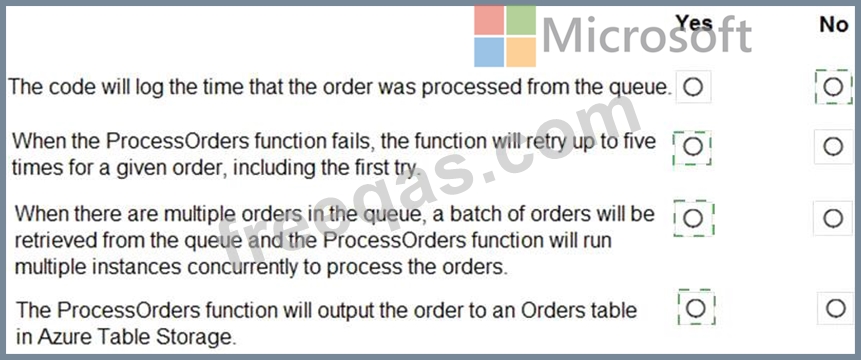
Box 1: No
ExpirationTime - The time that the message expires.
InsertionTime - The time that the message was added to the queue.
Box 2: Yes
maxDequeueCount - The number of times to try processing a message before moving it to the poison queue.
Default value is 5.
Box 3: Yes
When there are multiple queue messages waiting, the queue trigger retrieves a batch of messages and invokes function instances concurrently to process them. By default, the batch size is 16. When the number being processed gets down to 8, the runtime gets another batch and starts processing those messages. So the maximum number of concurrent messages being processed per function on one virtual machine (VM) is 24.
Box 4: Yes
References:
https://docs.microsoft.com/en-us/azure/azure-functions/functions-bindings-storage-queue
insert code

Question 377

Contoso, Ltd. provides an API to customers by using Azure API Management (APIM). The API authorizes users with a JWT token.
You must implement response caching for the APIM gateway. The caching mechanism must detect the user ID of the client that accesses data for a given location and cache the response for that user ID.
You need to add the following policies to the policies file:
* a set-variable policy to store the detected user identity
* a cache-lookup-value policy
* a cache-store-value policy
* a find-and-replace policy to update the response body with the user profile information To which policy section should you add the policies? To answer, drag the appropriate sections to the correct policies. Each section may be used once, more than once, or not at all. You may need to drag the split bar between panes or scroll to view content NOTE: Each correct selection is worth one point

Correct Answer:

Explanation

Box 1: Inbound.
A set-variable policy to store the detected user identity.
Example:
<policies>
<inbound>
<!-- How you determine user identity is application dependent -->
<set-variable
name="enduserid"
value="@(context.Request.Headers.GetValueOrDefault("Authorization","").Split(' ')[1].AsJwt()?.Subject)" /> Box 2: Inbound A cache-lookup-value policy Example:
<inbound>
<base />
<cache-lookup vary-by-developer="true | false" vary-by-developer-groups="true | false" downstream-caching-type="none | private | public" must-revalidate="true | false">
<vary-by-query-parameter>parameter name</vary-by-query-parameter> <!-- optional, can repeated several times -->
</cache-lookup>
</inbound>
Box 3: Outbound
A cache-store-value policy.
Example:
<outbound>
<base />
<cache-store duration="3600" />
</outbound>
Box 4: Outbound
A find-and-replace policy to update the response body with the user profile information.
Example:
<outbound>
<!-- Update response body with user profile-->
<find-and-replace
from='"$userprofile$"'
to="@((string)context.Variables["userprofile"])" />
<base />
</outbound>
Reference:
https://docs.microsoft.com/en-us/azure/api-management/api-management-caching-policies
https://docs.microsoft.com/en-us/azure/api-management/api-management-sample-cache-by-key
insert code

Question 378

You
are developing an Azure App Service hosted ASP.NET Core web app to deliver video on-demand streaming media. You enable an Azure Content Delivery Network (CDN) Standard for the web endpoint. Customer videos are downloaded from the web app by using the following example URL.:
http://www.contoso.com/content.mp4?quality=1
All media content must expire from the cache after one hour. Customer videos with varying quality must be delivered to the closest regional point of presence (POP) node.
You need to configure Azure CDN caching rules.
Which options should you use? To answer, select the appropriate options in the answer area.
NOTE: Each correct selection is worth one point.

Correct Answer:

Box 1: Override
Override: Ignore origin-provided cache duration; use the provided cache duration instead. This will not override cache-control: no-cache.
Set if missing: Honor origin-provided cache-directive headers, if they exist; otherwise, use the provided cache duration.
Incorrect:
Bypass cache: Do not cache and ignore origin-provided cache-directive headers.
Box 2: 1 hour
All media content must expire from the cache after one hour.
Box 3: Cache every unique URL
Cache every unique URL: In this mode, each request with a unique URL, including the query string, is treated as a unique asset with its own cache. For example, the response from the origin server for a request for example.ashx?q=test1 is cached at the POP node and returned for subsequent caches with the same query string. A request for example.ashx?q=test2 is cached as a separate asset with its own time-to-live setting.
Reference:
https://docs.microsoft.com/en-us/azure/cdn/cdn-query-string
insert code

Question 379

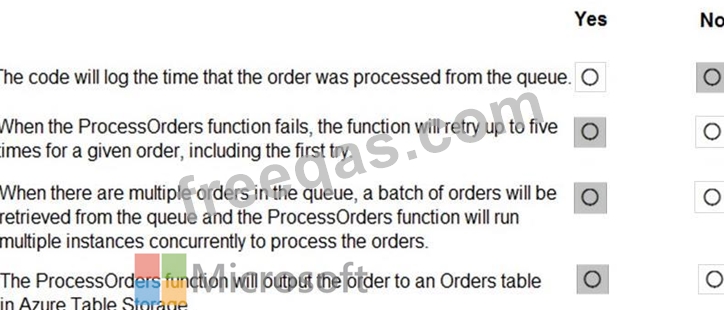
You are developing an Azure Function App by using Visual Studio. The app will process orders input by an Azure Web App. The web app places the order information into Azure Queue Storage.
You need to review the Azure Function App code shown below.

NOTE: Each correct selection is worth one point.
Correct Answer:

Explanation

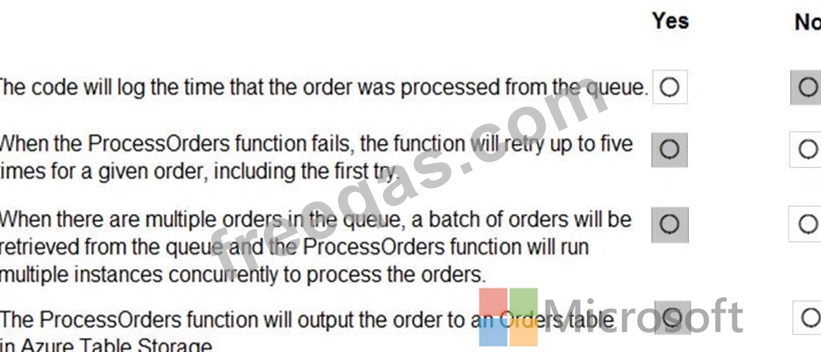
Box 1: No
ExpirationTime - The time that the message expires.
InsertionTime - The time that the message was added to the queue.
Box 2: Yes
maxDequeueCount - The number of times to try processing a message before moving it to the poison queue.
Default value is 5.
Box 3: Yes
When there are multiple queue messages waiting, the queue trigger retrieves a batch of messages and invokes function instances concurrently to process them. By default, the batch size is 16. When the number being processed gets down to 8, the runtime gets another batch and starts processing those messages. So the maximum number of concurrent messages being processed per function on one virtual machine (VM) is 24.
Box 4: Yes
References:
https://docs.microsoft.com/en-us/azure/azure-functions/functions-bindings-storage-queue
insert code

Question 380

You are configuring a development environment for your team. You deploy the latest Visual Studio image from the Azure Marketplace to your Azure subscription.
The development environment requires several software development kits (SDKs) and third-party components to support application development across the organization. You install and customize the deployed virtual machine (VM) for your development team. The customized VM must be saved to allow provisioning of a new team member development environment.
You need to save the customized VM for future provisioning.
Which tools or services should you use? To answer, select the appropriate options in the answer area.
NOTE: Each correct selection is worth one point.

Correct Answer:

Explanation

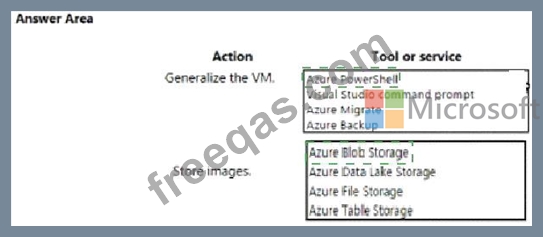
Box 1: Azure Powershell
Creating an image directly from the VM ensures that the image includes all of the disks associated with the VM, including the OS disk and any data disks.
Before you begin, make sure that you have the latest version of the Azure PowerShell module.
You use Sysprep to generalize the virtual machine, then use Azure PowerShell to create the image.
Box 2: Azure Blob Storage
References:
https://docs.microsoft.com/en-us/azure/virtual-machines/windows/capture-image-resource#create-an-image-of-a
insert code
  • ««
  • «
  • …
  • 69
  • 70
  • 71
  • 72
  • 73
  • 74
  • 75
  • 76
  • 77
  • 78
  • »
[×]

Download PDF File

Enter your email address to download Microsoft.AZ-204.v2024-05-19.q385 Dumps

Email:

FreeQAs

Our website provides the Largest and the most Latest vendors Certification Exam materials around the world.

Using dumps we provide to Pass the Exam, we has the Valid Dumps with passing guranteed just which you need.

  • DMCA
  • About
  • Contact Us
  • Privacy Policy
  • Terms & Conditions
©2026 FreeQAs

www.freeqas.com materials do not contain actual questions and answers from Cisco's certification exams.