FreeQAs
 Request Exam  Contact
  • Home
  • View All Exams
  • New QA's
  • Upload
PRACTICE EXAMS:
  • Oracle
  • Fortinet
  • Juniper
  • Microsoft
  • Cisco
  • Citrix
  • CompTIA
  • VMware
  • ISC
  • SAP
  • EMC
  • PMI
  • HP
  • Salesforce
  • Other
  • Oracle
    Oracle
  • Fortinet
    Fortinet
  • Juniper
    Juniper
  • Microsoft
    Microsoft
  • Cisco
    Cisco
  • Citrix
    Citrix
  • CompTIA
    CompTIA
  • VMware
    VMware
  • ISC
    ISC
  • SAP
    SAP
  • EMC
    EMC
  • PMI
    PMI
  • HP
    HP
  • Salesforce
    Salesforce
  1. Home
  2. Microsoft Certification
  3. AZ-400 Exam
  4. Microsoft.AZ-400.v2026-08-16.q229 Dumps
  • ««
  • «
  • …
  • 25
  • 26
  • 27
  • 28
  • 29
  • 30
  • 31
  • 32
  • 33
  • 34
  • …
  • »
  • »»
Download Now

Question 141

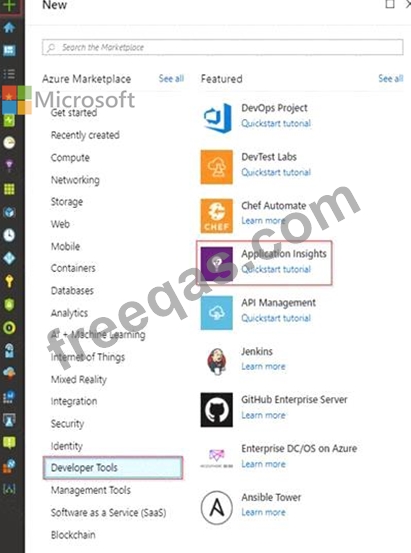
You need to create an instance of Azure Application Insights named az400-9940427-main and configure the instance to receive telemetry data from an Azure web app named az400-9940427-main.
To complete this task, sign in to the Microsoft Azure portal.
Correct Answer:
See solution below.
Explanation:
Step 1: Create an instance of Azure Application Insights
1. Open Microsoft Azure Portal
2. Log into your Azure account, Select Create a resource > Developer tools > Application Insights.

3. Enter the following settings, and then select Review + create.
Name: az400-9940427-main
Step 2: Configure App Insights SDK
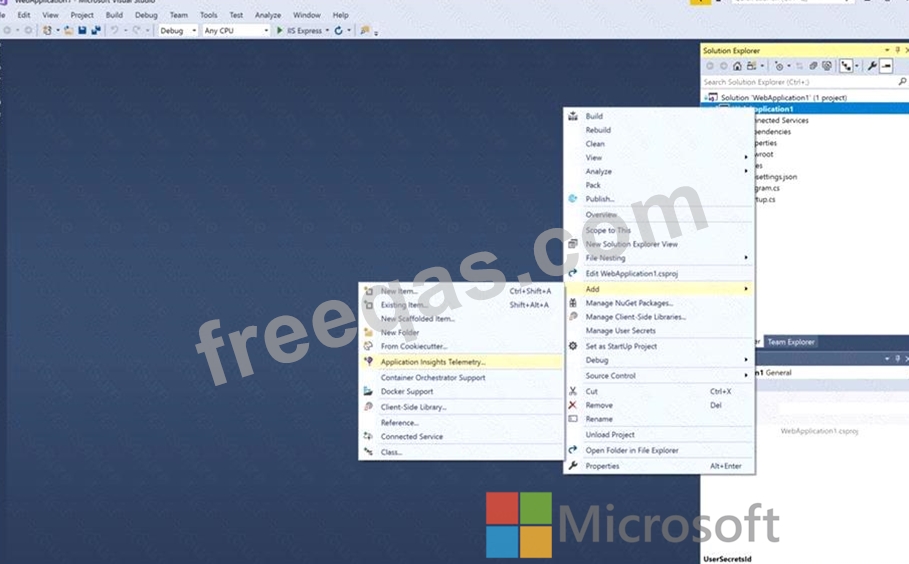
4. Open your ASP.NET Core Web App project in Visual Studio > Right-click on the AppName in the Solution Explorer > Select Add > Application Insights Telemetry.

5. Click the Get Started button
6. Select your account and subscription > Select the Existing resource you created in the Azure portal > Click Register.
References:
https://docs.microsoft.com/bs-latn-ba/azure/azure-monitor/learn/dotnetcore-quick-start?view=vs-2017
insert code

Question 142

You have an Azure subscription that contains two resource groups named ContosoRG and ContosoDev, an Azure data factory named Contoso Data Factory, and a release pipeline in Azure Pipelines named Pipeline1.
You plan to deploy Contoso Data Factory to ContosoRG by using Pipeline1.
You add the Azure Resource Manager (ARM) template deployment task shown the following exhibit.


Correct Answer:
See the image below in explanation for answer.
Explanation
Answer is as:
insert code

Question 143

Task 11
You need to create a new artifact feed named artifact_feed.
Only 10 versions of the packages must be retained, and downloaded packages must be retained for 90 days.

Correct Answer:
See explanation below
Explanation:
Task 11: Create an Artifact Feed with Specific Retention Policies
Step 1: Navigate to Artifacts
* In your Azure DevOps Project (Project1), click on the Artifacts section in the left menu.
Step 2: Create a New Feed
* Click on the + New feed button.
* In the Name field, enter:
nginx
Copy
artifact_feed
* Choose the visibility of the feed:
* Project scoped (only accessible to Project1).
* Or Organization scoped (accessible across your Azure DevOps organization).
* Leave other settings at default unless you have specific permissions or upstream sources.
* Click Create.
This creates a new feed named artifact_feed.
Step 3: Configure Retention Policies
* In the Artifacts section, click on the feed named artifact_feed to open its details page.
* In the top-right corner, click on the three dots (...) and select Feed settings.
Step 4: Set the Maximum Number of Versions to Retain
* In the Feed settings page, find the Retention policies section.
* Set Maximum number of versions per package to:
Copy
10
* Click Save.
This ensures that only the latest 10 versions of any package are retained in the feed.
Step 5: Set the Downloaded Package Retention Period
* In the Feed settings page, under Retention policies, find Downloaded package retention.
* Set Number of days to retain downloaded packages to:
Copy
90
* Click Save.
This ensures that downloaded packages will be retained in the cache for 90 days before deletion.
insert code

Question 144

You have a project in Azure DevOps.
You plan to deploy a self-hosted agent by using an unattended configuration script.
Which two values should you define in the configuration script? Each correct answer presents part of the solution.
NOTE: Each correct selection is worth one point.

Correct Answer: C,E
Unattended config:
The agent can be set up from a script with no human intervention. You must pass --unattended and the answers to all questions.
To configure an agent, it must know the URL to your organization or collection and credentials of someone authorized to set up agents. All other responses are optional.
Reference:
https://docs.microsoft.com/en-us/azure/devops/pipelines/agents/v2-windows Overview
insert code

Question 145

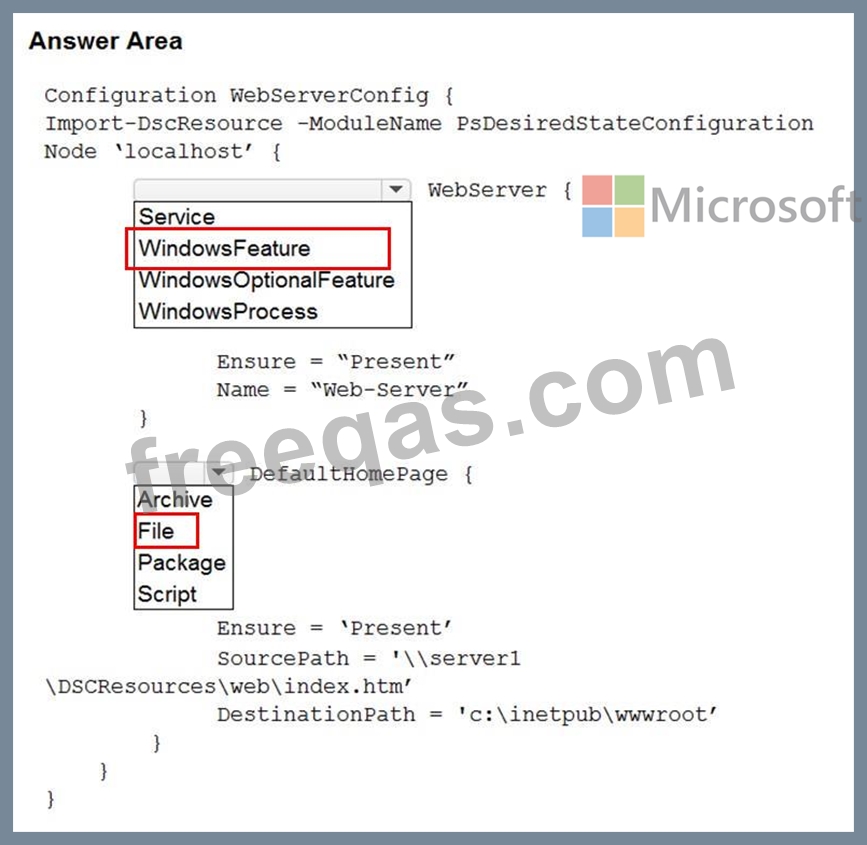
You plan to use Desired State Configuration (DSC) to maintain the configuration state of virtual machines that run Windows Server.
You need to perform the following:
Install Internet Information Services (IIS) on the virtual machines.
Update the default home page of the IIS web server.
How should you configure the DSC configuration file? To answer, select the appropriate options in the answer area.
NOTE: Each correct selection is worth one point.
Correct Answer:

Reference:
https://docs.microsoft.com/en-us/powershell/scripting/dsc/quickstarts/website-quickstart
insert code
  • ««
  • «
  • …
  • 25
  • 26
  • 27
  • 28
  • 29
  • 30
  • 31
  • 32
  • 33
  • 34
  • …
  • »
  • »»
[×]

Download PDF File

Enter your email address to download Microsoft.AZ-400.v2026-08-16.q229 Dumps

Email:

FreeQAs

Our website provides the Largest and the most Latest vendors Certification Exam materials around the world.

Using dumps we provide to Pass the Exam, we has the Valid Dumps with passing guranteed just which you need.

  • DMCA
  • About
  • Contact Us
  • Privacy Policy
  • Terms & Conditions
©2026 FreeQAs

www.freeqas.com materials do not contain actual questions and answers from Cisco's certification exams.
