You are setting up main accounts in Dynamics 365 for Finance and Operations.
You need to configure the main accounts to meet the requirements.
Which options should you use? To answer, select the appropriate configuration in the answer area.
NOTE: Each correct selection is worth one point.

You are configuring the Fixed assets module for a Dynamics 365 Finance and Operations environment, You need to set up the basic configuration to create a fixed asset Each correct answer presents part of the solution.
NOTE: Each correct selection is worth one point.
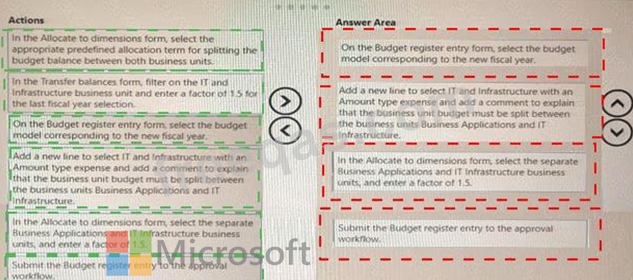
A company uses the basic budgeting functionality in Dynamics 365 Finance. You are creating the budget in the system for the upcoming fiscal year.
The company uses budget workflow approvals to process budget entries. The company plans to split a business unit named IT and Infrastructure into two business units: Business Applications and IT Infrastructure.
You need to create the budget for the two business units based on 1.5 Which four actions should you perform in sequence? To answer, move the appropriate actions from the list of actions to the answer area and arrange them in the correct order.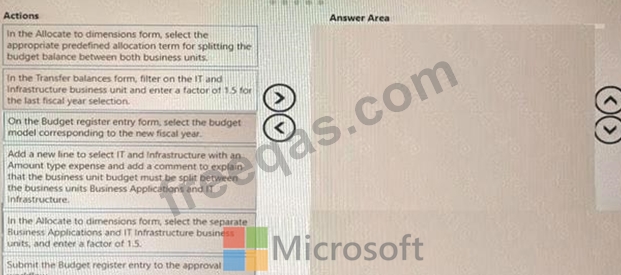

Note: This question is part of a series of questions that present the same scenario. Each question in the series contains a unique solution that might meet the stated goals. Some question sets might have more than one correct solution, while others might not have a correct solution.
After you answer a question in this section, you will NOT be able to return to it. As a result, these questions will not appear in the review screen.
You are configuring the year-end setup in Dynamics 365 Finance.
You need to configure the year-end setup to meet the following requirements:
* The accounting adjustments that are received in the first quarter must be able to be posted into the previous year's Period 13.
* The fiscal year closing can be run again, but only the most recent closing entry will remain in the transactions.
* All dimensions from profit and loss must carry over into the retained earnings.
* All future and previous periods must have an On Hold status.
Solution:
* Configure General ledger parameters.
- Set the Delete close of year transactions option to Yes.
- Set the Create closing transactions during transfer option to Yes.
- Set the Fiscal year status to permanently closed option to No.
* Define the Year-end close template.
- Designate a retained earnings main account for each legal entity.
- Set the Financial dimensions will be used on the Opening transactions option to No.
- Set the Transfer profit and loss dimensions option to Close All.
* Set all prior and future Ledger periods to a status of On Hold.
Does the solution meet the goal?
Note: This question is part of a series of questions that present the same scenario. Each question in the series contains a unique solution that might meet the stated goals. Some question sets might have more than one correct solution, while others might not have a correct solution.
After you answer a question in this section, you will NOT be able to return to it. As a result, these questions will not appear in the review screen.
You are configuring the year-end setup in Dynamics 365 for Finance and Operations.
You need to configure the year-end setup to meet the following requirements:
* The accounting adjustments that are received in the first quarter must be able to be posted in to the previous year's Period 13.
* The fiscal year closing can be run again, but only the most recent closing entry will remain in the transactions.
* All dimensions from profit and loss must carry over into the retained earnings.
* All future and previous periods must have an On Hold status.
Solution:
* Configure General ledger parameters.
- Set the Delete close of year transactions option to No.
- Set the Create closing transactions during transfer option to No.
- Set the Fiscal year status to permanently closed option to No.
* Define the Year-end close template.
- Designate a retained earnings main account for each legal entity.
- Set the Financial dimensions will be used on the Opening transactions option to No.
- Set the Transfer profit and loss dimensions' option to Close All.
* Set future Ledger periods to a status of On Hold.
Does the solution meet the goal?

