You need to configure the environment to support the planned changes for email addresses.
How should you complete the command? To answer, select the appropriate options in the answer area.
NOTE: Each correct selection is worth one point.


Your company named Contoso, Ltd. has a Microsoft Exchange Online subscription that uses a domain named contoso.com.
Contoso works with a partner company named A.Datum Corporation. A.Datum has an Exchange Server 2016 organization that uses a domain named adatum.com.
You need to ensure that users at Contoso can share their free/busy information with the users at A.Datum.
What should you do for each company? To answer, select the appropriate options in the answer area.
NOTE: Each correct selection is worth one point.

Please wait while the virtual machine loads. Once loaded, you may proceed to the lab section. This may take a few minutes, and the wait time will not be deducted from your overall test time.
When the Next button is available, click it to access the lab section. In this section, you will perform a set of tasks in a live environment. While most functionality will be available to you as it would be in a live environment, some functionality (e.g., copy and paste, ability to navigate to external websites) will not be possible by design.
Scoring is based on the outcome of performing the tasks stated in the lab. In other words, it doesn't matter how you accomplish the task, if you successfully perform it, you will earn credit for that task.
Labs are not timed separately, and this exam may have more than one lab that you must complete. You can use as much time as you would like to complete each lab. But, you should manage your time appropriately to ensure that you are able to complete the lab(s) and all other sections of the exam in the time provided.
Please note that once you submit your work by clicking the Next button within a lab, you will NOT be able to return to the lab.
Use the following login credentials as needed:
To enter your username, place your cursor in the Sign in box and click on the username below.
To enter your password, place your cursor in the Enter password box and click on the password below.
Microsoft 365 Username: [email protected]
Microsoft 365 Password: xxxxxx
If the Microsoft 365 portal does not load successfully in the browser, press CTRL-K to reload the portal in a new browser tab.
The following information is for technical support purposes only.
Lab Instance: XXXXXX
You need to reduce the likelihood that malicious links contained in emails received by mailboxes in
@lab.CloudCredential(1).TenantName are opened.
To complete this task, sign in to the Exchange admin center.
You have a Microsoft Exchange Server 2019 hybrid deployment.
All user mailboxes are migrated to Exchange Online.
You need to migrate the public folders from the on-premises organizations to Exchange Online.
Which three actions should you perform in sequence before you create the migration batch? To answer, move the appropriate actions from the list of actions to the answer area and arrange them in the correct order.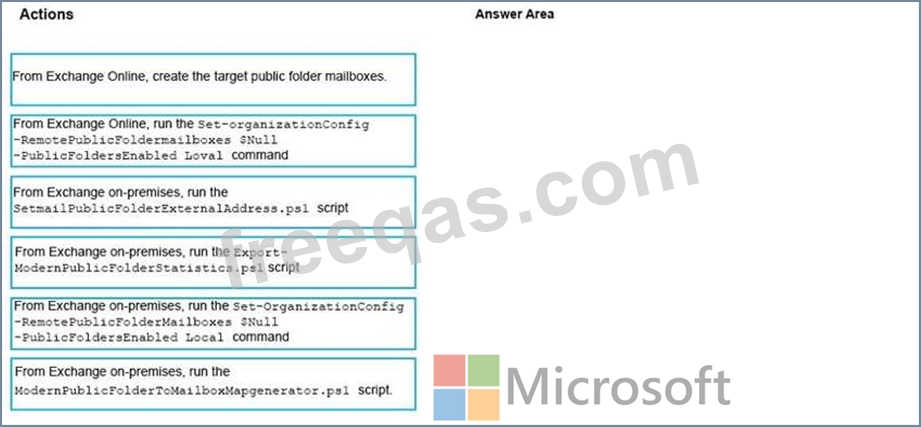

Your company named Contoso, Ltd. has a Microsoft Exchange Server 2019 hybrid deployment.
A partner company named Fabrikam, Inc. uses an Exchange Online subscription for email.
You need to ensure that all the users at Fabrikam can view the free/busy information of the users at Contoso.
What should you configure? To answer, drag the appropriate components to the correct companies. Each component may be used once, more than once, or not at all. You may need to drag the split bar between panes or scroll to view content.
NOTE: Each correct selection is worth one point.


