FreeQAs
 Request Exam  Contact
  • Home
  • View All Exams
  • New QA's
  • Upload
PRACTICE EXAMS:
  • Oracle
  • Fortinet
  • Juniper
  • Microsoft
  • Cisco
  • Citrix
  • CompTIA
  • VMware
  • ISC
  • SAP
  • EMC
  • PMI
  • HP
  • Salesforce
  • Other
  • Oracle
    Oracle
  • Fortinet
    Fortinet
  • Juniper
    Juniper
  • Microsoft
    Microsoft
  • Cisco
    Cisco
  • Citrix
    Citrix
  • CompTIA
    CompTIA
  • VMware
    VMware
  • ISC
    ISC
  • SAP
    SAP
  • EMC
    EMC
  • PMI
    PMI
  • HP
    HP
  • Salesforce
    Salesforce
  1. Home
  2. Microsoft Certification
  3. MS-203 Exam
  4. Microsoft.MS-203.v2024-01-15.q331 Dumps
  • ««
  • «
  • …
  • 31
  • 32
  • 33
  • 34
  • 35
  • 36
  • 37
  • 38
  • 39
  • 40
  • …
  • »
  • »»
Download Now

Question 171

Please wait while the virtual machine loads. Once loaded, you may proceed to the lab section. This may take a few minutes, and the wait time will not be deducted from your overall test time.
When the Next button is available, click it to access the lab section. In this section, you will perform a set of tasks in a live environment. While most functionality will be available to you as it would be in a live environment, some functionality (e.g., copy and paste, ability to navigate to external websites) will not be possible by design.
Scoring is based on the outcome of performing the tasks stated in the lab. In other words, it doesn't matter how you accomplish the task, if you successfully perform it, you will earn credit for that task.
Labs are not timed separately, and this exam may have more than one lab that you must complete. You can use as much time as you would like to complete each lab. But, you should manage your time appropriately to ensure that you are able to complete the lab(s) and all other sections of the exam in the time provided.
Please note that once you submit your work by clicking the Next button within a lab, you will NOT be able to return to the lab.

Use the following login credentials as needed:
To enter your username, place your cursor in the Sign in box and click on the username below.
To enter your password, place your cursor in the Enter password box and click on the password below.
Microsoft 365 Username: [email protected]
Microsoft 365 Password: xxxxxx
If the Microsoft 365 portal does not load successfully in the browser, press CTRL-K to reload the portal in a new browser tab.
The following information is for technical support purposes only.
Lab Instance: XXXXXX
You need to ensure that all emails sent from the users in your company to recipients who use a suffix of @fabnkam.com are encrypted by using Microsoft Office 365 Message Encryption (OME).
To complete this task, sign in to the Exchange admin center.

Correct Answer:
In the Microsoft 365 admin center, choose Admin centers > Exchange.
In the EAC, go to Mail flow > Rules and select New + > Create a new rule.
In Name, type a name for the rule, such as Encrypt mail for [email protected].
In Apply this rule if, select a condition, and enter a value if necessary. For example, to encrypt messages going to [email protected]:
- To select an existing name, select it from the list and then click OK.
- To enter a new name, type an email address in the check names box and then select check names > OK.
To add more conditions, choose More options and then choose add condition and select from the list.
For example, to apply the rule only if the recipient is outside your organization, select add condition and then select The recipient is external/internal > Outside the organization > OK.
To enable encryption using the new OME capabilities, from Do the following, select Modify the message security and then choose Apply Office 365 Message Encryption and rights protection. Select an RMS template from the list, choose Save, and then choose OK.
Reference:
https://docs.microsoft.com/en-us/microsoft-365/compliance/define-mail-flow-rules-to-encrypt-email?view=o365-worldwide
insert code

Question 172

You need to configure the new smartboard to support the planned changes.
Which three settings should you configure? To answer, select the appropriate settings in the answer area.
NOTE: Each correct selection is worth one point.

Correct Answer:

Reference:
https://docs.microsoft.com/en-us/exchange/recipients-in-exchange-online/manage-resource-mailboxes
Topic 4, ADatum Corporation
Company Information
ADatum Corporation is a consulting company that has a main office in Montreal.
ADatum has a Microsoft 365 E5 tenant named adatum.com and uses Microsoft Exchange Online for messaging services.
Existing Environment
Mailboxes

Public Folder Mailboxes

Rules

Connectors

Safe Attachments Policies


Groups

Group Membership


Contacts

Allan Deyoung Role Assignments and Mailbox Details

Organization Sharing

Roles

Outlook Web App Policies


Mobile Device Mailbox Policies


insert code

Question 173

You have a Microsoft Exchange Server 2019 organization and a Microsoft 365 E5 subscription.
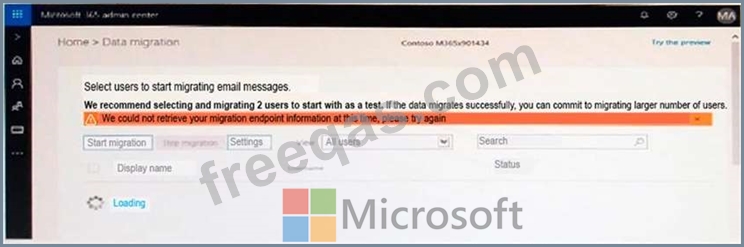
From the Microsoft 365 admin center, you open Data migration as shown in the following exhibit.

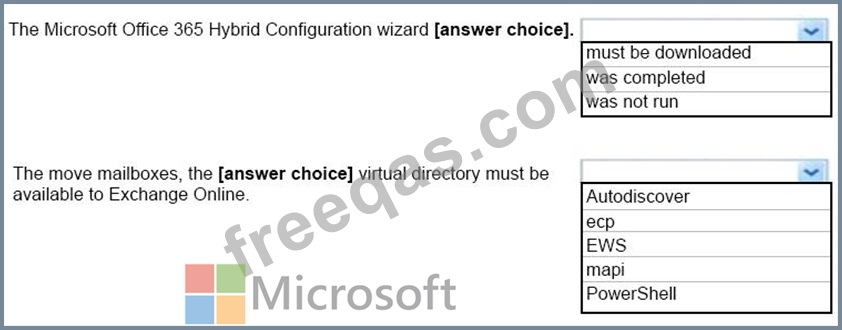
Use the drop-down menus to select the answer choice that completes each statement based on the information presented in the graphic.
NOTE: Each correct selection is worth one point.

Correct Answer:

Reference:
https://www.stellarinfo.com/blog/hybrid-migration-migrate-exchange-mailboxes-office-365/
https://www.kerneldatarecovery.com/blog/migrate-from-exchange-on-premises-to-exchange-online-in-hybrid-environment/
insert code

Question 174

You have a hybrid deployment of Microsoft Exchange Server 2019.
You need to configure modern attachments for Outlook on the web.
From Exchange Management Shell, which cmdlet should you run? To answer, select the appropriate options in the answer area.
NOTE: Each correct selection is worth one point.

Correct Answer:

Reference:
https://docs.microsoft.com/en-us/powershell/module/exchange/set-owamailboxpolicy?view=exchange-ps
insert code

Question 175

Your company named ADatum Corporation has a Microsoft 365 subscription.
ADatum acquires a company named Contoso, Ltd.
In the subscription, you create a new mailbox for each user at Contoso.
You need to provide the Contoso users with a global address list (GAL) that contains only their email addresses.
Which three actions should you perform in sequence? To answer, move the appropriate actions from the list of actions to the answer area and arrange them in the correct order.

Correct Answer:

1 - Create a new GAL named GAL
2 - Create an address book policy (ABP) named Contoso-AB that uses the GAL.
3 - Assign Contoso-AB to all the mailboxes of the Contoso users.
Reference:
https://docs.microsoft.com/en-us/exchange/address-books/address-lists/create-global-address-list
https://docs.microsoft.com/en-us/exchange/address-books/address-lists/address-lists
insert code
  • ««
  • «
  • …
  • 31
  • 32
  • 33
  • 34
  • 35
  • 36
  • 37
  • 38
  • 39
  • 40
  • …
  • »
  • »»
[×]

Download PDF File

Enter your email address to download Microsoft.MS-203.v2024-01-15.q331 Dumps

Email:

FreeQAs

Our website provides the Largest and the most Latest vendors Certification Exam materials around the world.

Using dumps we provide to Pass the Exam, we has the Valid Dumps with passing guranteed just which you need.

  • DMCA
  • About
  • Contact Us
  • Privacy Policy
  • Terms & Conditions
©2026 FreeQAs

www.freeqas.com materials do not contain actual questions and answers from Cisco's certification exams.