FreeQAs
 Request Exam  Contact
  • Home
  • View All Exams
  • New QA's
  • Upload
PRACTICE EXAMS:
  • Oracle
  • Fortinet
  • Juniper
  • Microsoft
  • Cisco
  • Citrix
  • CompTIA
  • VMware
  • ISC
  • SAP
  • EMC
  • PMI
  • HP
  • Salesforce
  • Other
  • Oracle
    Oracle
  • Fortinet
    Fortinet
  • Juniper
    Juniper
  • Microsoft
    Microsoft
  • Cisco
    Cisco
  • Citrix
    Citrix
  • CompTIA
    CompTIA
  • VMware
    VMware
  • ISC
    ISC
  • SAP
    SAP
  • EMC
    EMC
  • PMI
    PMI
  • HP
    HP
  • Salesforce
    Salesforce
  1. Home
  2. Microsoft Certification
  3. MS-203 Exam
  4. Microsoft.MS-203.v2024-04-10.q418 Dumps
  • «
  • 1
  • 2
  • 3
  • 4
  • 5
  • 6
  • 7
  • 8
  • 9
  • 10
  • …
  • »
  • »»
Download Now

Question 6

Your network contains an Active Directory forest named contoso.com.
You plan to implement Microsoft 365 and use Microsoft Exchange Online services.
You need to ensure that all client computers can use Autodiscover to connect to Microsoft 365.
Which record should you create? To answer, select the appropriate options in the answer area.
NOTE: Each correct selection is worth one point.

Correct Answer:

Reference:
https://docs.microsoft.com/en-us/microsoft-365/enterprise/external-domain-name-system-records?view=o365-worldwide
insert code

Question 7

You have a Microsoft Exchange Server 2019 organization and a Microsoft 365 E5 subscription.
From the Microsoft 365 admin center, you open Data migration as shown in the following exhibit.
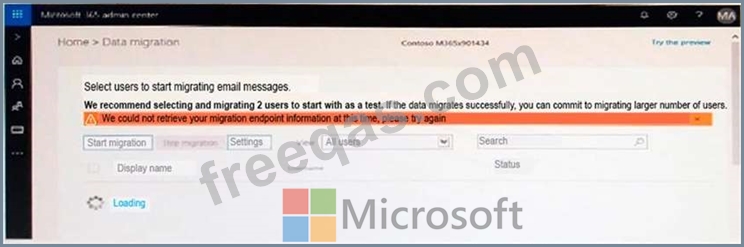
Use the drop-down menus to select the answer choice that completes each statement based on the information presented in the graphic.
NOTE: Each correct selection is worth one point.
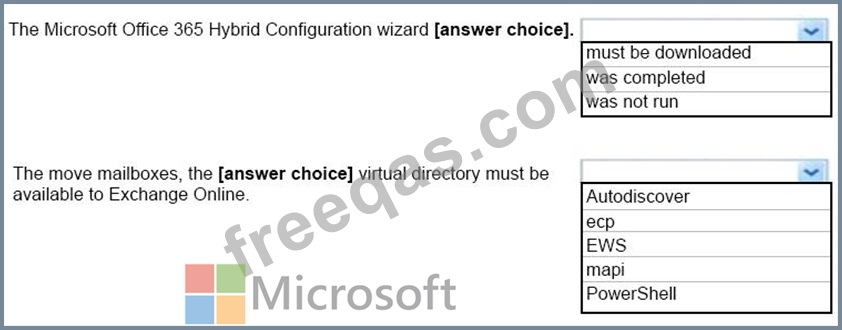
Correct Answer:

References:
https://www.stellarinfo.com/blog/hybrid-migration-migrate-exchange-mailboxes-office-365/
https://www.kerneldatarecovery.com/blog/migrate-from-exchange-on-premises-to-exchange-online-in-hybrid-environment/
insert code

Question 8

Please wait while the virtual machine loads. Once loaded, you may proceed to the lab section. This may take a few minutes, and the wait time will not be deducted from your overall test time.
When the Next button is available, click it to access the lab section. In this section, you will perform a set of tasks in a live environment. While most functionality will be available to you as it would be in a live environment, some functionality (e.g., copy and paste, ability to navigate to external websites) will not be possible by design.
Scoring is based on the outcome of performing the tasks stated in the lab. In other words, it doesn't matter how you accomplish the task, if you successfully perform it, you will earn credit for that task.
Labs are not timed separately, and this exam may have more than one lab that you must complete. You can use as much time as you would like to complete each lab. But, you should manage your time appropriately to ensure that you are able to complete the lab(s) and all other sections of the exam in the time provided.
Please note that once you submit your work by clicking the Next button within a lab, you will NOT be able to return to the lab.

Use the following login credentials as needed:
To enter your username, place your cursor in the Sign in box and click on the username below.
To enter your password, place your cursor in the Enter password box and click on the password below.
Microsoft 365 Username: [email protected]
Microsoft 365 Password: xxxxxx
If the Microsoft 365 portal does not load successfully in the browser, press CTRL-K to reload the portal in a new browser tab.
The following information is for technical support purposes only.
Lab Instance: XXXXXX
You need to create a public folder named Finance. The solution must ensure that only the members of a group named Finance Team can send email messages to the Finance folder.
To complete this task, sign in to the Microsoft 365 admin center.

Correct Answer:
See explanation below
Explanation:
In the EAC, go to Public folders > Public folder mailboxes, and then click Add +.
In the New public folder mailbox page that opens, enter the following information:
- Name: Enter the name for the public folder mailbox.
- Organizational unit: Click Browse to select the location in Active Directory where the mailbox object is created.
- Mailbox database: Click Browse to select the mailbox database where the mailbox is created.
When you're finished, click Save.
Use the EAC to create a public folder
When using the EAC to create a public folder, you'll only be able to set the name and the path of the public folder. To configure additional settings, you'll need to edit the public folder after it's created.
Navigate to Public folders > Public folders.
If you want to create this public folder as a child of an existing public folder, click the existing public folder in the list view. If you want to create a top-level public folder, skip this step.
Click Add +.
In Public Folder, type the name of the public folder.
In the Path box, verify the path to the public folder. If this isn't the desired path, click Cancel and follow Step 2 of this procedure.
Click Save.
Navigate back to Public folders > Public folders.
In the list view, select the public folder that you want to mail-enable or mail-disable.
In the details pane, under Mail settings, click Enable or Disable.
A warning box displays asking if you're sure you want to enable or disable email for the public folder. Click Yes to continue.
You can then run the Set-MailPublicFolder PowerShell cmdlet, and include the AcceptMessagesOnlyFromDLMembers parameter to specify who is allowed to send messages to this recipient.
Reference:
https://docs.microsoft.com/en-us/exchange/collaboration/public-folders/create-public-folder-mailboxes?view=exchserver-2019
https://docs.microsoft.com/en-us/exchange/collaboration/public-folders/create-public-folders?view=exchserver-2019
https://docs.microsoft.com/en-us/exchange/collaboration/public-folders/mail-enable-or-disable?view=exchserver-2019
https://docs.microsoft.com/en-us/powershell/module/exchange/set-mailpublicfolder?view=exchange-ps
insert code

Question 9

Your company has an Exchange Online tenant.
A partner company named Fourth Coffee also uses Exchange Online.
You need to ensure that the users at your company share free busy information with the users at Fourth Coffee. The solution must ensure that the meeting details included in the calendars of your company users remain hidden from the Fourth Coffee users.
How should you complete the command? To answer, select the appropriate options in the answer area.
NOTE: Each correct selection is worth one point.

Correct Answer:

Reference:
https://docs.microsoft.com/en-us/powershell/module/exchange/new-organizationrelationship?view=exchange-ps
insert code

Question 10

You run the Get-WebServicesVirtualDirectory cmdlet as shown in the following exhibit.

Use the drop-down menus to select the answer choice that answers each question based on the information presented in the graphic.
NOTE: Each correct selection is worth one point.
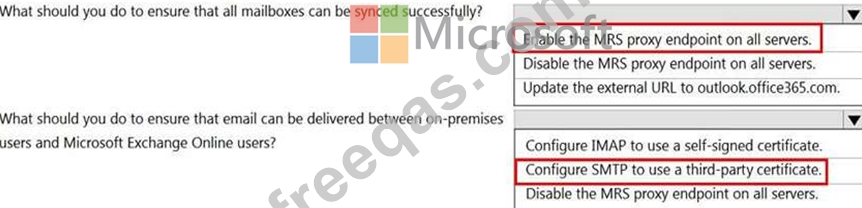
Correct Answer:

Reference:
https://docs.microsoft.com/en-us/Exchange/architecture/mailbox-servers/mrs-proxy-endpoint?view=exchserver-2019
insert code
  • «
  • 1
  • 2
  • 3
  • 4
  • 5
  • 6
  • 7
  • 8
  • 9
  • 10
  • …
  • »
  • »»
[×]

Download PDF File

Enter your email address to download Microsoft.MS-203.v2024-04-10.q418 Dumps

Email:

FreeQAs

Our website provides the Largest and the most Latest vendors Certification Exam materials around the world.

Using dumps we provide to Pass the Exam, we has the Valid Dumps with passing guranteed just which you need.

  • DMCA
  • About
  • Contact Us
  • Privacy Policy
  • Terms & Conditions
©2026 FreeQAs

www.freeqas.com materials do not contain actual questions and answers from Cisco's certification exams.
