FreeQAs
 Request Exam  Contact
  • Home
  • View All Exams
  • New QA's
  • Upload
PRACTICE EXAMS:
  • Oracle
  • Fortinet
  • Juniper
  • Microsoft
  • Cisco
  • Citrix
  • CompTIA
  • VMware
  • ISC
  • SAP
  • EMC
  • PMI
  • HP
  • Salesforce
  • Other
  • Oracle
    Oracle
  • Fortinet
    Fortinet
  • Juniper
    Juniper
  • Microsoft
    Microsoft
  • Cisco
    Cisco
  • Citrix
    Citrix
  • CompTIA
    CompTIA
  • VMware
    VMware
  • ISC
    ISC
  • SAP
    SAP
  • EMC
    EMC
  • PMI
    PMI
  • HP
    HP
  • Salesforce
    Salesforce
  1. Home
  2. Microsoft Certification
  3. MS-203 Exam
  4. Microsoft.MS-203.v2024-04-10.q418 Dumps
  • ««
  • «
  • …
  • 2
  • 3
  • 4
  • 5
  • 6
  • 7
  • 8
  • 9
  • 10
  • 11
  • …
  • »
  • »»
Download Now

Question 26

You have a hybrid deployment that contains a Microsoft Exchange Online tenant and an on-premises Exchange Server 2019 server named Server1. All users use an email address suffix of @contoso.com.
You migrate 200 mailboxes from Server1 to Exchange Online by using Exchange PowerShell cmdlets. Users hosted on Server1 can send email messages to the migrated mailboxes.
In Microsoft 365, you create a new mailbox that uses an email address of [email protected].
When email is sent from the mailboxes hosted on Server1 to [email protected], the senders receive a non-delivery report (NDR) that contains the following text:
"550 5.1.10 RESOLVER.ADR.RecipientNotFound;
Recipient not found by SMTP address lookup."
You verify that Microsoft 365 mailboxes can send email to [email protected] successfully.
You delete the user account and mailbox of User1.
You need to ensure that when new mailboxes are created, all the users at your company can exchange email successfully Which two actions should you perform? Each correct answer presents a complete solution.
NOTE: Each correct selection is worth one point.

Correct Answer: B,D
Explanation
The problem happens because the on-premise Exchange server is not aware of the existence of the mailbox created in Exchange Online. To prevent this happening, new mailboxes need to be created from the on-premise Exchange server.
You can create on Exchange Online mailbox from the on-premise server by running New-RemoteMailbox cmdlet. Alternatively, you can create a local mailbox on the on-premise server and then migrate the mailbox to Exchange Online.
insert code

Question 27

You need to recommend a solution to retain the items in the public folders. The solution must support the planned changes.
What should you recommend?

Correct Answer: B
Reference:
https://docs.microsoft.com/en-us/exchange/security-and-compliance/in-place-and-litigation-holds#placingpublic-folders-on-hold
Topic 1, Litware, inc
Physical Locations
Litware has a main office in Paris and branch offices in Munich, London, Brussels, Vienna, and Rome.
Each branch office has its own compliance officer.
Existing Environment
The network contains one Active Directory forest named litware.com. The forest contains a single Active Directory domain. Each office is configured as an Active Directory site.
Each branch office is represented organizational unit (OU) in an OU named Offices in Active Directory.
Each branch office has a special Administrators group that contains the delegated administrators for that office. Each Administrators group is named based on its location in a format of RegionalAdmins_Brussels, RegionalAdmins_Munich, RegionalAdmins_London, RegionalAdmins_Vienna and RegionalAdmins_Rome.
Network Infrastructure
Each office contains two domain controllers from the litware.com domain. All the domain controllers are configured as DNS servers. All client computers connect only to the DNS servers in their respective office.
All offices have a high-speed connection to the Internet. Each office connects to the Internet by using a VPN appliance.
Each office has the following servers and client computers:
The office in Brussels contains an Exchange Server 2016 server that has the Unified Messaging role installed and hosted voicemail configured.
Mailboxes are hosted on all the Exchange servers. Public folders are hosted only on an Exchange server in the main office. Litware uses a disjoint namespace to access the servers.
Each user has an archive mailbox. Archiving is configured to use the default settings.
Exchange services are published to the internet by using a reverse proxy in each office.
A full backup of Exchange is performed nightly. Incremental backups occur every six hours.
All the users in the transport department connect to network resources by using a connection in the main office.
Requirements
Planned Changes
Litware plans to implement the following changes:
Implement calendar sharing to partner companies.
Implement a solution that prevents malware from being delivered to end users.
Use personal archives to eliminate the need for PST files.
Ensure the Brussels office and move all the users in the Brussels office to the main office. All the mailboxes in the Brussels office will be moved to a server in the main office.
Implement a compliance solution to ensure that items deleted from public folders are retained. If an item in a public folder is modified, the original version of the item must be available.
Technical Requirements
Litware identifies the following technical requirements:
Minimize administrative effort.
Use the principle of least privilege.
Ensure that junk email is deleted automatically after 14 days.
Ensure that sent items and deleted items are deleted automatically after 30 days.
Ensure that users in the customer service department can open multiple mailboxes.
Ensure that all the former Brussels office users always maintain access to hosted voicemail.
Ensure that the staff in the IT department can manage the email environment without and-user involvement.
Ensure that users cannot recover email messages that are deleted from the Junk Email folder and the Deleted Items.
Ensure that if an email message has a spam confidence level (SCL) of 3 or higher, the message automatically moves to the Junk Email folder.
Problem statements
The transport department users report that accessing a public folder named TransportPF is sometimes very slow.
Users in the customer service department report that Microsoft Outlook sometimes hangs when many mailboxes are open.
insert code

Question 28

Your company named Contoso, Ltd. has a Microsoft Exchange Server 2019 organization that contains the mailbox databases shown in the following table.
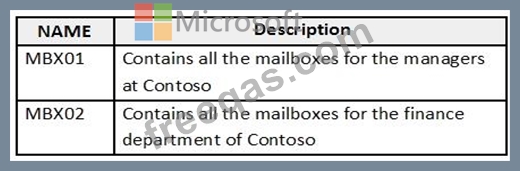
You need to assign an offline address book (OAB) named Managers to all the users in a group named Managers.
How should you complete the PowerShell script? To answer, select the appropriate options in the answer area.
NOTE: Each correct selection is worth one point.

Correct Answer:
insert code

Question 29

You recently implemented a hybrid deployment that contains a Microsoft Exchange Online tenant and an on- premises Exchange Server 2019 server named Server1. The public IP address of Server1 is 131.107.1.100.
The deployment is configured as shown in the following table.

Users hosted in Microsoft 365 report that they receive non-delivery reports (NDRs) when they attempt to send email messages to mailboxes hosted in Exchange Server 2019.
You need to ensure that the email is delivered successfully. The solution must ensure that email delivery is successful for all the users at your company.
What should you do?

Correct Answer: B
insert code

Question 30

You have a Microsoft 365 E5 tenant that contains the users shown in the following table.

You have a connector for a remote domain named contoso.com as shown in the following exhibit.
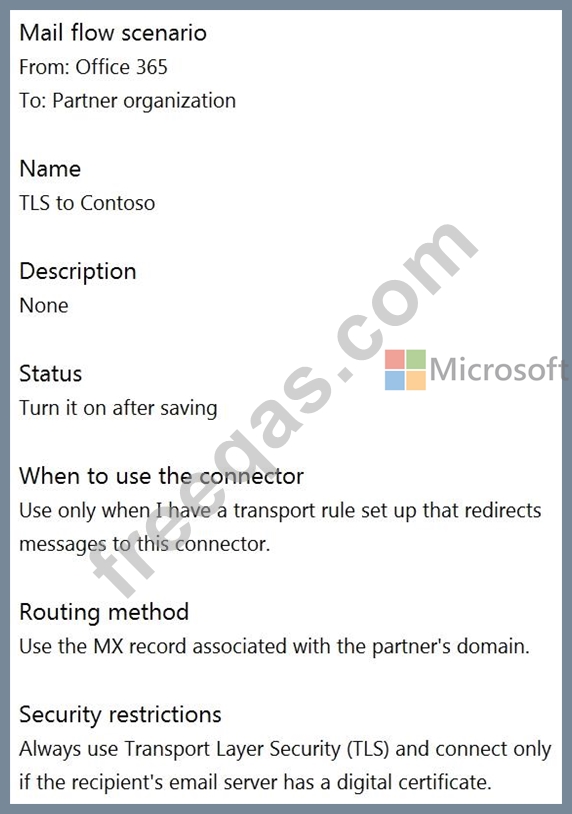
You have a transport rule as shown in the following exhibit.

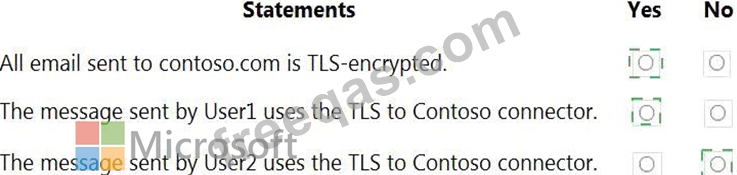
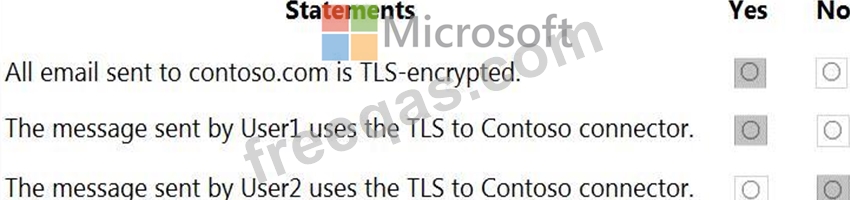
User1 sends an email message to [email protected] that has a subject line containing the word Confidential.
User2 sends an email message to [email protected] that has a subject line of New report. The body of the message contains the word confidential.
For each of the following statements, select Yes if the statement is true. Otherwise, select No.
NOTE: Each correct selection is worth one point.
Correct Answer:

Explanation

Reference:
https://docs.microsoft.com/en-us/compliance/assurance/assurance-encryption-in-transit
insert code
  • ««
  • «
  • …
  • 2
  • 3
  • 4
  • 5
  • 6
  • 7
  • 8
  • 9
  • 10
  • 11
  • …
  • »
  • »»
[×]

Download PDF File

Enter your email address to download Microsoft.MS-203.v2024-04-10.q418 Dumps

Email:

FreeQAs

Our website provides the Largest and the most Latest vendors Certification Exam materials around the world.

Using dumps we provide to Pass the Exam, we has the Valid Dumps with passing guranteed just which you need.

  • DMCA
  • About
  • Contact Us
  • Privacy Policy
  • Terms & Conditions
©2026 FreeQAs

www.freeqas.com materials do not contain actual questions and answers from Cisco's certification exams.
