Please wait while the virtual machine loads. Once loaded, you may proceed to the lab section. This may take a few minutes, and the wait time will not be deducted from your overall test time.
When the Next button is available, click it to access the lab section. In this section, you will perform a set of tasks in a live environment. While most functionality will be available to you as it would be in a live environment, some functionality (e.g., copy and paste, ability to navigate to external websites) will not be possible by design.
Scoring is based on the outcome of performing the tasks stated in the lab. In other words, it doesn't matter how you accomplish the task, if you successfully perform it, you will earn credit for that task.
Labs are not timed separately, and this exam may have more than one lab that you must complete. You can use as much time as you would like to complete each lab. But, you should manage your time appropriately to ensure that you are able to complete the lab(s) and all other sections of the exam in the time provided.
Please note that once you submit your work by clicking the Next button within a lab, you will NOT be able to return to the lab.
Use the following login credentials as needed:
To enter your username, place your cursor in the Sign in box and click on the username below.
To enter your password, place your cursor in the Enter password box and click on the password below.
Microsoft 365 Username: [email protected]
Microsoft 365 Password: xxxxxx
If the Microsoft 365 portal does not load successfully in the browser, press CTRL-K to reload the portal in a new browser tab.
The following information is for technical support purposes only.
Lab Instance: XXXXXX
You need to ensure that all email messages in the mailbox of a user named Pradeep Gupta are retained for 90 days.
To complete this task, sign in to the Microsoft 365 admin center.

Your company has a Microsoft Exchange Server 2019 hybrid deployment.
The company has two departments that have the mailboxes configured as shown in the following table.
All the accounting department mailboxes reside in a database named ACCT-DB01.
You create the mailboxes shown in the following table.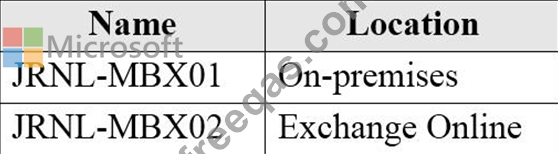
You need to record all the email communication of the users in each department. The solution must minimize costs.
What should you use for each department? To answer, drag the appropriate options to the correct departments.
Each option may be used once, more than once, or not at all. You may need to drag the split bar between panes or scroll to view content.
NOTE: Each correct selection is worth one point.


Your company has three departments name Dept1, Dept2. and Dept3 and a Microsoft Exchange Online tenant.
You need to increase security for the email messages sent from the departments. The solution must meet the following requirements:
+ Users in Dept1 must be able to digitally sign and encrypt email messages as required.
+ Email messages sent from Dept2 to an external email domain must be encrypted automatically during transit only.
+ Email messages sent from Dept3 to an external email domain must be encrypted until the recipient opens the message.
+ Implementation costs must be minimized.'Which type of encryption should you use for each department? To answer, drag the appropriate encryption types to the correct departments. Each encryption type may be used

You have a Microsoft 365 E3 subscription that uses Microsoft Exchange Online. You need to retain audit log entries for users in the legal department for up to one year. Which two actions should you perform? Each Correct answer presents part of the solution.
Note: Each Correct Selection is worth one point.
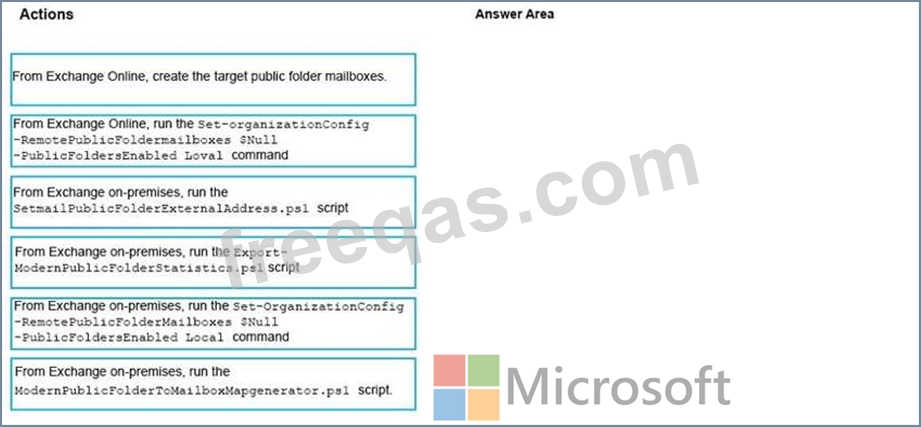
You have a Microsoft Exchange Server 2019 hybrid deployment.
All user mailboxes are migrated to Exchange Online.
You need to migrate the public folders from the on-premises organizations to Exchange Online.
Which three actions should you perform in sequence before you create the migration batch? To answer, move the appropriate actions from the list of actions to the answer area and arrange them in the correct order.