FreeQAs
 Request Exam  Contact
  • Home
  • View All Exams
  • New QA's
  • Upload
PRACTICE EXAMS:
  • Oracle
  • Fortinet
  • Juniper
  • Microsoft
  • Cisco
  • Citrix
  • CompTIA
  • VMware
  • ISC
  • SAP
  • EMC
  • PMI
  • HP
  • Salesforce
  • Other
  • Oracle
    Oracle
  • Fortinet
    Fortinet
  • Juniper
    Juniper
  • Microsoft
    Microsoft
  • Cisco
    Cisco
  • Citrix
    Citrix
  • CompTIA
    CompTIA
  • VMware
    VMware
  • ISC
    ISC
  • SAP
    SAP
  • EMC
    EMC
  • PMI
    PMI
  • HP
    HP
  • Salesforce
    Salesforce
  1. Home
  2. Cisco Certification
  3. 100-150 Exam
  4. Cisco.100-150.v2026-09-10.q60 Dumps
  • ««
  • «
  • …
  • 3
  • 4
  • 5
  • 6
  • 7
  • 8
  • 9
  • 10
  • 11
  • 12
  • …
  • »
  • »»
Download Now

Question 31

A support technician examines the front panel of a Cisco switch and sees 4 Ethernet cables connected in the first four ports. Ports 1, 2, and 3 have a green LED. Port 4 has a blinking green light.
What is the state of the Port 4?

Correct Answer: C
On a Cisco switch, a port with a blinking green LED typically indicates that the port is up (active) and is currently transmitting or receiving data.
This is a normal state indicating active traffic on the port.
* A. Link is up with cable malfunctions: Usually indicated by an amber or blinking amber light.
* B. Link is up and not stable: Not typically indicated by a green blinking light.
* D. Link is up and there is no activity: Would be indicated by a solid green light without blinking.
Thus, the correct answer is C. Link is up and active.
Reference: =
* Cisco Switch LED Indicators
* Cisco Ethernet Switch LED Patterns
insert code

Question 32

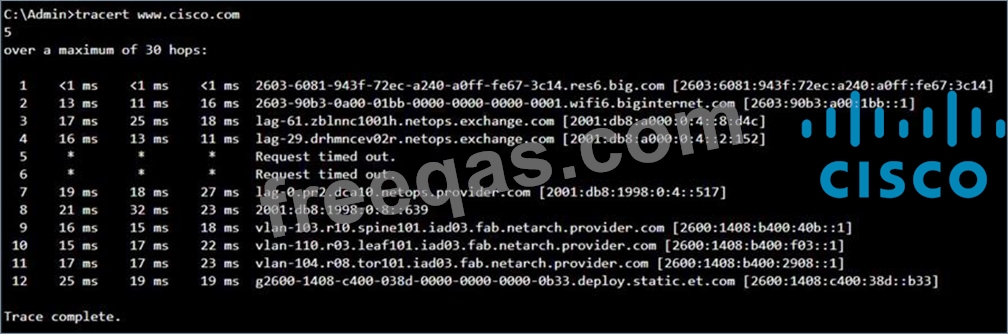
Examine the following output:

Which two conclusions can you make from the output of the tracert command? Note: You will receive partial credit for each correct answer. (Choose 2.)

Correct Answer: A,C
* Statement A: "The trace successfully reached the www.cisco.com server." This is true as indicated by the "Trace complete" message at the end, showing that the trace has reached its destination.
* Statement C: "The IPv6 address associated with the www.cisco.com server is
2600:1408:c400:38d::b33." This is true because the final hop in the trace, which is the destination, has this IPv6 address.
* Statement B: "The trace failed after the fourth hop." This is incorrect as the trace continues beyond the fourth hop, despite some intermediate timeouts.
* Statement D: "The routers at hops 5 and 6 are offline." This is not necessarily true. The routers might be configured to not respond to traceroute requests.
* Statement E: "The device sending the trace has IPv6 address 2600:1408:c400:38d::b33." This is incorrect; this address belongs to the destination server, not the sender.
Reference: * Understanding Traceroute: Traceroute Guide
insert code

Question 33

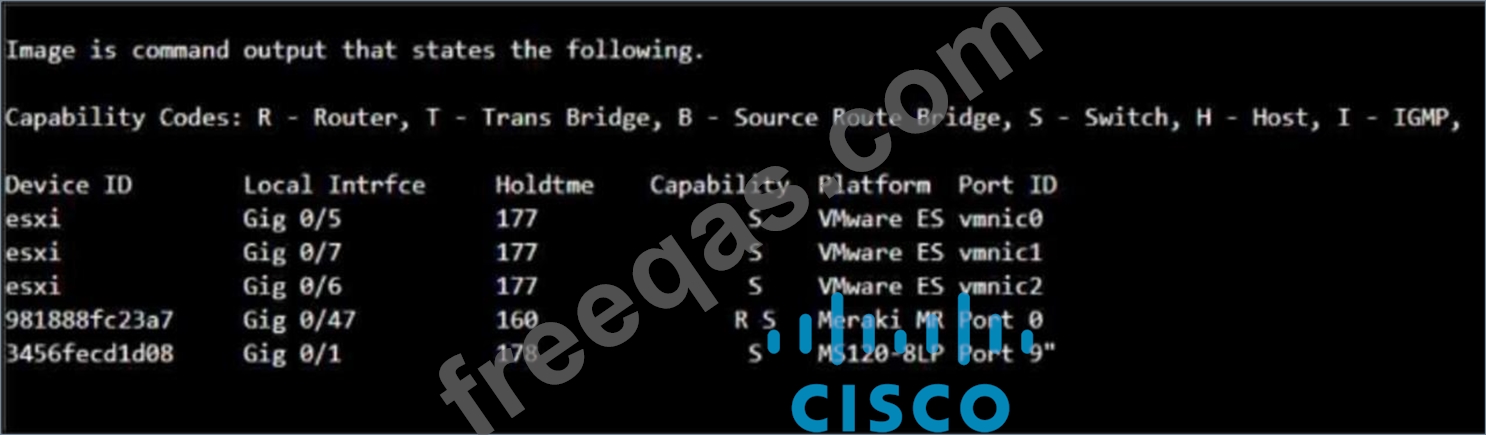
Which command will display the following output?

Correct Answer: B
The output columns (Device ID, Local Intrfce, Holdtime, Capability, Platform, Port ID) match the information provided by the show cdp neighbor command.
insert code

Question 34

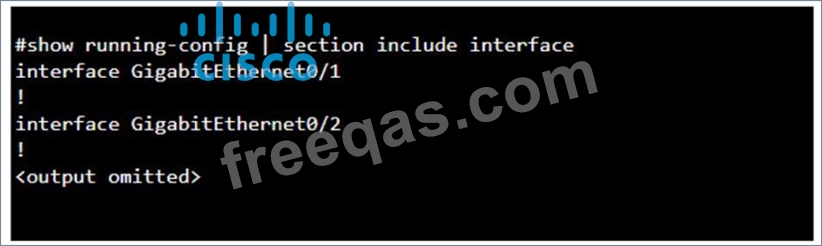
You purchase a new Cisco switch, turn it on, and connect to its console port. You then run the following command:

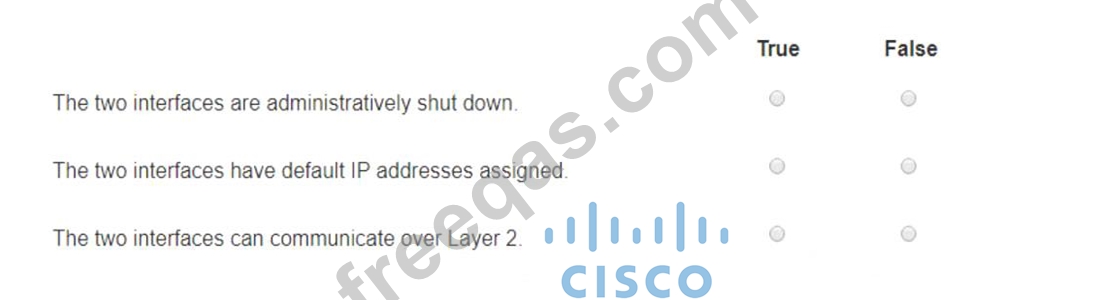
For each statement about the output, select True or False.
Note: You will receive partial credit for each correct selection.

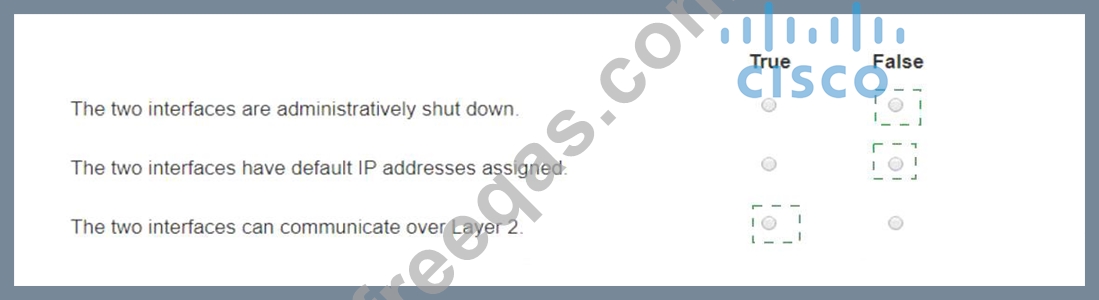
Correct Answer:

Explanation:
* The two interfaces are administratively shut down:
* False: The output does not show any "shutdown" command under the interfaces, which would indicate that they are administratively shut down. Therefore, they are likely in their default state, which is administratively up.
* The two interfaces have default IP addresses assigned:
* False: The output does not show any IP address configuration. In the default state, interfaces do not have IP addresses assigned unless explicitly configured.
* The two interfaces can communicate over Layer 2:
* True: By default, interfaces on a switch are Layer 2 interfaces capable of forwarding Ethernet frames. As there is no configuration provided that changes this, it can be assumed they can communicate over Layer 2.
* Interface Status: The absence of the "shutdown" command means the interfaces are not administratively shut down.
* IP Address Assignment: There is no evidence in the output that IP addresses have been assigned to the interfaces, which would typically be shown as "ip address" entries.
* Layer 2 Communication: Switch interfaces in their default state operate at Layer 2, enabling them to forward Ethernet frames and participate in Layer 2 communication.
References:
* Cisco IOS Interface Configuration: Cisco Interface Configuration
* Understanding Cisco Switch Interfaces: Cisco Switch Interfaces
insert code

Question 35

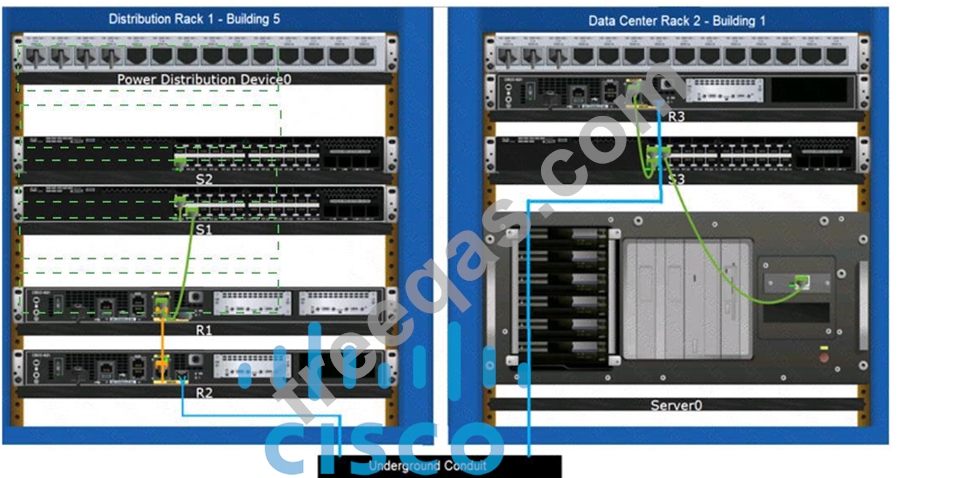
Examine the connections shown in the following image. Move the cable types on the right to the appropriate connection description on the left. You may use each cable type more than once or not at all.

Correct Answer:

Explanation:
Based on the image description provided, here are the cable types matched with the appropriate connection descriptions:
Connects Switch S1 to Router R1 Gi0/0/1 interface Cable Type: = Straight-through UTP Cable Connects Router R2 Gi0/0/0 to Router R3 Gi0/0/0 via underground conduit Cable Type: = Fiber Optic Cable Connects Router R1 Gi0/0/0 to Router R2 Gi0/0/1 Cable Type: = Crossover UTP Cable Connects Switch S3 to Server0 network interface card Cable Type: = Straight-through UTP Cable The choices are based on standard networking practices where:
* Straight-through UTP cables are typically used to connect a switch to a router or a network interface card.
* Fiber optic cables are ideal for long-distance, high-speed data transmission, such as connections through an underground conduit.
* Crossover UTP cables are used to connect similar devices, such as router-to-router connections.
These matches are consistent with the color-coded cables in the image: green for switch connections, yellow for router-to-router connections within the same rack, and blue for inter-rack connections. The use of these cables follows the Ethernet cabling standards.
* Connects Switch S1 to Router R1 Gi0/0/1 interface:
* Cable Type: Straight-through UTP Cable
* Explanation: A straight-through UTP cable is typically used to connect different types of devices, such as a switch to a router.
* Connects Router R2 Gi0/0/0 to Router R3 Gi0/0/0 via underground conduit:
* Cable Type: Fiber Optic Cable
* Explanation: Fiber optic cables are used for long-distance connections, such as those through an underground conduit between buildings.
* Connects Router R1 Gi0/0/0 to Router R2 Gi0/0/1:
* Cable Type: Crossover UTP Cable
* Explanation: A crossover UTP cable is typically used to connect similar devices directly, such as router to router connections.
* Connects Switch S3 to Server0 network interface card:
* Cable Type: Straight-through UTP Cable
* Explanation: A straight-through UTP cable is typically used to connect a switch to an end device, such as a server.
* Straight-through UTP Cable: Used to connect different devices (e.g., switch to router, switch to server).
* Crossover UTP Cable: Used to connect similar devices directly (e.g., router to router, switch to switch).
* Fiber Optic Cable: Used for long-distance and high-speed connections, often between buildings or data centers.
References:
* Network Cable Types and Uses: Cisco Network Cables
* Understanding Ethernet Cabling: Ethernet Cable Guide
insert code
  • ««
  • «
  • …
  • 3
  • 4
  • 5
  • 6
  • 7
  • 8
  • 9
  • 10
  • 11
  • 12
  • …
  • »
  • »»
[×]

Download PDF File

Enter your email address to download Cisco.100-150.v2026-09-10.q60 Dumps

Email:

FreeQAs

Our website provides the Largest and the most Latest vendors Certification Exam materials around the world.

Using dumps we provide to Pass the Exam, we has the Valid Dumps with passing guranteed just which you need.

  • DMCA
  • About
  • Contact Us
  • Privacy Policy
  • Terms & Conditions
©2026 FreeQAs

www.freeqas.com materials do not contain actual questions and answers from Cisco's certification exams.