FreeQAs
 Request Exam  Contact
  • Home
  • View All Exams
  • New QA's
  • Upload
PRACTICE EXAMS:
  • Oracle
  • Fortinet
  • Juniper
  • Microsoft
  • Cisco
  • Citrix
  • CompTIA
  • VMware
  • ISC
  • SAP
  • EMC
  • PMI
  • HP
  • Salesforce
  • Other
  • Oracle
    Oracle
  • Fortinet
    Fortinet
  • Juniper
    Juniper
  • Microsoft
    Microsoft
  • Cisco
    Cisco
  • Citrix
    Citrix
  • CompTIA
    CompTIA
  • VMware
    VMware
  • ISC
    ISC
  • SAP
    SAP
  • EMC
    EMC
  • PMI
    PMI
  • HP
    HP
  • Salesforce
    Salesforce
  1. Home
  2. F5 Certification
  3. F5CAB5 Exam
  4. F5.F5CAB5.v2026-07-18.q66 Dumps
  • ««
  • «
  • …
  • 6
  • 7
  • 8
  • 9
  • 10
  • 11
  • 12
  • 13
  • 14
  • 15
  • »
Download Now

Question 61

Which menu should you use on the BIG-IP Configuration Utility to generate a QKView support file? (Choose one answer)

Correct Answer: C
A QKView is the primary diagnostic file used by F5 Support to analyze BIG-IP system health, configuration, performance, and logs. It collects a wide range of data, including running configuration, license details, module provisioning, hardware status, logs, statistics, and diagnostic command output. Generating a QKView is a standard first step when troubleshooting issues or opening a support case with F5.
In the BIG-IP Configuration Utility (GUI), the correct location to generate a QKView is System > Support (Option C). This menu is specifically designed for support and troubleshooting activities. From this section, administrators can create QKView files, upload them directly to F5 iHealth, or download them locally for later analysis or submission to F5 Support.
The other options are incorrect:
System > Configuration (Option A) is used for system-wide settings such as device name, NTP, and DNS.
System > Archive (Option B) is used to create UCS backups, not diagnostic QKViews.
System > Logs (Option D) is used to view and manage log files, not to generate support bundles.
This workflow is clearly documented in BIG-IP Administration and Support guides and is considered a best practice for efficient troubleshooting and support engagement.
insert code

Question 62

Which command displays current connections?

Correct Answer: A
This shows active connections handled by the system.
insert code

Question 63

Refer to the exhibit.

The image shows the status of a virtual server namedapplication_vsin the BIG-IP Configuration Utility.
What is the cause of the status shown? (Choose two answers)

Correct Answer: A,C
The exhibit shows the virtual serverapplication_vswith a status indicating it isoffline but enabled. In BIG-IP terminology, this status means the virtual server itself is administratively enabled, but it is unable to pass traffic becauseno usable pool members are available.
Two common and documented causes for this condition are:
* Pool member(s) administratively disabled (Option A):When all pool members are administratively disabled, BIG-IP removes them from load-balancing decisions. Even though the virtual server remains enabled, it has no available pool members to send traffic to, resulting in an offline status.
* Node(s) administratively disabled (Option C):Pool members inherit the status of their parent nodes. If a node is administratively disabled, all associated pool members are also marked unavailable. This condition causes the virtual server to show as offline, even though the virtual server configuration itself is correct.
The other options are incorrect:
* Forced offline pool members (Option B)result in a different operational intent and are explicitly set for maintenance scenarios.
* Virtual server administratively disabled (Option D)would show the virtual server as disabled, not enabled/offline.
This behavior is consistent with BIG-IP traffic management logic and is commonly verified by reviewingpool and node availability stateswhen diagnosing virtual server availability issues.
insert code

Question 64

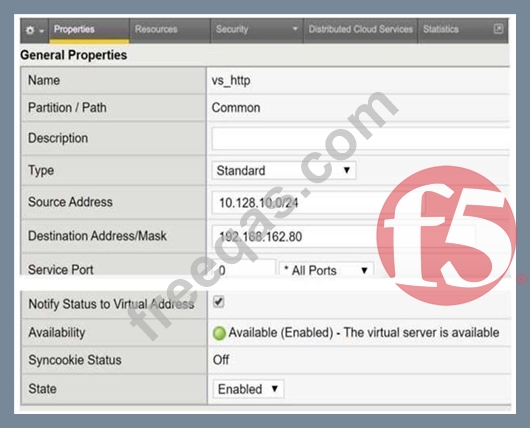
Refer to the exhibit. A user with IP address 192.168.162.70 is unable to connect to an HTTP application. What is a possible cause within the Virtual Server configuration?
Correct Answer: D
The failure to connect is caused by a restrictive Source Address filter configured on the Virtual Server.
Source Address Filtering: In the BIG-IP system, the Source Address field on a Virtual Server acts as an implicit Access Control List (ACL). Only traffic originating from a client IP address that matches the specified network range will be accepted and processed by the Virtual Server.
Analyzing the Exhibit: The provided configuration for vs_http shows the Source Address is set to
10.128.10.0/24. This means the Virtual Server will only accept connections from the subnet ranging from 10.128.10.1 to 10.128.10.254.
Identifying the Conflict: The user trying to connect has the IP address 192.168.162.70. Since
192.168.162.70 does not fall within the allowed 10.128.10.0/24 range, the BIG-IP system will not match this traffic to the Virtual Server, effectively blocking the connection attempt.
insert code

Question 65

A BIG-IP Administrator receives reports from users that SSL connections to the BIG-IP device are failing. Upon checking the log files, the administrator notices: SSL transaction (TPS) rate limit reached. stats show a maximum of 1200 client-side SSL TPS and 800 server-side SSL TPS.
What is the minimum SSL license limit required to handle this peak?


Correct Answer: D
Troubleshooting failed SSL handshakes involves interpreting the resource limits defined by the system's license. The log message SSL transaction (TPS) rate limit reached indicates the BIG-IP is dropping SSL connections because it has exceeded its licensed "Transactions Per Second" capacity. When analyzing stats to determine the correct license level, the administrator must focus on "Client- side" SSL TPS. This represents the initial encrypted handshakes between users and the BIG-IP virtual servers91. In this scenario, the peak client-side demand is 1200 TPS.
While the 800 server-side transactions represent re-encryption toward the backend, F5's primary SSL TPS license limits typically apply to the client-facing side of the traffic flow. Therefore, to resolve the intermittent connectivity issues and ensure the virtual server works reliably during peaks, the license must be upgraded to at least 1200 TPS. Confirming this peak via statistics andcomparing it to the current license is a standard troubleshooting step for SSL performance issues.
insert code
  • ««
  • «
  • …
  • 6
  • 7
  • 8
  • 9
  • 10
  • 11
  • 12
  • 13
  • 14
  • 15
  • »
[×]

Download PDF File

Enter your email address to download F5.F5CAB5.v2026-07-18.q66 Dumps

Email:

FreeQAs

Our website provides the Largest and the most Latest vendors Certification Exam materials around the world.

Using dumps we provide to Pass the Exam, we has the Valid Dumps with passing guranteed just which you need.

  • DMCA
  • About
  • Contact Us
  • Privacy Policy
  • Terms & Conditions
©2026 FreeQAs

www.freeqas.com materials do not contain actual questions and answers from Cisco's certification exams.