FreeQAs
 Request Exam  Contact
  • Home
  • View All Exams
  • New QA's
  • Upload
PRACTICE EXAMS:
  • Oracle
  • Fortinet
  • Juniper
  • Microsoft
  • Cisco
  • Citrix
  • CompTIA
  • VMware
  • ISC
  • SAP
  • EMC
  • PMI
  • HP
  • Salesforce
  • Other
  • Oracle
    Oracle
  • Fortinet
    Fortinet
  • Juniper
    Juniper
  • Microsoft
    Microsoft
  • Cisco
    Cisco
  • Citrix
    Citrix
  • CompTIA
    CompTIA
  • VMware
    VMware
  • ISC
    ISC
  • SAP
    SAP
  • EMC
    EMC
  • PMI
    PMI
  • HP
    HP
  • Salesforce
    Salesforce
  1. Home
  2. Fortinet Certification
  3. NSEI_OTS_AR-7.6 Exam
  4. Fortinet.NSEI_OTS_AR-7.6.v2026-10-30.q30 Dumps
  • «
  • 1
  • 2
  • 3
  • 4
  • 5
  • 6
  • 7
  • »
Download Now

Question 16

Refer to the exhibit.
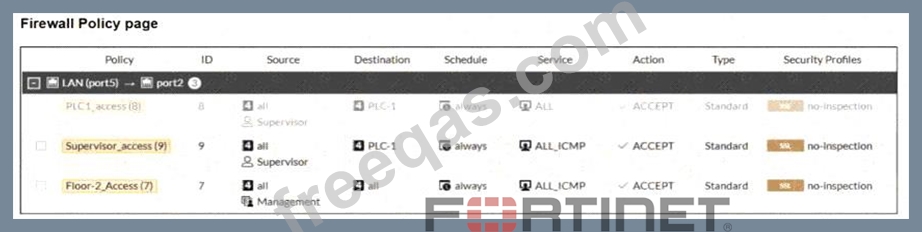
A firewall policy page is shown. To improve the security of your OT network, you have configured a Supervisor profile in the firewall policies, as shown in the exhibit. However, a supervisor is reporting that he cannot ping PLC-1. What are the two reasons? (Choose two answers)

Correct Answer: A,C
The correct answers are A and C .
Option A is correct because the study guide explains that with active authentication , FortiGate prompts the user only when they use "an acceptable login protocol." It states: "When you use only active authentication, if all possible policies that could match the source IP address have authentication enabled, then the user will receive a login prompt (assuming they use an acceptable login protocol)." A direct ping to PLC-1 uses ICMP , which is not the kind of login protocol used to trigger user authentication.
So the supervisor must first authenticate through a protocol such as HTTPS or Telnet , then the ICMP traffic can match the authenticated policy.
Option C is also correct because the exhibit shows policy ID 8 greyed out, meaning it is not enabled. That policy appears above the Supervisor_access (9) policy and allows broader access to PLC-1 , whereas policy 9 is limited to ALL_ICMP . The study guide explains that "Because the user has not yet authenticated, the user group aspect of the traffic does not match" and FortiGate continues searching for another complete match. In this case, with policy 8 disabled, the supervisor is left with only the ICMP rule, which cannot be used to perform the initial login step needed for active authentication.
Option B is not supported by the exhibit. Option D is incorrect because auth-on-demand always would force authentication prompts more aggressively, but the core problem here is that the user is trying to start with ICMP and the broader policy that could permit the initial authenticated access is disabled.
insert code

Question 17

Match each industrial protocol to its corresponding characteristics.
Select each OT industrial protocol in the column on the left and drag and drop it into the blank space next to its corresponding characteristic in the column on the right. You must match all four industrial protocols to their characteristics in the work area.
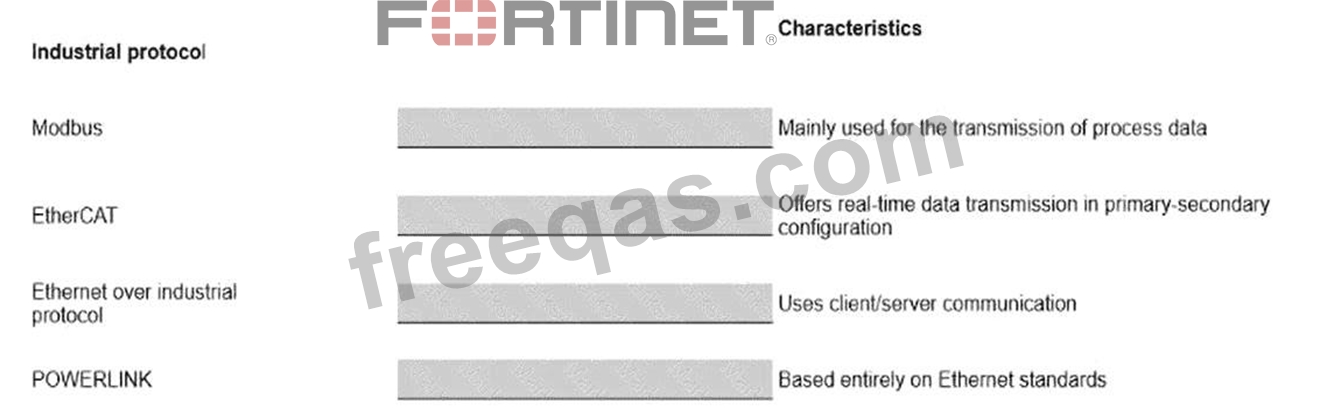
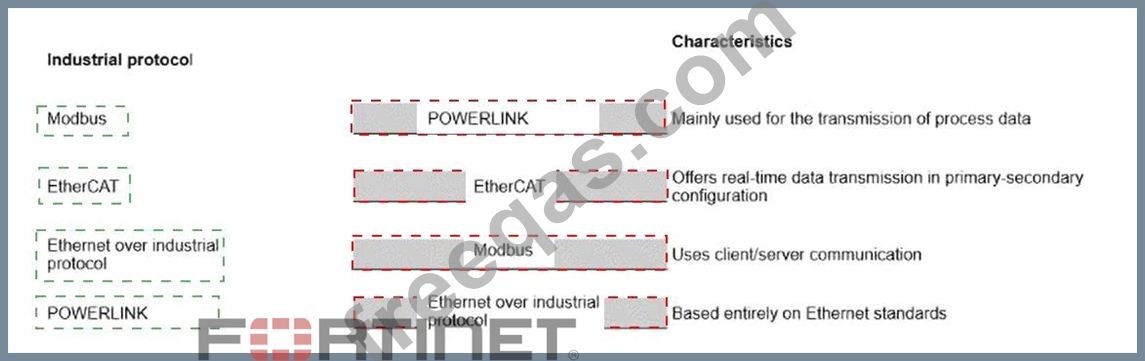
Correct Answer:

Explanation:
Industrial Protocol
Correct Characteristic
POWERLINK
Mainly used for the transmission of process data
EtherCAT
Offers real-time data transmission in a primary-secondary configuration Modbus Uses client/server communication Ethernet/IP Based entirely on Ethernet standards The correct mappings follow the industrial Ethernet characteristics defined in the OT Security 7.6 curriculum.
Ethernet/IP is the industrial protocol based entirely on Ethernet standards and adapts to the standard Ethernet
/TCP-IP architecture. EtherCAT is designed for deterministic real-time communication and specifically operates in a primary-secondary configuration while bypassing OSI layers 3 through 6. POWERLINK is an open real-time industrial Ethernet protocol that uses OSI layers 2 and 7 and is mainly intended for transmitting process data. Modbus , by contrast, uses a client/server communication model in which the server responds only after receiving a request from a client; it is not considered a real-time transmission protocol. These distinctions uniquely determine all four drag-and-drop placements.
insert code

Question 18

Refer to the exhibit.

The configuration of firewall policies is shown.
To improve the security of your OT network, you have configured authentication in the firewall policies as shown in the exhibit, with CLI parameters set to their default settings. However, when you test HTTPS access from the LAN subnet to PLC-1, it is successful without any authentication prompt.
What is the reason?

Correct Answer: A
The correct answer is A . Policy ID 8 contains the Supervisors user group, so authentication is required for traffic matching that policy. However, policy ID 9 permits traffic to PLC-1 without a user or user-group authentication requirement. Fortinet explains that when an authentication policy is followed by a fall-through policy that does not require authentication , traffic can match the fall-through policy and proceed without generating a login prompt. This is particularly relevant because the default CLI setting is auth-on-demand implicitly. Under the default implicitly behavior, FortiGate does not trigger active authentication when a matching unauthenticated fall-through policy exists. Setting auth-on-demand always, or requiring authentication on all potentially matching policies, changes that behavior. Therefore, HTTPS succeeds without prompting because authentication was not configured on firewall policy ID 9 .
insert code

Question 19

Refer to the exhibit.

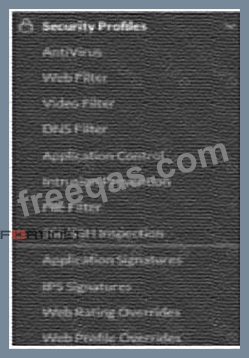
The OT devices behind the ruggedized FortiGate have vulnerabilities and you want to apply a virtual patching profile in the firewall policy. Why is Virtual Patching not available in the Security Profiles section? (Choose one answer)

Correct Answer: A
The correct answer is A. You must enable Virtual Patching in the Feature Visibility section .
The study guide states clearly that "By default, virtual patching profiles are hidden on the GUI, and you must enable them through System > Feature Visibility." That exactly matches the situation in the exhibit, where Virtual Patching does not appear under Security Profiles . So the issue is not that the feature is unsupported, but that it is simply hidden in the GUI until it is enabled.
The other options do not answer the question being asked. A valid OT security service license is required for virtual patching signatures and protection workflow, and OT signatures are relevant to IPS-based OT protection, but those do not explain why the menu item itself is missing from the Security Profiles section .
The guide specifically identifies Feature Visibility as the reason the Virtual Patching profile is not shown in the GUI. Therefore, the required action is to enable Virtual Patching in System > Feature Visibility .
insert code

Question 20

You want FortiAnalyzer to trigger an automation stitch on a FortiGate device automatically. What must you configure on FortiAnalyzer to enable direct communication with FortiGate? (Choose one answer)

Correct Answer: C
The verified answer is C. The Fabric settings . The study guide ties FortiAnalyzer-triggered actions to the Security Fabric relationship with FortiGate, not to playbook tasks or standalone event handlers alone. It explains that "within the Security Fabric environment, FortiAnalyzer is a key element in the creation of automation stitches" and shows the flow where a downstream FortiGate sends logs to FortiAnalyzer, then FortiAnalyzer parses the logs and notifies the root FortiGate , after which the root FortiGate triggers the action . This shows that FortiAnalyzer must be configured so it can communicate with FortiGate through the Security Fabric.
The guide also states that FortiAnalyzer is the foundation of the Security Fabric , providing logging, reporting, analytics, and automation for Fabric devices and endpoints. It further explains that the FortiAnalyzer Fabric connector consolidates the traffic logs within the Security Fabric. This confirms that the automation workflow depends on proper Security Fabric integration. A playbook task is used for automated SOC actions, and an event handler is used to generate events from logs, but neither one alone establishes the direct communication path needed between FortiAnalyzer and FortiGate. Therefore, the required configuration on FortiAnalyzer is the Fabric settings .
insert code
  • «
  • 1
  • 2
  • 3
  • 4
  • 5
  • 6
  • 7
  • »
[×]

Download PDF File

Enter your email address to download Fortinet.NSEI_OTS_AR-7.6.v2026-10-30.q30 Dumps

Email:

FreeQAs

Our website provides the Largest and the most Latest vendors Certification Exam materials around the world.

Using dumps we provide to Pass the Exam, we has the Valid Dumps with passing guranteed just which you need.

  • DMCA
  • About
  • Contact Us
  • Privacy Policy
  • Terms & Conditions
©2026 FreeQAs

www.freeqas.com materials do not contain actual questions and answers from Cisco's certification exams.