FreeQAs
 Request Exam  Contact
  • Home
  • View All Exams
  • New QA's
  • Upload
PRACTICE EXAMS:
  • Oracle
  • Fortinet
  • Juniper
  • Microsoft
  • Cisco
  • Citrix
  • CompTIA
  • VMware
  • ISC
  • SAP
  • EMC
  • PMI
  • HP
  • Salesforce
  • Other
  • Oracle
    Oracle
  • Fortinet
    Fortinet
  • Juniper
    Juniper
  • Microsoft
    Microsoft
  • Cisco
    Cisco
  • Citrix
    Citrix
  • CompTIA
    CompTIA
  • VMware
    VMware
  • ISC
    ISC
  • SAP
    SAP
  • EMC
    EMC
  • PMI
    PMI
  • HP
    HP
  • Salesforce
    Salesforce
  1. Home
  2. Microsoft Certification
  3. AZ-400 Exam
  4. Microsoft.AZ-400.v2026-08-16.q229 Dumps
  • ««
  • «
  • …
  • 15
  • 16
  • 17
  • 18
  • 19
  • 20
  • 21
  • 22
  • 23
  • 24
  • …
  • »
  • »»
Download Now

Question 91

You have an Azure subscription. The subscription contains virtual machines that run either Windows Server or Linux.
You plan to use Prometheus to monitor performance metrics.
You need to integrate Prometheus and Azure Monitor.
Which two actions should you perform? Each correct answer presents part of the solution.
NOTE: Each correct selection is worth one point.

Correct Answer: D,F
insert code

Question 92

You have an Azure DevOps project named Project1 and an Azure subscription named Sub1.
You need to prevent releases from being deployed unless the releases comply with the Azure Policy rules assigned to Sub1.
What should you do in the release pipeline of Project1?

Correct Answer: A
You can check policy compliance with gates.
You can extend the approval process for the release by adding a gate. Gates allow you to configure automated calls to external services, where the results are used to approve or reject a deployment.
You can use gates to ensure that the release meets a wide range or criteria, without requiring user intervention.
Reference:
https://docs.microsoft.com/en-us/azure/devops/pipelines/release/deploy-using-approvals
insert code

Question 93

You are creating a container for an ASP.NET Core app.
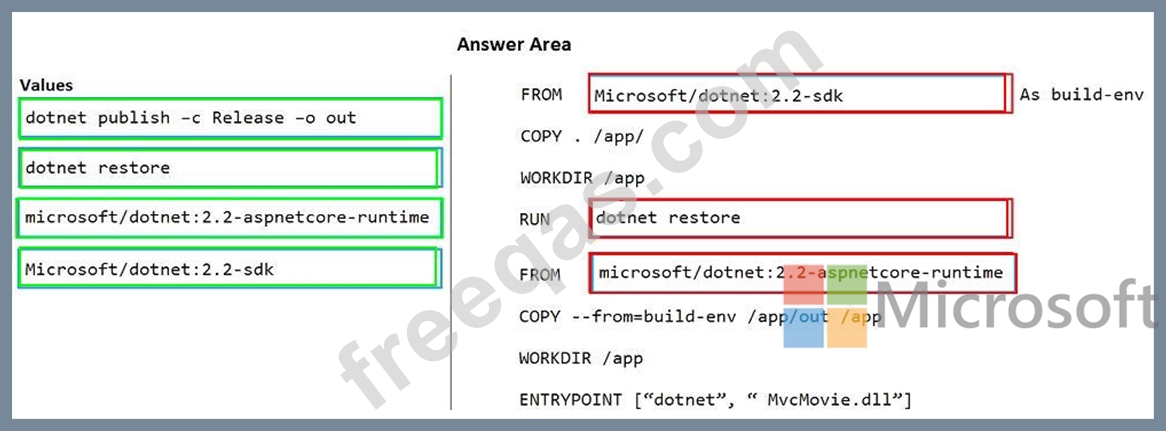
You need to create a Dockerfile file to build the image. The solution must ensure that the size of the image is minimized.
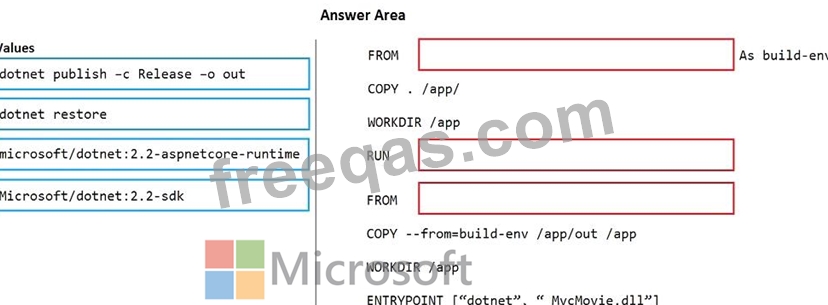
How should you configure the file? To answer, drag the appropriate values to the correct targets. Each value must be used once, more than once, or not at all. You may need to drag the split bar between panes or scroll to view content.
NOTE: Each correct selection is worth one point.
Correct Answer:

Reference:
https://docs.microsoft.com/de-DE/virtualization/windowscontainers/quick-start/building-sample-app
insert code

Question 94

You have an Azure DevOps organization named Contoso.
You need to recommend an authentication mechanism that meets the following requirements:
- Supports authentication from Git
- Minimizes the need to provide credentials during authentication
What should you recommend?

Correct Answer: A
Personal access tokens (PATs) give you access to Azure DevOps and Team Foundation Server (TFS), without using your username and password directly. These tokens have an expiration date from when they're created. You can restrict the scope of the data they can access. Use PATs to authenticate if you don't already have SSH keys set up on your system or if you need to restrict the permissions that are granted by the credential.
Incorrect Answers:
B: Azure DevOps no longer supports Alternate Credentials authentication since the beginning of March 2, 2020. If you're still using Alternate Credentials, we [Microsoft] strongly encourage you to switch to a more secure authentication method (for example, personal access tokens).
Reference:
https://docs.microsoft.com/en-us/azure/devops/repos/git/auth-overview
insert code

Question 95

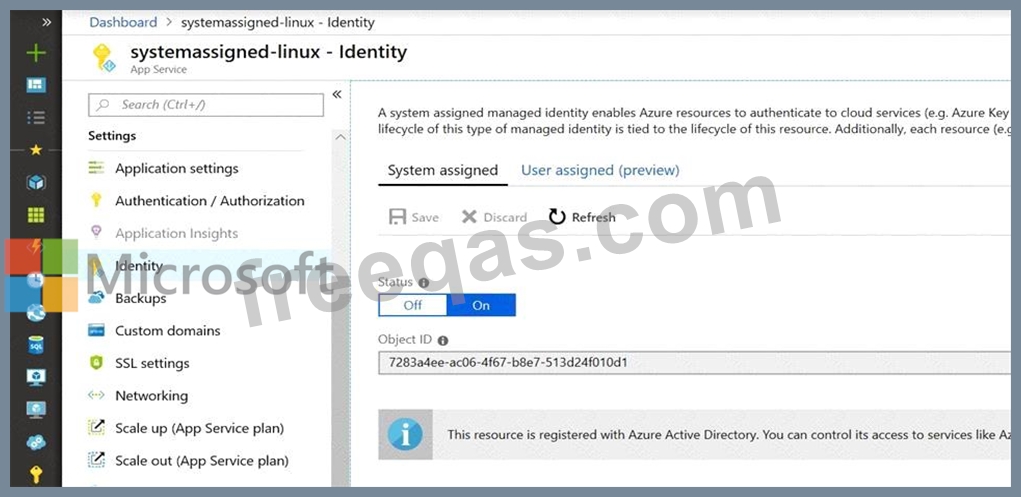
You need to ensure that an Azure web app named az400-9940427-main can retrieve secrets from an Azure key vault named az400-9940427-kv1 by using a system managed identity.
The solution must use the principle of least privilege.
To complete this task, sign in to the Microsoft Azure portal.
Correct Answer:
See solution below.
Explanation:
1. In Azure portal navigate to the az400-9940427-main app.
2. Scroll down to the Settings group in the left navigation.
3. Select Managed identity.
4. Within the System assigned tab, switch Status to On. Click Save.

References:
https://docs.microsoft.com/en-us/azure/app-service/overview-managed-identity
insert code
  • ««
  • «
  • …
  • 15
  • 16
  • 17
  • 18
  • 19
  • 20
  • 21
  • 22
  • 23
  • 24
  • …
  • »
  • »»
[×]

Download PDF File

Enter your email address to download Microsoft.AZ-400.v2026-08-16.q229 Dumps

Email:

FreeQAs

Our website provides the Largest and the most Latest vendors Certification Exam materials around the world.

Using dumps we provide to Pass the Exam, we has the Valid Dumps with passing guranteed just which you need.

  • DMCA
  • About
  • Contact Us
  • Privacy Policy
  • Terms & Conditions
©2026 FreeQAs

www.freeqas.com materials do not contain actual questions and answers from Cisco's certification exams.
