FreeQAs
 Request Exam  Contact
  • Home
  • View All Exams
  • New QA's
  • Upload
PRACTICE EXAMS:
  • Oracle
  • Fortinet
  • Juniper
  • Microsoft
  • Cisco
  • Citrix
  • CompTIA
  • VMware
  • ISC
  • SAP
  • EMC
  • PMI
  • HP
  • Salesforce
  • Other
  • Oracle
    Oracle
  • Fortinet
    Fortinet
  • Juniper
    Juniper
  • Microsoft
    Microsoft
  • Cisco
    Cisco
  • Citrix
    Citrix
  • CompTIA
    CompTIA
  • VMware
    VMware
  • ISC
    ISC
  • SAP
    SAP
  • EMC
    EMC
  • PMI
    PMI
  • HP
    HP
  • Salesforce
    Salesforce
  1. Home
  2. Microsoft Certification
  3. DP-600 Exam
  4. Microsoft.DP-600.v2026-10-12.q204 Dumps
  • ««
  • «
  • …
  • 10
  • 11
  • 12
  • 13
  • 14
  • 15
  • 16
  • 17
  • 18
  • 19
  • …
  • »
  • »»
Download Now

Question 66

You have a Fabric tenant that contains a warehouse. The warehouse uses row-level security (RLS).
You create a Direct Lake semantic model that uses the Delta tables and RLS of the warehouse.
When users interact with a report built from the model, which mode will be used by the DAX queries?

Correct Answer: A
Row-level security only applies to queries on a Warehouse or SQL analytics endpoint in Fabric.
Power BI queries on a warehouse in Direct Lake mode will fall back to Direct Query mode to abide by row-level security.
https://learn.microsoft.com/en-us/fabric/data-warehouse/row-level-security
insert code

Question 67

You have the following KQL query named Query1.

You need to improve the performance of Query1.
The solution must minimize resource use How should you restructure Query1?

Correct Answer: D
insert code

Question 68

You have a Fabric tenant that contains a lakehouse named Lakehouse1.
You need to prevent new tables added to Lakehouse1 from being added automatically to the default semantic model of the lakehouse.
What should you configure? (5)

Correct Answer: D
To prevent new tables added to Lakehouse1 from being automatically added to the default semantic model, you should configure the semantic model settings. There should be an option within the settings of the semantic model to include or exclude new tables by default. By adjusting these settings, you can control the automatic inclusion of new tables.
References: The management of semantic models and their settings would be covered under the documentation for the semantic layer or modeling features of the Fabric tenant's lakehouse solution.
insert code

Question 69

You have a Microsoft Power B1 report and a semantic model that uses Direct Lake mode. From Power Si Desktop, you open Performance analyzer as shown in the following exhibit.
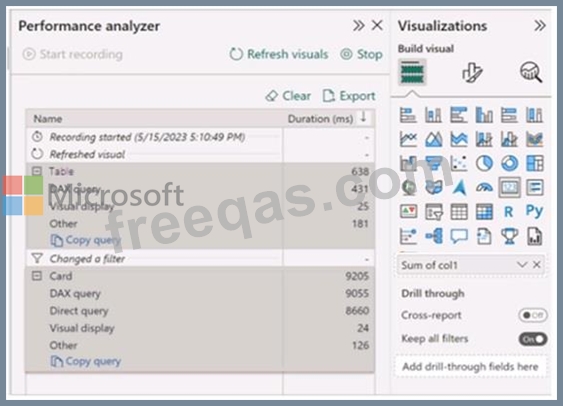
Use the drop-down menus to select the answer choice that completes each statement based on the information presented in the graphic. NOTE: Each correct selection is worth one point.
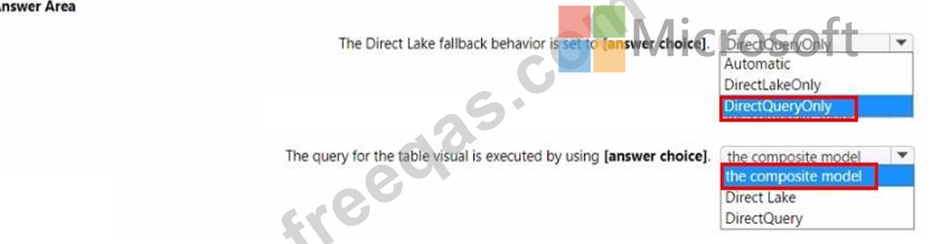
Correct Answer:
insert code

Question 70

You have a Fabric tenant that contains a semantic model named Model1. Model1 contains a fact table named FactSales. FactSales has a relationship to a dimension table named DimDate on a column named OrderDate.
To FactSales, you add a second relationship between FactSales and DimDate based on a column named ShippedDate.
You need to filter by using ShippedDate in a new report. The solution must NOT affect the function of existing reports.
Which two actions should you perform? Each correct answer presents part of the solution.
NOTE: Each correct answer is worth one point.


Correct Answer: D,E
To use the ShippedDate relationship without breaking existing reports, you must treat the second relationship as inactive and invoke it specifically within a DAX measure.
[E]
Step 1: Configure the Relationship
The most important step for backward compatibility is ensuring the new relationship does not become the "Active" path.
Open your Model View in Power BI Desktop or the Fabric Web UI.
Locate the relationship between FactTable[ShippedDate] and DimDate[OrderDate].
Right-click the relationship and select Properties.
Uncheck the box "Make this relationship active."
Ensure the existing relationship (OrderDate) remains Active.
[D]
Step 2: Create the DAX Measure
Because the relationship is inactive, standard filters on the Date table will only affect OrderDate.
To filter by ShippedDate, you must create a measure that explicitly activates that path.
Total Sales by Shipped Date =
CALCULATE(
[Total Sales],
USERELATIONSHIP(FactTable[ShippedDate], DimDate[DateKey])
)
Incorrect:
[Not A]
Do not make the ShippedDate relationship active: This will immediately break all existing reports that expect the OrderDate relationship to be the default.
[Not C]
Do not use bi-directional filters: This does not solve the multiple-date problem and can cause performance issues or ambiguity.
Reference:
https://sergiomurru.com/2021/02/19/ambiguous-model-and-userelationship/
insert code
  • ««
  • «
  • …
  • 10
  • 11
  • 12
  • 13
  • 14
  • 15
  • 16
  • 17
  • 18
  • 19
  • …
  • »
  • »»
[×]

Download PDF File

Enter your email address to download Microsoft.DP-600.v2026-10-12.q204 Dumps

Email:

FreeQAs

Our website provides the Largest and the most Latest vendors Certification Exam materials around the world.

Using dumps we provide to Pass the Exam, we has the Valid Dumps with passing guranteed just which you need.

  • DMCA
  • About
  • Contact Us
  • Privacy Policy
  • Terms & Conditions
©2026 FreeQAs

www.freeqas.com materials do not contain actual questions and answers from Cisco's certification exams.