FreeQAs
 Request Exam  Contact
  • Home
  • View All Exams
  • New QA's
  • Upload
PRACTICE EXAMS:
  • Oracle
  • Fortinet
  • Juniper
  • Microsoft
  • Cisco
  • Citrix
  • CompTIA
  • VMware
  • ISC
  • SAP
  • EMC
  • PMI
  • HP
  • Salesforce
  • Other
  • Oracle
    Oracle
  • Fortinet
    Fortinet
  • Juniper
    Juniper
  • Microsoft
    Microsoft
  • Cisco
    Cisco
  • Citrix
    Citrix
  • CompTIA
    CompTIA
  • VMware
    VMware
  • ISC
    ISC
  • SAP
    SAP
  • EMC
    EMC
  • PMI
    PMI
  • HP
    HP
  • Salesforce
    Salesforce
  1. Home
  2. Microsoft Certification
  3. DP-600 Exam
  4. Microsoft.DP-600.v2026-10-12.q204 Dumps
  • ««
  • «
  • …
  • 13
  • 14
  • 15
  • 16
  • 17
  • 18
  • 19
  • 20
  • 21
  • 22
  • …
  • »
  • »»
Download Now

Question 81

You have a Fabric tenant.
You plan to create a Fabric notebook that will use Spark DataFrames to generate Microsoft Power Bl visuals.
You run the following code.

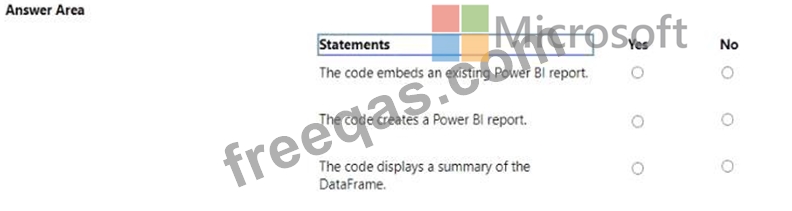
For each of the following statements, select Yes if the statement is true. Otherwise, select No. NOTE: Each correct selection is worth one point.
Correct Answer:

Explanation:
The code embeds an existing Power BI report. - No
The code creates a Power BI report. - Yes
The code displays a summary of the DataFrame. - Yes
The code provided seems to be a snippet from a SQL query or script which is neither creating nor embedding a Power BI report directly. It appears to be setting up a DataFrame for use within a larger context, potentially for visualization in Power BI, but the code itself does not perform the creation or embedding of a report.
Instead, it ' s likely part of a data processing step that summarizes data.
References =
Introduction to DataFrames - Spark SQL
Power BI and Azure Databricks
insert code

Question 82

You have a Microsoft Power Bl project that contains a file named definition.pbir. definition.pbir contains the following JSON.

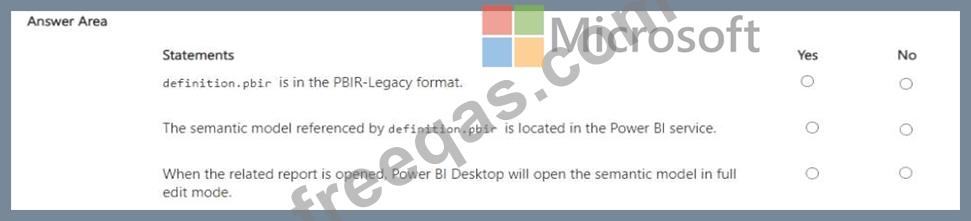
For each of the following statements, select Yes if the statement is true. Otherwise, select No. NOTE: Each correct selection is worth one point.
Correct Answer:

Explanation:

We are analyzing the JSON for definition.pbir in a Power BI Project:
{
" version " : " 1.0 " ,
" datasetReference " : {
" byPath " : {
" path " : " ../Sales.Dataset "
},
" byConnection " : null
}
}
Statement 1:
" definition.pbir is in the PBIR-Legacy format. "
No # The legacy PBIR format references datasets by byConnection (pointing to the Power BI service).
Here, it uses byPath, which is the new project format, not legacy.
Statement 2:
" The semantic model referenced by definition.pbir is located in the Power BI service. " No # The JSON shows byPath: " ../Sales.Dataset " , meaning the semantic model is referenced locally within the project folder (Sales.Dataset), not in the Power BI service.
Statement 3:
" When the related report is opened, Power BI Desktop will open the semantic model in full edit mode. " Yes # Since the semantic model is referenced by path (local PBIP project files), Power BI Desktop will open the model in full edit mode. If it had been byConnection, it would open in live connect mode to the service instead.
Final Answer:
PBIR-Legacy format # No
Semantic model in Power BI service # No
Opens in full edit mode # Yes
References:
Power BI Project (PBIP) structure
PBIR formats: byPath vs byConnection
insert code

Question 83

You have a Microsoft Power B1 report and a semantic model that uses Direct Lake mode. From Power Si Desktop, you open Performance analyzer as shown in the following exhibit.

Use the drop-down menus to select the answer choice that completes each statement based on the information presented in the graphic. NOTE: Each correct selection is worth one point.

Correct Answer:

Explanation:
* The Direct Lake fallback behavior is set to: DirectQueryOnly
* The query for the table visual is executed by using: DirectQuery
In the context of Microsoft Power BI, when using DirectQuery in Direct Lake mode, there is no caching of data and all queries are sent directly to the underlying data source. The Performance Analyzer tool shows the time taken for different operations, and from the options provided, it indicates that DirectQuery mode is being used for the visuals, which is consistent with the Direct Lake setting. DirectQueryOnly as the fallback behavior ensures that only DirectQuery will be used without reverting to import mode.
insert code

Question 84

You have a Fabric warehouse that contains two tables named DimDate and Trips.
DimDate contains the following fields.

Trips contains the following fields.

You need to compare the average miles per trip for statutory holidays versus non-statutory holidays.
How should you complete the T-SQL statement? To answer, select the appropriate options in the answer area.
NOTE: Each correct selection is worth one point.

Correct Answer:

Explanation:

Comprehensive Detailed Explanation
Step 1: Requirement
We need to compare the average miles per trip for:
Statutory holidays (when IsHoliday = 1)
Non-statutory holidays (when IsHoliday = 0)
Step 2: Formula for average miles per trip
Average miles per trip = total miles ÷ number of trips
Total miles # SUM(t.tripDistance)
Number of trips # COUNT(t.tripID)
So the calculation is:
(SUM(t.tripDistance) / COUNT(t.tripID)) AS MilesPerTrip
Step 3: Grouping
We need a comparison by holiday status.
So we must group the results by:
GROUP BY d.IsHoliday
This ensures we get two rows: one for IsHoliday = 1 and one for IsHoliday = 0.
Step 4: Final Query
SELECT
d.IsHoliday,
(SUM(t.tripDistance) / COUNT(t.tripID)) AS MilesPerTrip
FROM DimDate d
INNER JOIN Trips t ON d.DateID = t.DateID
GROUP BY d.IsHoliday;
Why This is Correct
The formula ensures average miles per trip.
Grouping ensures comparison between holidays vs non-holidays.
Efficient aggregation, minimal computation.
References
Aggregate functions in T-SQL
GROUP BY clause
insert code

Question 85

You have a query in Power Query Editor that contains two columns named Order_Date and Shipping_Date.
You need to create a column that will calculate the number of days between Order_Date and Shipping_Date for each row.
Which Power Query function should you use?


Correct Answer: A
Comprehensive Detailed Explanation
Requirement
We have two columns in Power Query Editor:
Order_Date
Shipping_Date
We need to calculate the number of days between the two dates .
Step 1: How date differences work in Power Query (M language)
Subtracting two date or datetime values in Power Query returns a duration value.
Example:
[Shipping_Date] - [Order_Date]
This produces a duration such as 3.00:00:00 (3 days).
Step 2: Converting duration into days
To get the number of days as an integer, we use Duration.Days() .
Example:
Duration.Days([Shipping_Date] - [Order_Date] )
This returns 3 if the shipping date is 3 days after the order date.
Step 3: Evaluate other options
A). Duration.From # Converts a value to a duration type but does not extract the number of days.
B). Date.AddDays # Adds days to a given date, not used for calculating the difference.
C). Duration.Days # Correct, extracts total days from a duration.
D). DateTime.LocalNow # Returns the current system datetime, unrelated to this requirement.
References
Duration.Days function (Power Query M)
Working with dates in Power Query
insert code
  • ««
  • «
  • …
  • 13
  • 14
  • 15
  • 16
  • 17
  • 18
  • 19
  • 20
  • 21
  • 22
  • …
  • »
  • »»
[×]

Download PDF File

Enter your email address to download Microsoft.DP-600.v2026-10-12.q204 Dumps

Email:

FreeQAs

Our website provides the Largest and the most Latest vendors Certification Exam materials around the world.

Using dumps we provide to Pass the Exam, we has the Valid Dumps with passing guranteed just which you need.

  • DMCA
  • About
  • Contact Us
  • Privacy Policy
  • Terms & Conditions
©2026 FreeQAs

www.freeqas.com materials do not contain actual questions and answers from Cisco's certification exams.