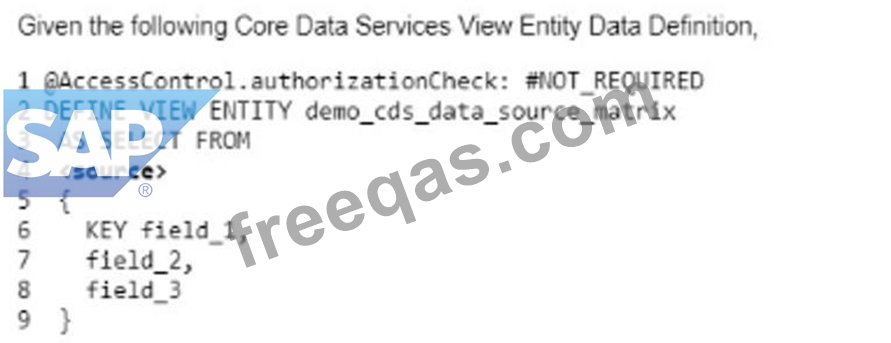
Why would you use Access Controls with CDS Views? Note: There are 2 correct answers to this question.
Correct Answer: A,C
You would use Access Controls with CDS Views for the following reasons: A) Only the data corresponding to the user's authorization is transferred from the database to the application layer. This is true because Access Controls allow you to define CDS roles that specify the authorization conditions for accessing a CDS view. The CDS roles are evaluated for every user at runtime and the system automatically adds the restrictions to the selection conditions of the CDS view. This ensures that only the data that the user is authorized to see is read from the database and transferred to the application layer. This improves the security and the performance of the data access1. C) You do not have to remember to implement AUTHORITY CHECK statements. This is true because Access Controls provide a declarative and centralized way of defining the authorization logic for a CDS view. You do not have to write any procedural code or use the AUTHORITY CHECK statement to check the user's authorization for each data source or field. The system handles the authorization check automatically and transparently for you2. The following reasons are not valid for using Access Controls with CDS Views: B) The system field sy-subrc is set, giving you the result of the authorization check. This is false because the system field sy-subrc is not used by Access Controls. The sy-subrc field is used by the AUTHORITY CHECK statement to indicate the result of the authorization check, but Access Controls do not use this statement. Instead, Access Controls use CDS roles to filter the data according to the user's authorization2. D) All of the data from the data sources is loaded into your application automatically and filtered there according to the user's authorization. This is false because Access Controls do not load all the data from the data sources into the application layer. Access Controls filter the data at the database layer, where the data resides, and only transfer the data that the user is authorized to see to the application layer. This reduces the data transfer and the memory consumption of the application layer1.
Question 52
Which of the following are parts of answers to this question.
Correct Answer: B,C
A CDS view is a data definition that defines a data structure and a data selection from one or more data sources. A CDS view consists of several parts, but two of them are: * Extension: An extension is an optional clause that allows a CDS view to extend another CDS view by adding new elements, annotations, or associations. The extension clause has the syntax EXTEND VIEW view_name WITH view_name. The first view_name is the name of the CDS view that is being extended, and the second view_name is the name of the CDS view that is doing the extension1. * Field list: A field list is a mandatory clause that specifies the elements of the CDS view. The field list has the syntax SELECT FROM data_source { element_list }. The data_source is the name of the data source that the CDS view selects data from, and the element_list is a comma-separated list of elements that the CDS view exposes. The elements can be fields of the data source, expressions, associations, or annotations2. The following example shows a CDS view that extends another CDS view and defines a field list: @AbapCatalog.sqlViewName: 'ZCDS_EXT' define view Z_CDS_Extension extend view Z_CDS_Base with Z_CDS_Extension as select from ztable { // field list key ztable.id as ID, ztable.name as Name, ztable.age as Age, // extension @Semantics.currencyCode: true ztable.currency as Currency } The other options are not parts of a CDS view, but rather related concepts: * Partitioning attributes: Partitioning attributes are attributes that are used to partition a table into smaller subsets of data. Partitioning attributes are defined in the ABAP Dictionary for transparent tables and can improve the performance and scalability of data access. Partitioning attributes are not part of the CDS view definition, but rather the underlying table definition3. * Semantic table attributes: Semantic table attributes are attributes that provide additional information about the meaning and usage of a table. Semantic table attributes are defined in the ABAP Dictionary for transparent tables and can be used to enhance the data modeling and consumption of the table. Semantic table attributes are not part of the CDS view definition, but rather the underlying table definition4. References: 1: Extending CDS Views | SAP Help Portal 2: SELECT List - ABAP Keyword Documentation 3: Partitioning Attributes - ABAP Keyword Documentation 4: Semantic Table Attributes - ABAP Keyword Documentation
Question 53
For what kind of applications would you consider using on-stack developer extensions? Note: There are 2 correct answers to this question.
Correct Answer: A,B
On-stack developer extensibility is a type of extensibility that allows you to create development projects directly on the SAP S/4HANA Cloud technology stack. It gives you the opportunity to develop cloud-ready and upgrade-stable custom ABAP applications and services inside the SAP S/4HANA Cloud, public edition system. You can use the ABAP Development Tools in Eclipse to create and deploy your on-stack extensions. On-stack developer extensibility is suitable for the following kinds of applications: Applications that provide APIs for side by side SAP BTP apps. On-stack developer extensibility allows you to create OData services or RESTful APIs based on CDS view entities or projection views. These services or APIs can expose SAP S/4HANA data and logic to other applications that run on the SAP Business Technology Platform (SAP BTP) or other platforms. This way, you can create a loosely coupled integration between your SAP S/4HANA system and your side by side SAP BTP apps. Applications that access SAP S/4HANA data using complex SQL. On-stack developer extensibility allows you to use ABAP SQL to access SAP S/4HANA data using complex queries, such as joins, aggregations, filters, parameters, and code pushdown techniques. You can also use ABAP SQL to perform data manipulation operations, such as insert, update, delete, and upsert. This way, you can create applications that require advanced data processing and analysis on SAP S/4HANA data. The other kinds of applications are not suitable for on-stack developer extensibility, as they have different requirements and challenges. These kinds of applications are: Applications that integrate data from several different systems. On-stack developer extensibility is not meant for creating applications that integrate data from multiple sources, such as other SAP systems, third-party systems, or cloud services. This is because on-stack developer extensibility does not support remote access or data replication, and it may cause performance or security issues. For this kind of applications, you should use side by side extensibility, which allows you to create applications that run on the SAP BTP and communicate with the SAP S/4HANA system via public APIs or events. Applications that run separate from SAP S/4HANA. On-stack developer extensibility is not meant for creating applications that run independently from the SAP S/4HANA system, such as standalone apps, microservices, or web apps. This is because on-stack developer extensibility requires a tight coupling with the SAP S/4HANA system, and it may limit the scalability, flexibility, and portability of the applications. For this kind of applications, you should use side by side extensibility, which allows you to create applications that run on the SAP BTP and leverage the cloud-native features and services of the platform.
Question 54
Which of the following types are permitted to be used for <source> on line #4? Note: There are 2 correct answers to this question.
Correct Answer: A,B
Explanation The <source> clause in the CDS View Entity Data Definition can be used to specify the data source for the view entity. The <source> clause can accept different types of data sources, depending on the type of the view entity1. A database table from the ABAP Dictionary: This is a valid type of data source for a CDS View Entity Data Definition. A database table from the ABAP Dictionary is a table that is defined in the ABAP Dictionary using the keyword TABLE or TABLE OF. The name of the database table must be unique within its namespace and must not contain any special characters2. A CDS DDIC-based view: This is also a valid type of data source for a CDS View Entity Data Definition. A CDS DDIC-based view is a view that is defined in the Core Data Services using the keyword DEFINE VIEW ENTITY. The name of the CDS DDIC-based view must be unique within its namespace and must not contain any special characters3. You cannot do any of the following: An external view from the ABAP Dictionary: This is not a valid type of data source for a CDS View Entity Data Definition. An external view from the ABAP Dictionary is a view that is defined in an external application using any language supported by SAP, such as SQL, PL/SQL, or Java. The name of the external view must be unique within its namespace and must not contain any special characters4. A database view from the ABAP Dictionary: This is not a valid type of data source for a CDS View Entity Data Definition. A database view from the ABAP Dictionary is a view that is defined in an external application using any language supported by SAP, such as SQL, PL/SQL, or Java. The name of the database view must be unique within its namespace and must not contain any special characters4. References: 1: CDS DDL - DEFINE VIEW ENTITY - ABAP Keyword Documentation - SAP Online Help 2: ABAP Dictionary Tables - SAP Online Help 3: CDS DDL - DEFINE VIEW ENTITY - ABAP Keyword Documentation - SAP Online Help 4: ABAP Dictionary Views - SAP Online Help
Question 55
Which of the following string functions are predicate functions? Note: There are 2 correct answers to this question.
Correct Answer: B,D
Explanation String functions are expressions that can be used to manipulate character-like data in ABAP. String functions can be either predicate functions or non-predicate functions. Predicate functions are string functions that return a truth value (true or false) for a condition of the argument text. Non-predicate functions are string functions that return a character-like result for an operation on the argument text1. The following string functions are predicate functions: B). contains_any_of(): This function returns true if the argument text contains at least one of the characters specified in the character set. For example, the following expression returns true, because the text 'ABAP' contains at least one of the characters 'A', 'B', or 'C': contains_any_of( val = 'ABAP' set = 'ABC' ). D). matches(): This function returns true if the argument text matches the pattern specified in the regular expression. For example, the following expression returns true, because the text 'ABAP' matches the pattern that consists of four uppercase letters: matches( val = 'ABAP' regex = '[A-Z]{4}' ). The following string functions are not predicate functions, because they return a character-like result, not a truth value: A). find_any_not_of(): This function returns the position of the first character in the argument text that is not contained in the character set. If no such character is found, the function returns 0. For example, the following expression returns 3, because the third character of the text 'ABAP' is not contained in the character set 'ABC': find_any_not_of( val = 'ABAP' set = 'ABC' ). C). count_any_of(): This function returns the number of characters in the argument text that are contained in the character set. For example, the following expression returns 2, because there are two characters in the text 'ABAP' that are contained in the character set 'ABC': count_any_of( val = 'ABAP' set = 'ABC' ). References: 1: String Functions - ABAP Keyword Documentation