FreeQAs
 Request Exam  Contact
  • Home
  • View All Exams
  • New QA's
  • Upload
PRACTICE EXAMS:
  • Oracle
  • Fortinet
  • Juniper
  • Microsoft
  • Cisco
  • Citrix
  • CompTIA
  • VMware
  • ISC
  • SAP
  • EMC
  • PMI
  • HP
  • Salesforce
  • Other
  • Oracle
    Oracle
  • Fortinet
    Fortinet
  • Juniper
    Juniper
  • Microsoft
    Microsoft
  • Cisco
    Cisco
  • Citrix
    Citrix
  • CompTIA
    CompTIA
  • VMware
    VMware
  • ISC
    ISC
  • SAP
    SAP
  • EMC
    EMC
  • PMI
    PMI
  • HP
    HP
  • Salesforce
    Salesforce
  1. Home
  2. UiPath Certification
  3. UiPath-ADAv1 Exam
  4. UiPath.UiPath-ADAv1.v2024-05-27.q139 Dumps
  • ««
  • «
  • …
  • 5
  • 6
  • 7
  • 8
  • 9
  • 10
  • 11
  • 12
  • 13
  • 14
  • …
  • »
  • »»
Download Now

Question 41

What is the functionality of the Include Subfolders filter in the Monitoring pages when a modern folder is selected?

Correct Answer: B
Explanation
The Include Subfolders filter is a toggle button that appears in the Monitoring pages when a modern folder is selected from the Folders drop-down list1. The modern folders are folders that can have subfolders and support role-based access control2. The Include Subfolders filter allows you to choose whether to display the data for the selected folder only, or for the selected folder and all its subfolders3. This filter applies to the Jobs, Queues, Triggers, and Robots pages4. The Include Subfolders filter helps you to monitor and manage the processes and resources across different levels of folders.
https://forum.uipath.com/t/read-all-file-from-sub-folder-and-sub-folder-of-sub-folder/460493
insert code

Question 42

A developer loaded an existing workflow that uses Ul Automation in Google Chrome. The Google Chrome extension has not been installed on the developer's machine How should the developer load the Google Chrome extension from UiPath Studio?
Instructions: Drag the Description found on the left and drop on the correct Step found on the right.

Correct Answer:

Explanation
The developer can load the Google Chrome extension from UiPath Studio by following these steps:
Step 1 = Navigate to Home in UiPath Studio. This is the section where you can create, open, or manage your projects.
Step 2 = Click Tools to see UiPath Extensions. This is the section where you can install or update various extensions for different applications or browsers.
Step 3 = Select Chrome and then click Install. This will launch the Chrome browser and redirect you to the Chrome Web Store page for the UiPath extension.
Step 4 = Click Enable extension in the Google Chrome confirmation pop-up. This will add the UiPath extension to your browser and allow you to use UI automation activities in Chrome.
insert code

Question 43

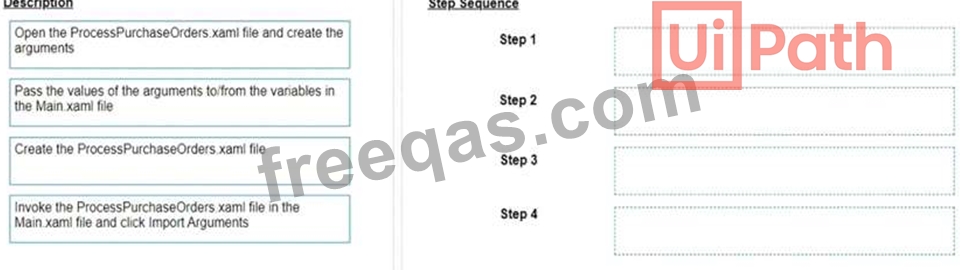
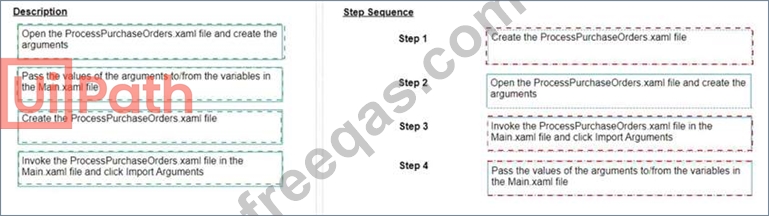
A developer wants to invoke a workflow in Main xaml called ProcessPurchaseOrders.xamI. Data needs to be passed to and from the invoked workflow What is the correct sequence of steps the developer needs to perform?
Instructions: Drag the Description found on the left and drop on the correct Step found on the right
Correct Answer:

Explanation
The correct sequence of steps the developer needs to perform is:
Step 1 = Create the ProcessPurchaseOrders.xaml file
Step 2 = Open the ProcessPurchaseOrders.xaml file and create the arguments Step 3 = Invoke the ProcessPurchaseOrders.xaml file in the Main.xaml file and click Import Arguments Step 4 = Pass the values of the arguments to/from the variables in the Main.xaml file This sequence will ensure that the developer can create a reusable workflow, invoke it from the main workflow, and pass data between them using arguments.
https://forum.uipath.com/t/import-arguments-in-invoke-workflow-file/1923
https://forum.uipath.com/t/pass-arguments-invoke/132595
insert code

Question 44

When should the Show Elements button be used in the Computer Vision wizard?

Correct Answer: A
Explanation
The Show Elements button in the Computer Vision wizard is used to toggle the highlighting of all UI elements that have been detected by the Computer Vision engine on the target application. This helps to visualize the accuracy and scope of the UI element recognition and to select the desired UI element for automation. (UiPath Automation Developer study guide) References:
Computer Vision
Computer Vision Wizard
insert code

Question 45

A developer designed an automation to use an Asset value from Orchestrator using the Get Asset activity. The value represents email addresses of the process owners which may change.
Which Asset Type should be used?

Correct Answer: C
The Asset Type that should be used for storing email addresses of the process owners is Text. Text assets are used to store only string values, such as names, addresses, URLs, etc. Text assets can be easily retrieved and updated using the Get Asset and Set Asset activities in UiPath Studio. Text assets are suitable for storing email addresses, as they can contain alphanumeric characters, symbols, and special characters. Text assets can also be used in various activities that require string input or output, such as Send Email, Write Line, Assign, etc.
References: About Assets and Assets in UiPath Orchestrator and their usage in project from UiPath documentation and RPA Learners.
insert code
  • ««
  • «
  • …
  • 5
  • 6
  • 7
  • 8
  • 9
  • 10
  • 11
  • 12
  • 13
  • 14
  • …
  • »
  • »»
[×]

Download PDF File

Enter your email address to download UiPath.UiPath-ADAv1.v2024-05-27.q139 Dumps

Email:

FreeQAs

Our website provides the Largest and the most Latest vendors Certification Exam materials around the world.

Using dumps we provide to Pass the Exam, we has the Valid Dumps with passing guranteed just which you need.

  • DMCA
  • About
  • Contact Us
  • Privacy Policy
  • Terms & Conditions
©2026 FreeQAs

www.freeqas.com materials do not contain actual questions and answers from Cisco's certification exams.
