FreeQAs
 Request Exam  Contact
  • Home
  • View All Exams
  • New QA's
  • Upload
PRACTICE EXAMS:
  • Oracle
  • Fortinet
  • Juniper
  • Microsoft
  • Cisco
  • Citrix
  • CompTIA
  • VMware
  • ISC
  • SAP
  • EMC
  • PMI
  • HP
  • Salesforce
  • Other
  • Oracle
    Oracle
  • Fortinet
    Fortinet
  • Juniper
    Juniper
  • Microsoft
    Microsoft
  • Cisco
    Cisco
  • Citrix
    Citrix
  • CompTIA
    CompTIA
  • VMware
    VMware
  • ISC
    ISC
  • SAP
    SAP
  • EMC
    EMC
  • PMI
    PMI
  • HP
    HP
  • Salesforce
    Salesforce
  1. Home
  2. UiPath Certification
  3. UiPath-ADAv1 Exam
  4. UiPath.UiPath-ADAv1.v2024-05-27.q139 Dumps
  • ««
  • «
  • …
  • 4
  • 5
  • 6
  • 7
  • 8
  • 9
  • 10
  • 11
  • 12
  • 13
  • …
  • »
  • »»
Download Now

Question 36

The provided exhibit displays the representation of the "Deadline" field using the yyyy-mm-dd format.
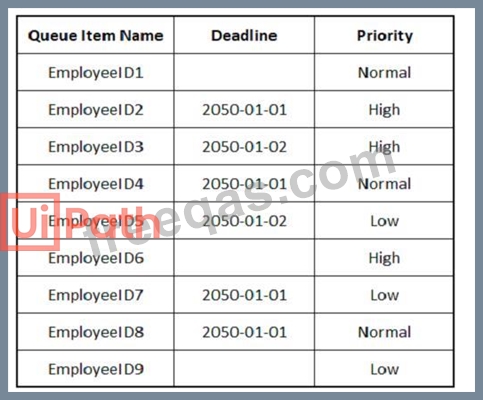
In what order should the Queue Items be processed by a single robot executing a Performer workflow?

Correct Answer:

Explanation
The Queue Items should be processed by a single robot executing a Performer workflow in the following order:
EmployeeID1
EmployeeID4
EmployeeID8
EmployeeID3
EmployeeID6
EmployeeID9
EmployeeID5
EmployeeID2
EmployeeID7
A queue is a container that holds an unlimited number of items that can be processed by a robot1. A queue item can have a deadline and a priority, which affect the order in which the robot retrieves the items from the queue2. The Performer workflow is a part of the REFramework template that processes the queue items using the Get Transaction Item activity3. The order of queue execution is determined by the following rules4:
Items that have a deadline are processed first, in order of priority and according to the set deadline for items with the same priority.
Items that have no deadline are processed next, in order of priority and according to the rule First In, First Out for items with the same priority.
Based on these rules and the exhibit, the order of queue execution is as follows:
EmployeeID1 has the earliest deadline (2050-01-01) and high priority, so it is processed first.
EmployeeID4 has the same deadline as EmployeeID1, but normal priority, so it is processed second.
EmployeeID8 has the same deadline and priority as EmployeeID4, but it was added later to the queue, so it is processed third.
EmployeeID3 has the next earliest deadline (2050-01-02) and high priority, so it is processed fourth.
EmployeeID6 has the same deadline as EmployeeID3, but normal priority, so it is processed fifth.
EmployeeID9 has the same deadline and priority as EmployeeID6, but it was added later to the queue, so it is processed sixth.
EmployeeID5 has no deadline, but high priority, so it is processed seventh.
EmployeeID2 has no deadline and normal priority, so it is processed eighth.
EmployeeID7 has no deadline and low priority, so it is processed ninth.
References:
About Queues and Transactions documentation from UiPath
Processing Order documentation from UiPath
Performer documentation from UiPath
Order processing queue forum post from UiPath Community
insert code

Question 37

A developer loaded an existing workflow that uses Ul Automation in Google Chrome. The Google Chrome extension has not been installed on the developer's machine How should the developer load the Google Chrome extension from UiPath Studio?
Instructions: Drag the Description found on the left and drop on the correct Step found on the right.

Correct Answer:

Explanation
The developer can load the Google Chrome extension from UiPath Studio by following these steps:
Step 1 = Navigate to Home in UiPath Studio. This is the section where you can create, open, or manage your projects.
Step 2 = Click Tools to see UiPath Extensions. This is the section where you can install or update various extensions for different applications or browsers.
Step 3 = Select Chrome and then click Install. This will launch the Chrome browser and redirect you to the Chrome Web Store page for the UiPath extension.
Step 4 = Click Enable extension in the Google Chrome confirmation pop-up. This will add the UiPath extension to your browser and allow you to use UI automation activities in Chrome.
insert code

Question 38

What variable type should the developer use to store the monetary amount read from a single cell in an Excel file, before inputting it into a field in a web application for the automation process?

Correct Answer: B
The variable type that the developer should use to store the monetary amount read from a single cell in an Excel file, before inputting it into a field in a web application for the automation process, is Double. This is because the Double variable type can store decimal numbers with high precision and a large range of values.
This is suitable for storing monetary amounts that may have fractions or large digits. The Double variable type can be used with the Read Cell activity to read the value from the Excel file, and with the Type Into activity to input the value into the web application. The developer can also use the Format Value activity to format the Double variable as a currency, if needed.
References:
Types of Variables - UiPath Studio
Read Cell - UiPath Activities
Type Into - UiPath Activities
Format Value - UiPath Activities
insert code

Question 39

Data from an Excel file is read into a data table named "dtEmployee", as displayed in the following graphic:

A developer needs to filter the data table to obtain all rows representing employees from the Finance and IT departments with a Salary under 30,000. Which expression yields the desired outcomes?

Correct Answer: C
Explanation
This expression filters the data table to obtain all rows representing employees from the Finance and IT departments with a Salary under 30,000. The expression uses the Select method of the data table, which returns an array of data rows that match a specified condition. The condition is written as a string that follows the syntax and rules of the DataColumn.Expression property. The condition uses parentheses to group the logical operators OR and AND, which have different precedence levels. The OR operator returns true if either operand is true, while the AND operator returns true only if both operands are true. The condition also uses single quotes to enclose the string values of the Department column, and the less than operator to compare the numeric values of the Salary column. (UiPath Studio documentation1) References:
1: DataTable.Select Method (System.Data) | Microsoft Docs.
insert code

Question 40

What differentiates a List type from an Array type?

Correct Answer: B
Explanation
Both list and arrays are a collection type of variables that can store multiple values of the same data type. The main difference between them is if their size is fixed or not. Array has a fixed size, meaning that if you create an array containing 3 elements, you can't add more than 3 or reduce its size. List has a dynamic size, meaning that you can add or remove elements as you need. List also provides some methods that can be invoked to perform operations on the elements, such as sorting, reversing, finding, etc. Array does not have such methods, but it is more optimized for arithmetic computations.
References:
Differences between a list and an array - UiPath Community Forum
Array manipulation with UiPath (List, Dictionary, Array) - F-PenIT blog List Collection ArrayList - Activities - UiPath Community Forum
insert code
  • ««
  • «
  • …
  • 4
  • 5
  • 6
  • 7
  • 8
  • 9
  • 10
  • 11
  • 12
  • 13
  • …
  • »
  • »»
[×]

Download PDF File

Enter your email address to download UiPath.UiPath-ADAv1.v2024-05-27.q139 Dumps

Email:

FreeQAs

Our website provides the Largest and the most Latest vendors Certification Exam materials around the world.

Using dumps we provide to Pass the Exam, we has the Valid Dumps with passing guranteed just which you need.

  • DMCA
  • About
  • Contact Us
  • Privacy Policy
  • Terms & Conditions
©2026 FreeQAs

www.freeqas.com materials do not contain actual questions and answers from Cisco's certification exams.
