FreeQAs
 Request Exam  Contact
  • Home
  • View All Exams
  • New QA's
  • Upload
PRACTICE EXAMS:
  • Oracle
  • Fortinet
  • Juniper
  • Microsoft
  • Cisco
  • Citrix
  • CompTIA
  • VMware
  • ISC
  • SAP
  • EMC
  • PMI
  • HP
  • Salesforce
  • Other
  • Oracle
    Oracle
  • Fortinet
    Fortinet
  • Juniper
    Juniper
  • Microsoft
    Microsoft
  • Cisco
    Cisco
  • Citrix
    Citrix
  • CompTIA
    CompTIA
  • VMware
    VMware
  • ISC
    ISC
  • SAP
    SAP
  • EMC
    EMC
  • PMI
    PMI
  • HP
    HP
  • Salesforce
    Salesforce
  1. Home
  2. UiPath Certification
  3. UiPath-ADAv1 Exam
  4. UiPath.UiPath-ADAv1.v2024-05-27.q139 Dumps
  • ««
  • «
  • …
  • 20
  • 21
  • 22
  • 23
  • 24
  • 25
  • 26
  • 27
  • 28
  • 29
Download Now

Question 136

A developer is working on an automation using the REFramework. Each transaction item represents a piece of client information. For each customer, the automated procedure must click the
"Generate Shipment Details" button. This generates a table of shipment records for each customer.
What type of exception occurs when the data is not accessible, the created table displays only the header row, and processing for that client must be halted?

Correct Answer: B
A BusinessRuleException occurs when a business rule is violated or a business requirement is not met during the execution of a process. In this case, the data is not accessible and the created table displays only the header row, which means that the expected output for the client is not generated. Therefore, processing for that client must be halted and a BusinessRuleException must be thrown. (UiPath Studio - Exception Handling - UiPath Academy) References:
Studio - Exception Handling - UiPath Documentation Portal
UiPath Studio - Exception Handling - UiPath Academy
REFramework in UiPath | Robotic Enterprise Framework - SOAIS
insert code

Question 137

Which Control Flow activity is suitable for a developer who needs to assess the value of a counter before executing the loop's body in a workflow?

Correct Answer: C
Explanation
The While activity is a Control Flow activity that enables the developer to execute a specified part of the automation while a condition is met. The condition is evaluated before the loop body is executed, which means that the developer can assess the value of a counter or any other variable before performing the actions inside the loop. This type of activity can be useful to iterate through an array, a list, a data table, or any other collection of data, or to repeat an action until a certain value is reached or changed. The While activity can be found in the Activities panel, under Workflow > Control.
References:
While - UiPath Activities
While Activity - UiPath Studio
UiPath While Loop Tutorial with Examples - RPA Tutorial
insert code

Question 138

A developer is reviewing an existing workflow in UiPath Studio Based on best practices, what should be used to view the available versions for activities used in the workflow?

Correct Answer: B
To view the available versions for activities used in the workflow, the Project Dependencies option should be used. The Project Dependencies option is located in the Project panel in UiPath Studio. It shows the list of all the packages and activities that are used in the current project, along with their current versions and available updates. The Project Dependencies option also allows the developer to install, update, or remove packages and activities, as well as view their details and documentation2. By using the Project Dependencies option, the developer can ensure that the project is using the latest and compatible versions of the activities, and avoid any errors or conflicts that might arise from outdated or missing packages3.
References: Managing Dependencies and Project Dependencies Mass Update from UiPath documentation and forum.
insert code

Question 139

What are the steps to publish a project from UiPath Studio?
Instructions: Drag the Description found on the "Left" and drop on the correct Step Sequence found on the
"Right".
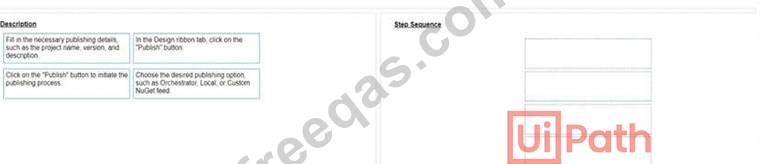
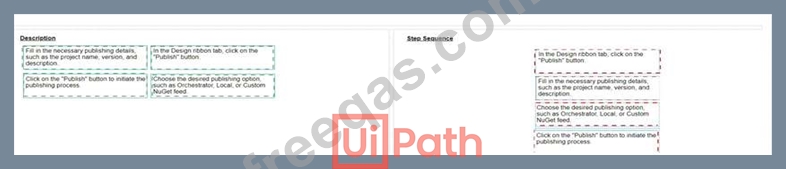
Correct Answer:

Explanation
A screenshot of a computer Description automatically generated

The steps to publish a project from UiPath Studio are:
In the Design ribbon tab, click on the "Publish" button. The Publish Project window opens. (UiPath Studio documentation1) Fill in the necessary publishing details, such as the project name, version, and description. You can also add release notes and select the environment where the project will run. (UiPath Studio documentation1) Choose the desired publishing option, such as Orchestrator, Local, or Custom NuGet feed. Depending on your choice, you may need to provide additional information, such as the Orchestrator URL, the local folder path, or the custom feed URL. (UiPath Studio documentation1) Click on the "Publish" button to initiate the publishing process. A confirmation message will appear when the project is successfully published. (UiPath Studio documentation1) Short Explanation: Publishing a project from UiPath Studio means creating a package that contains all the files and dependencies required to run the automation process. The package can be deployed to different locations, such as Orchestrator, a local machine, or a custom NuGet feed. Publishing a project from UiPath Studio involves four main steps: clicking on the Publish button, filling in the publishing details, choosing the publishing option, and confirming the publishing process. (UiPath Automation Developer study guide2) References:
1: Publishing Projects from Studio - UiPath Studio.
2: UiPath Certified Automation Developer - Learning Plan.
insert code
  • ««
  • «
  • …
  • 20
  • 21
  • 22
  • 23
  • 24
  • 25
  • 26
  • 27
  • 28
  • 29
[×]

Download PDF File

Enter your email address to download UiPath.UiPath-ADAv1.v2024-05-27.q139 Dumps

Email:

FreeQAs

Our website provides the Largest and the most Latest vendors Certification Exam materials around the world.

Using dumps we provide to Pass the Exam, we has the Valid Dumps with passing guranteed just which you need.

  • DMCA
  • About
  • Contact Us
  • Privacy Policy
  • Terms & Conditions
©2026 FreeQAs

www.freeqas.com materials do not contain actual questions and answers from Cisco's certification exams.
